【HarmonyOS】Web组件同步与异步数据获取
Web组件交互同步与异步获取数据的方式示例
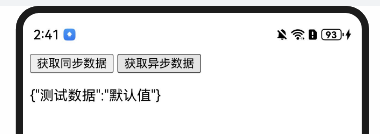
【html测试文件】src/main/resources/rawfile/Page04.html
<!DOCTYPE html>
<html lang="en">
<head>
    <meta charset="UTF-8">
    <script>
        let isEnvSupported = 'CSS' in window && typeof CSS.supports === 'function' &&
            (CSS.supports('top: env(a)') || CSS.supports('top: constant(a)'));
        document.write(`<meta name="viewport" content="width=device-width, user-scalable=no, initial-scale=1.0, maximum-scale=1.0, minimum-scale=1.0${isEnvSupported ? ', viewport-fit=cover' : ''}">`);
    </script>
    <title>Page Title</title>
    <link rel="stylesheet" href="mycss.css">
    <link rel="icon" href="./static/favicon.ico">
</head>
<body>
<button onclick="fetchSyncData()">获取同步数据</button>
<button onclick="fetchAsyncData()">获取异步数据</button>
<p id="dataDisplay"></p>
</body>
<script>
    function fetchSyncData() {
        console.log('开始获取同步数据');
        const result = window.hm.getTestData("测试数据");
        document.getElementById("dataDisplay").textContent = result;
        console.log('完成获取同步数据');
    }

    function fetchAsyncData() {
        console.log('开始获取异步数据');
        window.hm.getTestDataAsync("测试数据").then(value => {
            document.getElementById("dataDisplay").textContent = value;
            console.log('完成获取异步数据');
        });
    }
</script>
</html>
【使用示例】src/main/ets/pages/Page04.ets
import web_webview from '@ohos.web.webview';
import dataPreferences from '@ohos.data.preferences';

class WebService {
  context: Context

  constructor(context: Context) {
    this.context = context
  }

  getTestData = (input: string): string => {
    console.info('输入数据:', input);
    const resultMap = new Map<string, string>();
    resultMap[input] = "我是value";
    return JSON.stringify(resultMap);
  }
  getTestDataAsync = async (input: string): Promise<string> => {
    console.info('输入数据:', input);
    const preferences = await dataPreferences.getPreferences(this.context, 'DATA_STORE');
    const value = await preferences.get('KEY', '默认值');
    console.info('读取到的值:', value);
    const resultMap = new Map<string, string>();
    resultMap[input] = value;
    return JSON.stringify(resultMap);
  }
}

@Entry
@Component
struct Page04 {
  controller: web_webview.WebviewController = new web_webview.WebviewController();
  webService: WebService = new WebService(getContext(this));
  methodList: Array<string> = []

  aboutToAppear(): void {
    this.methodList.splice(0) //清空原数组
    console.info('====this.testObjtest', JSON.stringify(this.webService))
    Object.keys(this.webService).forEach((key) => {
      this.methodList.push(key)
      console.info('====key', key)
    });
  }

  build() {
    Column() {
      Web({
        src: $rawfile('Page04.html'),
        // src: 'https://xxx',
        controller: this.controller
      })
        .width('100%')
        .height('100%')
        .domStorageAccess(true)//设置是否开启文档对象模型存储接口(DOM Storage API)权限。
        .javaScriptAccess(true)//设置是否允许执行JavaScript脚本,默认允许执行。
        .databaseAccess(true)//设置是否开启数据库存储API权限,默认不开启。
        .mixedMode(MixedMode.All)//HTTP和HTTPS混合

        .javaScriptProxy({
          name: "hm",
          object: this.webService,
          methodList: this.methodList,
          controller: this.controller,
        })
    }
    .width('100%')
    .height('100%')
  }
}

 浙公网安备 33010602011771号