android cts(Compatibility Test Suite)
CTS如何工作?
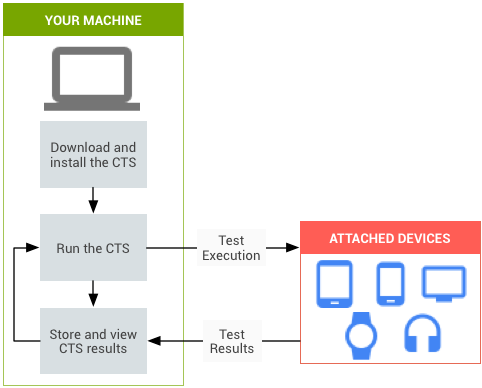
tradefed test harness
运行在桌面系统并组织管理测试用例,测试用例运行于设备。测试用例为JAVA编写的JUnit测试程序。
- Unit tests test atomic units of code within the Android platform;e.g. a single class, such as java.util.HashMap
- Functional tests test a combination of APIs together in a higher-level use-case.
- Robustness tests test the durability of the system under stress.
- Performance tests test the performance of the system against defined benchmarks, for example rendering frames per second.
测试包含的项目
| Signature Tests | For each Android release, there are XML files describing the signatures of all public APIs contained in the release. The CTS contains a utility to check those API signatures against the APIs available on the device. The results from signature checking are recorded in the test result XML file. |
| Platform API Tests | Test the platform (core libraries and Android Application Framework) APIs as documented in the SDK Class Index to ensure API correctness, including correct class, attribute and method signatures, correct method behavior, and negative tests to ensure expected behavior for incorrect parameter handling. |
| Dalvik Tests | The tests focus on testing the Dalvik Executable Format. |
| Platform Data Model | The CTS tests the core platform data model as exposed to application developers through content providers, as documented in the SDK android.provider package: contacts, browser, settings, etc. |
| Platform Intents | The CTS tests the core platform intents, as documented in the SDK Available Intents. |
| Platform Permissions | The CTS tests the core platform permissions, as documented in the SDK Available Permissions. |
| Platform Resources | The CTS tests for correct handling of the core platform resource types, as documented in the SDK Available Resource Types. This includes tests for: simple values, drawables, nine-patch, animations, layouts, styles and themes, and loading alternate resources. |
测试需要的条件
主机端设置
1.Android设备需要连接WIFI并且可以使用IPV6协议
2.如果需要测试蓝牙相关,需要在5m范围内放置蓝牙设备来进行查找设备测试
3.主机端需要新版ADB和AAPT,安装独立SDK工具
4.安装JDK
CTS 5.0 and later: Java 7
CTS 4.4 and earlier: Java 6
5.根据你的设备和ROM版本下载CTS测试包
6.添加udev规则让linux主机识别设备
a.root下,创建/etc/udev/rules.d/51-android.rules
b.添加规则
格式:SUBSYSTEM=="usb", ATTR{idVendor}=="0bb4", MODE="0666", GROUP="plugdev"
VenderId见下表
c.改变文件权限
chmod a+r /etc/udev/rules.d/51-android.rules
设备端设置
1.打开设备的USB调试
Settings > Developer options > USB debugging 2.打开设备的保持唤醒
Settings > Developer options > Stay Awake
3.Copy CTS media files
a.下载CTS Media files 下载地址
b.解压到本地,到解压目录下
运行bash copy_media.sh all(时间很长)
运行测试
1.连接设备到主机
2.到/android-cts/tools/目录下,运行./cts-tradefed
run cts --plan planname
run cts -p packname
run cts -c classname
run cts -c classname -m methonname
3.运行结果保存在 /android-cts/repository/results/目录下

 浙公网安备 33010602011771号