
Oracle RAC双机心跳网络故障,bond 双网卡问题
背景:
因为主板故障问题,更换主板,换盘主板后,心跳网络不通。B机PING不通A机, 其两台机器是直连
处理过程
原因1
因为更换完主板,其中有两个板载网口,MAC产生变化, ARP无法进行解析, 网卡名称也发生变化
解决思路: 删除原来所有bond2 相关配置, 进行重新配置, 启动 networkmanager 服务进行重新配置
原因2
这是因为服务器更换了主板,mac地址改变所导致的。系统加载网卡驱动后会去读一个文件(即/etc/udev/rules.d/70-persistent-net.rules),这个文件是一个缓冲文件,包含了网卡的mac地址,因为更换了主板,网卡的mac地址也变了,但是这个文件的mac地址还没变,还是之前坏了的主板的上面的网卡的MAC地址,这样系统在加载网卡,读取这个文件的时候读取的是之前网卡的mac地址,和现在更换后主板后的网卡mac地址不一致导致混乱,所以就识别不了当前网卡;
解决方法:
一般来说,删除/etc/udev/rules.d/70-persistent-net.rules文件(或者把这个文件重新命名 或者 清空该文件内容),重启服务器就可以解决了,重启后会重新生成这个文件,
这样就顺利解决这个问题了!这里注意下,由于我的这台服务器绑定了网卡,所以重启网卡后,还需要进行modprobe命令使得网卡绑定生效,大致步骤如下:
# mv /etc/udev/rules.d/70-persistent-net.rules /etc/udev/rules.d/70-persistent-net.rules.bak20180307
# init 6

重启服务器后,查看/etc/udev/rules.d/70-persistent-net.rules文件,发现没有eth0、eth1、eth3、eth4的网卡信息(mac和设备名称)
[root@kevin network-scripts]# cat /etc/udev/rules.d/70-persistent-net.rules
# This file was automatically generated by the /lib/udev/write_net_rules
# program, run by the persistent-net-generator.rules rules file.
#
# You can modify it, as long as you keep each rule on a single
# line, and change only the value of the NAME= key.

# PCI device 0x14e4:0x1657 (tg3)
SUBSYSTEM=="net", ACTION=="add", DRIVERS=="?*", ATTR{address}=="****", ATTR{type}=="1", KERNEL=="eth*"

# PCI device 0x14e4:0x1657 (tg3)
SUBSYSTEM=="net", ACTION=="add", DRIVERS=="?*", ATTR{address}=="****", ATTR{type}=="1", KERNEL=="eth*"

# PCI device 0x14e4:0x1657 (tg3)
SUBSYSTEM=="net", ACTION=="add", DRIVERS=="?*", ATTR{address}=="****", ATTR{type}=="1", KERNEL=="eth*"

# PCI device 0x14e4:0x1657 (tg3)
SUBSYSTEM=="net", ACTION=="add", DRIVERS=="?*", ATTR{address}=="****", ATTR{type}=="1", KERNEL=="eth*"

然后重启网卡等操作
[root@kevin ~]# modprobe bonding
[root@kevin ~]# /etc/init.d/network restart
[root@kevin ~]# modprobe bonding

接着ifconfig查看,发现eth0、eth1、eth2、eth3网卡设备都能识别了
[root@kevin ~]# ifconfig -a
bond0     Link encap:Ethernet  HWaddr 08:94:EF:5E:AE:72
          inet addr:192.168.10.20  Bcast:192.168.10.255  Mask:255.255.255.0
          inet6 addr: fe80::a94:efff:fe5e:ae72/64 Scope:Link
          UP BROADCAST RUNNING MASTER MULTICAST  MTU:1500  Metric:1
          RX packets:108809 errors:0 dropped:0 overruns:0 frame:0
          TX packets:84207 errors:0 dropped:0 overruns:0 carrier:0
          collisions:0 txqueuelen:0
          RX bytes:8471111 (8.0 MiB)  TX bytes:6322341 (6.0 MiB)

eth0      Link encap:Ethernet  HWaddr 08:94:EF:5E:AE:72
          UP BROADCAST RUNNING SLAVE MULTICAST  MTU:1500  Metric:1
          RX packets:38051 errors:0 dropped:0 overruns:0 frame:0
          TX packets:14301 errors:0 dropped:0 overruns:0 carrier:0
          collisions:0 txqueuelen:1000
          RX bytes:2869726 (2.7 MiB)  TX bytes:944276 (922.1 KiB)
          Interrupt:16

eth1      Link encap:Ethernet  HWaddr 08:94:EF:5E:AE:72
          UP BROADCAST RUNNING SLAVE MULTICAST  MTU:1500  Metric:1
          RX packets:69158 errors:0 dropped:0 overruns:0 frame:0
          TX packets:68615 errors:0 dropped:0 overruns:0 carrier:0
          collisions:0 txqueuelen:1000
          RX bytes:5469647 (5.2 MiB)  TX bytes:5279012 (5.0 MiB)
          Interrupt:17

eth2      Link encap:Ethernet  HWaddr 08:94:EF:5E:AE:74
          BROADCAST MULTICAST  MTU:1500  Metric:1
          RX packets:0 errors:0 dropped:0 overruns:0 frame:0
          TX packets:0 errors:0 dropped:0 overruns:0 carrier:0
          collisions:0 txqueuelen:1000
          RX bytes:0 (0.0 b)  TX bytes:0 (0.0 b)
          Interrupt:16

eth3      Link encap:Ethernet  HWaddr 08:94:EF:5E:AE:75
          BROADCAST MULTICAST  MTU:1500  Metric:1
          RX packets:0 errors:0 dropped:0 overruns:0 frame:0
          TX packets:0 errors:0 dropped:0 overruns:0 carrier:0
          collisions:0 txqueuelen:1000
          RX bytes:0 (0.0 b)  TX bytes:0 (0.0 b)
          Interrupt:17

lo        Link encap:Local Loopback
          inet addr:127.0.0.1  Mask:255.0.0.0
          inet6 addr: ::1/128 Scope:Host
          UP LOOPBACK RUNNING  MTU:65536  Metric:1
          RX packets:26 errors:0 dropped:0 overruns:0 frame:0
          TX packets:26 errors:0 dropped:0 overruns:0 carrier:0
          collisions:0 txqueuelen:0
          RX bytes:1983 (1.9 KiB)  TX bytes:1983 (1.9 KiB)

usb0      Link encap:Ethernet  HWaddr 0A:94:EF:5E:AE:79
          BROADCAST MULTICAST  MTU:1500  Metric:1
          RX packets:0 errors:0 dropped:0 overruns:0 frame:0
          TX packets:0 errors:0 dropped:0 overruns:0 carrier:0
          collisions:0 txqueuelen:1000
          RX bytes:0 (0.0 b)  TX bytes:0 (0.0 b)


在查看/etc/udev/rules.d/70-persistent-net.rules文件,发现eth0、eth1、eth2、eth3网卡及其mac地址信息都有了
[root@kevin ~]# cat /etc/udev/rules.d/70-persistent-net.rules
# This file was automatically generated by the /lib/udev/write_net_rules
# program, run by the persistent-net-generator.rules rules file.
#
# You can modify it, as long as you keep each rule on a single
# line, and change only the value of the NAME= key.

# PCI device 0x14e4:0x1657 (tg3)
SUBSYSTEM=="net", ACTION=="add", DRIVERS=="?*", ATTR{address}=="08:94:ef:5e:ae:75", ATTR{type}=="1", KERNEL=="eth*", NAME="eth3"

# PCI device 0x14e4:0x1657 (tg3)
SUBSYSTEM=="net", ACTION=="add", DRIVERS=="?*", ATTR{address}=="08:94:ef:5e:ae:72", ATTR{type}=="1", KERNEL=="eth*", NAME="eth0"

# PCI device 0x14e4:0x1657 (tg3)
SUBSYSTEM=="net", ACTION=="add", DRIVERS=="?*", ATTR{address}=="08:94:ef:5e:ae:73", ATTR{type}=="1", KERNEL=="eth*", NAME="eth1"

# PCI device 0x14e4:0x1657 (tg3)
SUBSYSTEM=="net", ACTION=="add", DRIVERS=="?*", ATTR{address}=="08:94:ef:5e:ae:74", ATTR{type}=="1", KERNEL=="eth*", NAME="eth2"

接着尝试ping其他机器
[root@kevin ~]# ping 192.168.10.23
PING 192.168.10.23 (192.168.10.23) 56(84) bytes of data.
64 bytes from 192.168.10.23: icmp_seq=1 ttl=64 time=0.030 ms
64 bytes from 192.168.10.23: icmp_seq=2 ttl=64 time=0.016 ms
64 bytes from 192.168.10.23: icmp_seq=3 ttl=64 time=0.016 ms

如果ping不通的话,多执行下面命令
[root@kevin ~]# modprobe bonding
原因3:
A机同时也出现网卡故障,故同时更换主板,配置同上重新操作
常用使用命令:
1. 网卡配置文件

cat /etc/sysconfig/network-scripts/ifcfg-bond0

2. 查看网卡bonding状态

cat /proc/net/bonding/bond1
[root@localhost ~]# cat /proc/net/bonding/bond0

Ethernet Channel Bonding Driver: v3.7.1 (April 27, 2011)

Bonding Mode: fault-tolerance (active-backup)
Primary Slave: None
Currently Active Slave: eno1                # 当前主要网卡
MII Status: up
MII Polling Interval (ms): 100
Up Delay (ms): 0
Down Delay (ms): 0

Slave Interface: eno1
MII Status: up
Speed: 1000 Mbps
Duplex: full
Link Failure Count: 0
Permanent HW addr: 3c:ec:ef:0e:29:0e
Slave queue ID: 0

Slave Interface: eno2        # 备网卡
MII Status: up
Speed: 1000 Mbps
Duplex: full
Link Failure Count: 0
Permanent HW addr: 3c:ec:ef:0e:29:0f
Slave queue ID: 0

3. 查看网卡状态

ethtool eth0

4. 查看网卡在linux中缓存文件

/etc/udev/rules.d/70-persistent-net.rules

5. 启停 networkmanager 服务
systemctl start NetworkManager.service     # 启动NetworkManager服务
systemctl enable NetworkManager.service  # 开机启动NetworkManager服务
systemctl stop NetworkManager.service     # 停止NetworkManager服务
systemctl disable NetworkManager.service  # 禁止开机启动NetworkManager服务

5.加载bonding模块(没有提示说明加载成功)

modprobe bonding

6.查看bonding模块是否被加载

[root@localhost ~]# lsmod | grep bonding
bonding               152979  0
bond几种模式介绍:
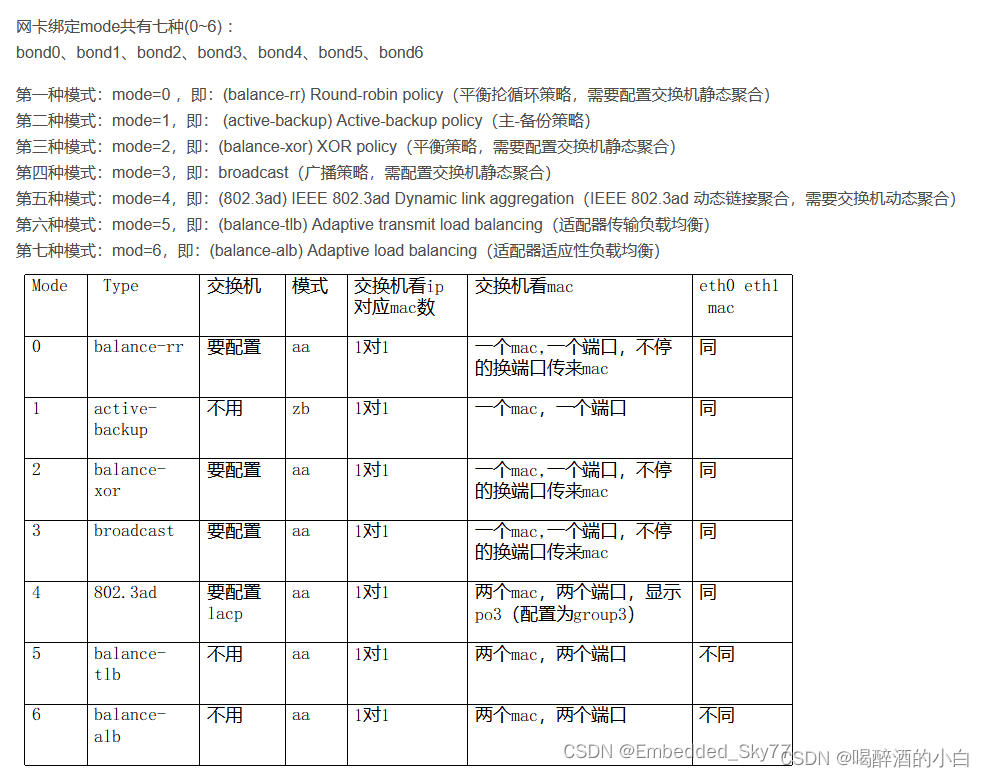
此信息来源Redhat官网信息
3.2. Upstream switch configuration depending on the bonding modes
Depending on the bonding mode you want to use, you must configure the ports on the switch:
| Bonding mode | Configuration on the switch |
|---|---|
|
|
Requires static EtherChannel enabled, not Link Aggregation Control Protocol (LACP)-negotiated. |
|
|
No configuration required on the switch. |
|
|
Requires static EtherChannel enabled, not LACP-negotiated. |
|
|
Requires static EtherChannel enabled, not LACP-negotiated. |
|
|
Requires LACP-negotiated EtherChannel enabled. |
|
|
No configuration required on the switch. |
|
|
No configuration required on the switch. |
For details how to configure your switch, see the documentation of the switch.
Certain network bonding features, such as the fail-over mechanism, do not support direct cable connections without a network switch. For further details, see the Is bonding supported with direct connection using crossover cables? KCS solution.

双机通过bond直连的问题
如两个节点有一个节点的网卡宕了,日志中可以看到两个节点的网卡都down了,如果通过交换机就不是这样,
那么在集群环境下,两个节点可能都认为自己有问题,可能会影响故障转移效果,会造成fence混乱
本文来自博客园,作者:xiaoming zhang,转载请注明原文链接:https://www.cnblogs.com/xmzhang

 浙公网安备 33010602011771号