
原生js实现全选和反选以及任意一个未被选中的效果
模仿一个百度音乐的全选和反选的的操作。
html代码如下:
<div class="box">
    <ul id="lists">
        <li>
            <input type="checkbox" value="">
            <span>我爱你中国</span>
        </li>
        <li>
            <input type="checkbox" value="">
            <span>北京</span>
        </li>
        <li>
            <input type="checkbox" value="">
            <span>花火</span>
        </li>
        <li>
            <input type="checkbox" value="">
            <span>回来</span>
        </li>
    </ul>
    <p>
        <input type="checkbox" value="">
        <span>全选</span>
    </p>
</div>
css代码如下:
<style>
    *{margin:0;padding:0;}
    ul,li{list-style: none;margin:0;padding:0;}
    li{line-height:45px;padding:0 15px;}
    .box{border:1px solid #e5e5e5;width:200px;margin:0 auto;}
    #lists{width:200px;}
    p{line-height:45px;border-top:1px solid #e5e5e5;padding:0 15px;}
</style>
js代码如下:
window.onload=function(){
        var oUl=document.getElementById("lists");
        var aLi=oUl.getElementsByTagName("li");
        var oP=document.getElementsByTagName("p")[0];
        var aQxuan=oP.getElementsByTagName("input")[0];
        var arrColor=["#f6f6f6","#f0fdff"];
        for(var i=0;i<aLi.length;i++){
            aLi[i].index=i;
            aLi[i].style.backgroundColor=arrColor[i%arrColor.length];//所有的li隔行变色
            //鼠标移入li背景变灰
            aLi[i].onmouseover=function(){
                this.style.backgroundColor="#ccc"
            };
            //鼠标移出li背景变当前色值
            aLi[i].onmouseout=function(){
                this.style.backgroundColor=arrColor[this.index%arrColor.length]
            };
            //全选
            aQxuan.onclick=function(){
                //alert(1)
                if(this.checked==true){
                    for(var i=0;i<aLi.length;i++){
                        var aInp=aLi[i].getElementsByTagName("input")[0];
                        aInp.checked=true;
                    }
                }else{
                    for(var i=0;i<aLi.length;i++){
                        var aInp=aLi[i].getElementsByTagName("input")[0];
                        aInp.checked=false;
                    }
                }
            };

            var aInp=aLi[i].getElementsByTagName("input")[0];

            aInp.onclick=function(){
                if(this.checked==false){//只要自己未被选中,那么总得全选就不被选中
                    aQxuan.checked=false;
                }else{
                    var onOff=true;//设定一个开关
                    for(var i=0;i<aLi.length;i++){
                        var Inp=aLi[i].getElementsByTagName("input")[0];
                        if(Inp.checked==false){
                            onOff=false;//若有一个未被选中,那么开关就为假
                        }
                    }
                    if(onOff){
                        aQxuan.checked=true;
                    }
                }
            }
        }


    }
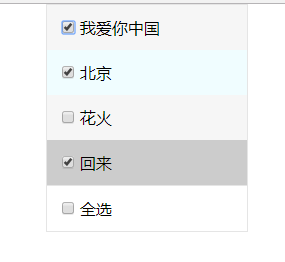
代码运行效果图如下:

 浙公网安备 33010602011771号