
漂亮的title提示信息
- <HTML>
- <HEAD>
- <title>一种很酷的文字提示效果演示</title>
- <style>
- .tableBorder7{width:800;solid; background-color: #000000;}
- TD{font-family: 宋体;font-size: 12px;line-height : 15px ;}
- th{background-color: #f7f7f7;color: #000000;font-size: 12px;font-weight:bold;}
- th.th1{background-color: #333333;}
- td.TableBody7{background-color: #B1EA45;}
- </style>
- <script language="JavaScript">
- //more javascript from http://www.51it.org
- <!--
- var pltsPop=null;
- var pltsoffsetX = 10; // 弹出窗口位于鼠标左侧或者右侧的距离;3-12 合适
- var pltsoffsetY = 15; // 弹出窗口位于鼠标下方的距离;3-12 合适
- var pltsPopbg="#FFFFEE"; //背景色
- var pltsPopfg="#111111"; //前景色
- var pltsTitle="";
- document.write('<div id=pltsTipLayer style="display: none;position: absolute; z-index:10001"></div>');
- function pltsinits()
- {
- document.onmouseover = plts;
- document.onmousemove = moveToMouseLoc;
- }
- function plts()
- { var o=event.srcElement;
- if(o.alt!=null && o.alt!=""){oo.dypop=o.alt;o.alt=""};
- if(o.title!=null && o.title!=""){oo.dypop=o.title;o.title=""};
- pltsPop=o.dypop;
- if(pltsPop!=null&&pltsPop!=""&&typeof(pltsPop)!="undefined")
- {
- pltsTipLayer.style.left=-1000;
- pltsTipLayer.style.display='';
- var Msg=pltsPop.replace(/\n/g,"<br>");
- MsgMsg=Msg.replace(/\0x13/g,"<br>");
- var re=/\{(.[^\{]*)\}/ig;
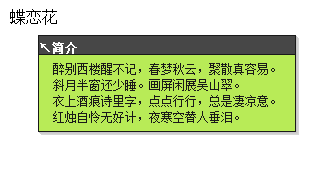
- if(!re.test(Msg))pltsTitle="<font color=#ffffff>简介</font>";
- else{
- re=/\{(.[^\{]*)\}(.*)/ig;
- pltsTitle=Msg.replace(re,"$1")+" ";
- re=/\{(.[^\{]*)\}/ig;
- MsgMsg=Msg.replace(re,"");
- MsgMsg=Msg.replace("<br>","");}
- //var attr=(document.location.toString().toLowerCase().indexOf("list.asp")>0?"nowrap":"");
- var content =
- '<table style="FILTER:alpha(opacity=90) shadow(color=#bbbbbb,direction=135);" id=toolTipTalbe border=0><tr><td width="100%"><table class=tableBorder7 cellspacing="1" cellpadding="0" style="width:100%">'+
- '<tr id=pltsPoptop ><th height=18 valign=bottom class=th1 ><b><p id=topleft align=left><font color=#ffffff>↖</font>'+pltsTitle+'</p><p id=topright align=right style="display:none">'+pltsTitle+'<font color=#ffffff>↗</font></b></th></tr>'+
- '<tr><td "+attr+" class=tablebody7 style="padding-left:14px;padding-right:14px;padding-top: 6px;padding-bottom:6px;line-height:135%">'+Msg+'</td></tr>'+
- '<tr id=pltsPopbot style="display:none"><th height=18 valign=bottom class=th1><b><p id=botleft align=left><font color=#ffffff>↙</font>'+pltsTitle+'</p><p id=botright align=right style="display:none">'+pltsTitle+'<font color=#ffffff>↘</font></b></th></tr>'+
- '</table></td></tr></table>';
- pltsTipLayer.innerHTML=content;
- toolTipTalbe.style.width=Math.min(pltsTipLayer.clientWidth,document.body.clientWidth/2.2);
- moveToMouseLoc();
- return true;
- }
- else
- {
- pltsTipLayer.innerHTML='';
- pltsTipLayer.style.display='none';
- return true;
- }
- }
- function moveToMouseLoc()
- {
- if(pltsTipLayer.innerHTML=='')return true;
- var MouseX=event.x;
- var MouseY=event.y;
- //window.status=event.y;
- var popHeight=pltsTipLayer.clientHeight;
- var popWidth=pltsTipLayer.clientWidth;
- if(MouseY+pltsoffsetY+popHeight>document.body.clientHeight)
- {
- popTopAdjust=-popHeight-pltsoffsetY*1.5;
- pltsPoptop.style.display="none";
- pltsPopbot.style.display="";
- }
- else
- {
- popTopAdjust=0;
- pltsPoptop.style.display="";
- pltsPopbot.style.display="none";
- }
- if(MouseX+pltsoffsetX+popWidth>document.body.clientWidth)
- {
- popLeftAdjust=-popWidth-pltsoffsetX*2;
- topleft.style.display="none";
- botleft.style.display="none";
- topright.style.display="";
- botright.style.display="";
- }
- else
- {
- popLeftAdjust=0;
- topleft.style.display="";
- botleft.style.display="";
- topright.style.display="none";
- botright.style.display="none";
- }
- pltsTipLayer.style.left=MouseX+pltsoffsetX+document.body.scrollLeft+popLeftAdjust;
- pltsTipLayer.style.top=MouseY+pltsoffsetY+document.body.scrollTop+popTopAdjust;
- return true;
- }
- pltsinits();
- //-->
- </script>
- </HEAD>
- <BODY>
- <div title="醉别西楼醒不记,春梦秋云,聚散真容易。<br>斜月半窗还少睡。画屏闲展吴山翠。<br>衣上酒痕诗里字,点点行行,总是凄凉意。<br>红烛自怜无好计,夜寒空替人垂泪。">蝶恋花</div>
- </BODY>
- </HTML>
积跬步以致千里,积小流以成江海。
2016年5月之前的博文发布于51cto,链接地址:shamrock.blog.51cto.com
2016年5月之后博文发布与cnblogs上。
Github地址 https://github.com/umgsai
Keep moving~!!!
2016年5月之前的博文发布于51cto,链接地址:shamrock.blog.51cto.com
2016年5月之后博文发布与cnblogs上。
Github地址 https://github.com/umgsai
Keep moving~!!!

 浙公网安备 33010602011771号