mercator瓦片核心原理

Engineer at Mapbox, building mapping tools of the future. Creator of Leaflet. Algorithms geek, open source enthusiast, rock musician,,,
Tutorials,Published,Nov 17, 2020,ISC,1 fork,100 Likes
A Web Map from Scratch
This static map was made from OpenStreetMap tiles with 8 lines of code :
osmMap = ƒ(…)
osmMap = (lng, lat, zoom, w = width, h = 400) => {
  let result = `<div style="width:${w}px;height:${h}px;position:relative;overflow:hidden">`,
    x = 256 * (1 << zoom) * (lng / 360 + 0.5) - w / 2 | 0,
    y = 256 * (1 << zoom) * (1 - Math.log(Math.tan(Math.PI * (0.25 + lat / 360))) / Math.PI) / 2 - h / 2 | 0;

  for (let ty = y / 256 | 0; ty * 256 < y + h; ty++)
    for (let tx = x / 256 | 0; tx * 256 < x + w; tx++)
      result += `<img src="https://tile.osm.org/${zoom}/${tx}/${ty}.png"
        style="position:absolute;left:${tx * 256 - x}px;top:${ty * 256 - y}px">`;

  return html`${result}<div style="position:absolute;bottom:0;right:0;font:11px sans-serif;background:#fffa;padding:1px 5px">© <a href="https://osm.org/copyright">OpenStreetMap</a> contributors</div></div>`;
}
You can use this in your own notebooks by importing the function:
import {osmMap} from '@mourner/simple-web-map'
How does this code work? Let's find out, step by step.
Most web maps, including OpenStreetMap, use the Web Mercator system, exposing map data as fixed-size square images (e.g. 256×256). Here's the only tile available at the lowest zoom level 0, covering the whole world:

html`<img src="https://tile.osm.org/0/0/0.png">`
On the next zoom level, we have 4 tiles covering the same area as the parent one but more detailed. Combined, they take double the width and height:
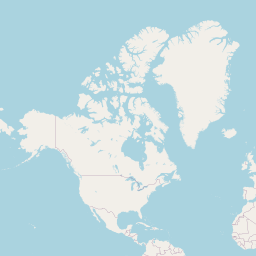
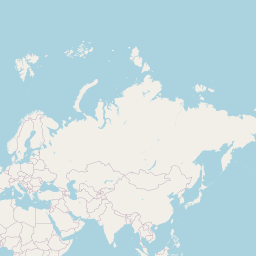
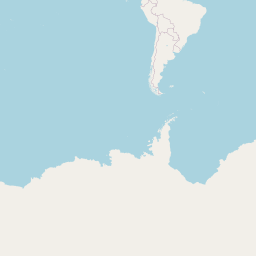
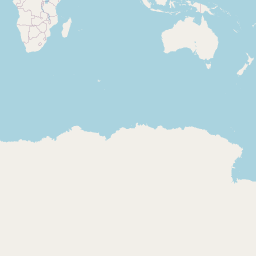
html`<div style="display: flex; flex-wrap: wrap; width: 514px; gap: 2px">
  <img src="https://tile.osm.org/1/0/0.png">
  <img src="https://tile.osm.org/1/1/0.png">
  <img src="https://tile.osm.org/1/0/1.png">
  <img src="https://tile.osm.org/1/1/1.png">
</div>`
Note that I'm using the donation-supported OpenStreetMap tile server for learning purposes. For end-user applications, please use commercial OSM providers.
The amount of tiles quadruples every next zoom, consisting of 2^z2z columns and 2^z2z rows. Let's say we want to display an area on zoom 15:
tileSize = 256
zoom = 15
There will be 32,768 × 32,768 available tiles on this zoom that will cover a total area of 8,388,608 × 8,388,608 pixels:
tilesAcross = 32768
tilesAcross = Math.pow(2, zoom)
worldSize = 8388608
worldSize = tileSize * tilesAcross
Going forward, we'll call points within this area world pixel coordinates . Let's show an area around the downtown London:
longitude = -0.15
latitude = 51.502
To get the world pixel coordinates of this location at the given zoom, we'll use the Web Mercator projection formulas:
mercatorX = 4190808.7466666666
mercatorX = worldSize * (longitude / 360 + 0.5)
mercatorY = 2789628.410445589
mercatorY = worldSize * (1 - Math.log(Math.tan(Math.PI * (0.25 + latitude / 360))) / Math.PI) / 2
Now, assuming we'll show the map in a container with a defined size, we'll substract half of the width and height from the center coordinates to get ones for the top left corner, rounding down:
height = 400
x0 = 4190232
x0 = Math.floor(mercatorX - width / 2)
y0 = 2789428
y0 = Math.floor(mercatorY - height / 2)
As tiles are numbered by rows and columns starting from zero, we can determine the tile underneath a given point by dividing the world pixel coordinates by tile size and rounding down. Let's find the tile in the top-left corner:
cornerTileX = 16368
cornerTileX = Math.floor(x0 / tileSize)
cornerTileY = 10896
cornerTileY = Math.floor(y0 / tileSize)
Did we get that right? Fetching the corresponding tile, it appears to be around Hyde Park, so we're doing well so far!

html`<img src="https://tile.osm.org/${zoom}/${cornerTileX}/${cornerTileY}.png">`
Now the only thing's left is to fetch all the tiles that should fill our map container, starting with this corner tile and going by rows and columns. To be able to position the tiles relative to the container, we'll set the following CSS rules on it:
position: relative; /* position child elements relative to it */
overflow: hidden;   /* hide parts of the tiles past the container */
To position individual tiles, we'll set them as "position: absolute". The top-left corner of the map is (x0, y0) in absolute pixel coordinates, while each tile's coordinates are (x * tileSize, y * tileSize), so to position each tile relative to the top-left corner, we'll substract the two to get the final left and top values:


{
  let result = `<div style="height: ${height}px; position: relative; overflow: hidden;">`;

  for (let tileY = cornerTileY; tileY * tileSize < y0 + height; tileY++) {
    for (let tileX = cornerTileX; tileX * tileSize < x0 + width; tileX++) {

      result += `<img src="https://tile.osm.org/${zoom}/${tileX}/${tileY}.png" style="
        position: absolute; outline: 1px dashed black;
        left: ${tileX * tileSize - x0}px;
        top: ${tileY * tileSize - y0}px;">`;
    }
  }
  return html`${result}`;
}
This simple approach to tile-based mapping is at the heart of how Leaflet works. 🌿 So if you ever want to implement your own tiny mapping library from scratch, I hope this was useful! 😊

 浙公网安备 33010602011771号