
ios 自定义键盘输入框 输入框跟随文字换行变宽 输入框随着键盘消失出现位置进行变化
1.首先通过xib创建一个自定义输入框view
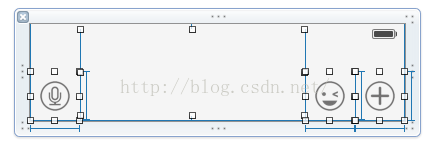
2.在自定义的输入框View中添加block,并实现textView的代理方法
- @property (nonatomic,copy) void(^changeInputViewFrame)(float viewH);
- - (void)textViewDidChange:(UITextView *)textView{
- if (textView != self.inputTextView) {
- return;
- }
- CGSize size = [self.inputTextView.text sizeWithAttributes:@{UIFontDescriptorCascadeListAttribute:[UIFont systemFontOfSize:15.0]}];
- CGFloat singleH = size.height;
- NSInteger lines = (NSInteger)self.inputTextView.contentSize.height/singleH;
- NSLog(@"行数行数======%ld",lines);
- if (lines>self.minLines) {
- self.minLines = lines;
- if (self.changeInputViewFrame&&lines<=7) {
- self.changeInputViewFrame(singleH);
- }
- }
- if (lines<self.minLines) {
- self.minLines = lines;
- if (self.changeInputViewFrame&&lines>2) {
- self.changeInputViewFrame(singleH*(-1));
- }
- }
- }
3.在使用该自定义view的类中实现以下方法
- __weak CustomChatViewController * weakSelf = self;
- self.inputBar.changeInputViewFrame = ^(float viewH){
- weakSelf.inputBar.frame = CGRectMake(0, weakSelf.inputBar.frame.origin.y-viewH, weakSelf.view.frame.size.width, weakSelf.inputBar.frame.size.height+viewH);
- //自定义输入view刷新约束
- [weakSelf.inputBar layoutIfNeeded];
- };
以上三步即可实现自定义输入框高度随着输入行数的变化而变化
4.在添加自定义输入框的类中实现输入框随着键盘出现消失,位置跟随变化
- /增加监听,当键盘出现或改变时收出消息
- [[NSNotificationCenter defaultCenter] addObserver:self
- selector:@selector(keyboardWillShow:)
- name:UIKeyboardWillShowNotification
- object:nil];
- //增加监听,当键退出时收出消息
- [[NSNotificationCenter defaultCenter] addObserver:self
- selector:@selector(keyboardWillHide:)
- name:UIKeyboardWillHideNotification
- object:nil];
- - (void)keyboardWillShow:(NSNotification *)aNotification
- {
- //获取键盘的高度
- /*
- iphone 6:
- 中文
- 2014-12-31 11:16:23.643 Demo[686:41289] 键盘高度是 258
- 2014-12-31 11:16:23.644 Demo[686:41289] 键盘宽度是 375
- 英文
- 2014-12-31 11:55:21.417 Demo[1102:58972] 键盘高度是 216
- 2014-12-31 11:55:21.417 Demo[1102:58972] 键盘宽度是 375
- iphone 6 plus:
- 英文:
- 2014-12-31 11:31:14.669 Demo[928:50593] 键盘高度是 226
- 2014-12-31 11:31:14.669 Demo[928:50593] 键盘宽度是 414
- 中文:
- 2015-01-07 09:22:49.438 Demo[622:14908] 键盘高度是 271
- 2015-01-07 09:22:49.439 Demo[622:14908] 键盘宽度是 414
- iphone 5 :
- 2014-12-31 11:19:36.452 Demo[755:43233] 键盘高度是 216
- 2014-12-31 11:19:36.452 Demo[755:43233] 键盘宽度是 320
- ipad Air:
- 2014-12-31 11:28:32.178 Demo[851:48085] 键盘高度是 264
- 2014-12-31 11:28:32.178 Demo[851:48085] 键盘宽度是 768
- ipad2 :
- 2014-12-31 11:33:57.258 Demo[1014:53043] 键盘高度是 264
- 2014-12-31 11:33:57.258 Demo[1014:53043] 键盘宽度是 768
- */
- NSDictionary *userInfo = [aNotification userInfo];
- NSValue *aValue = [userInfo objectForKey:UIKeyboardFrameEndUserInfoKey];
- CGRect keyboardRect = [aValue CGRectValue];
- float height = keyboardRect.size.height;
- self.inputBar.frame = CGRectMake(0, self.view.frame.size.height-50-height, self.view.frame.size.width, 50);
- }
- //当键退出时调用
- - (void)keyboardWillHide:(NSNotification *)aNotification{
- [UIView animateWithDuration:0.5 animations:^{
- self.inputBar.frame = CGRectMake(0, self.view.frame.size.height-50, self.view.frame.size.width, 50);
- }];
- }
键盘失去响应根据自己需求添加

 浙公网安备 33010602011771号