实验3:OpenFlow协议分析实践
一、实验目的
- 能够运用 wireshark 对 OpenFlow 协议数据交互过程进行抓包;
- 能够借助包解析工具,分析与解释 OpenFlow协议的数据包交互过程与机制。
二、实验环境
- 下载虚拟机软件Oracle VisualBox;
- 在虚拟机中安装Ubuntu 20.04 Desktop amd64,并完整安装Mininet;
三、实验要求
(一)基本要求
- 搭建下图所示拓扑,完成相关 IP 配置,并实现主机与主机之间的 IP 通信。用抓包软件获取控制器与交换机之间的通信数据包。
![]()
![]()

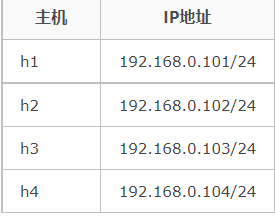
-
保存拓扑文件
![]()
-
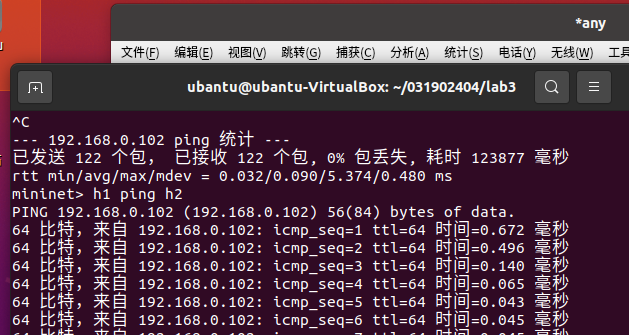
打开终端输入
sudo wireshark打开wires hark,选择any进行抓包,然后打开另一个终端打开保存的拓扑文件进行ping操作。![]()
-
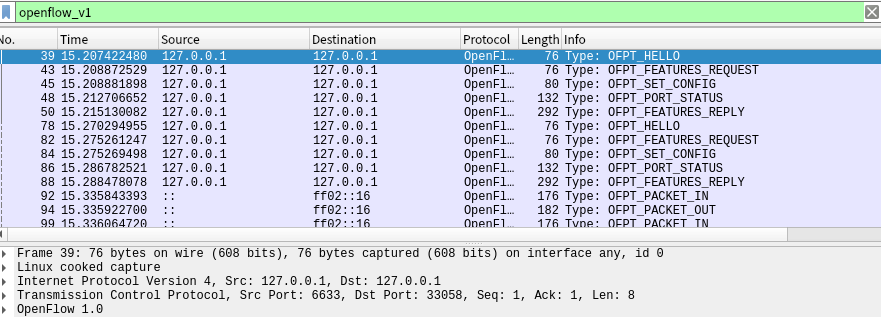
查看抓包结果,分析OpenFlow协议中交换机与控制器的消息交互过程

-
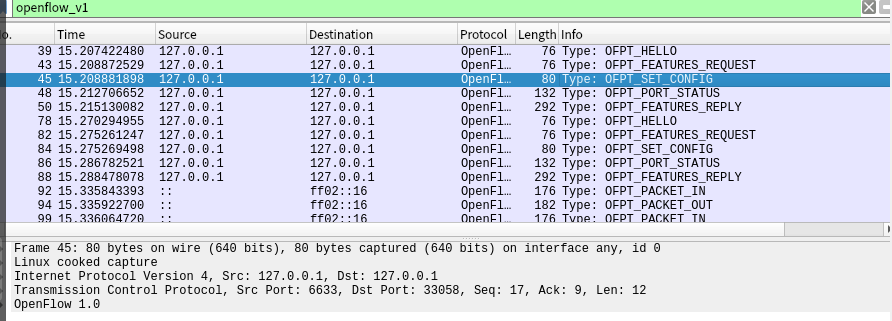
OFPT_HELLO控制器6633端口 ---> 交换机33058端口,从控制器到交换机
![]()
-
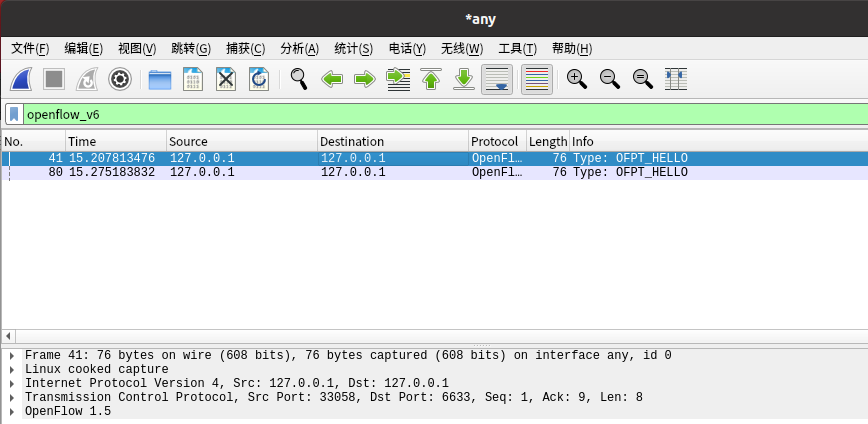
OFTP_HELLO 交换机33058端口---> 控制器6633端口
![]()
双方建立连接![]()
-
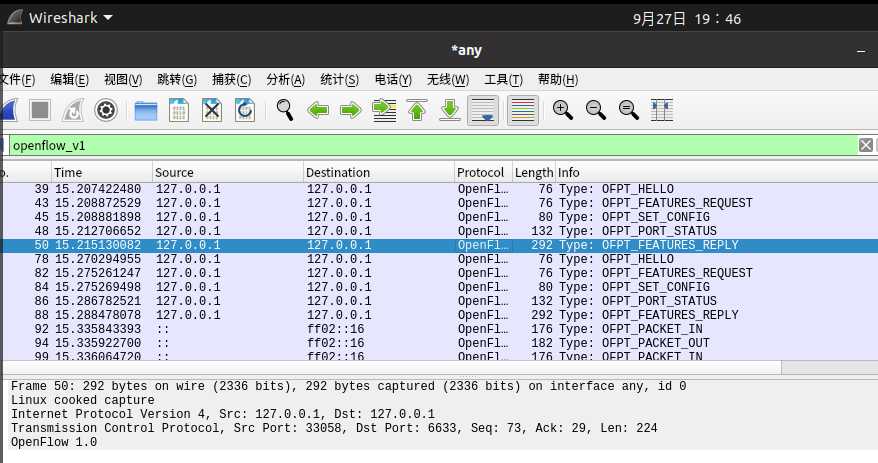
OFTP_FEATRUES_REQUEST控制器6633端口 ---> 交换机33058端口,从控制器到交换机。控制器请求交换器的特征信息
![]()
-
OFTP_SET_CONFIG控制器6633端口 ---> 交换机33058端口。控制器要求交换机按照所给出的信息进行配置
![]()
-
OFTP_PORT_STATUS当交换机端口发生变化时,告知控制器相应的端口状态。
![]()
-
OFTP_FEATURES_REPLY交换机33058端口---> 控制器6633端口。交换机告知控制器它的特征信息
![]()
-
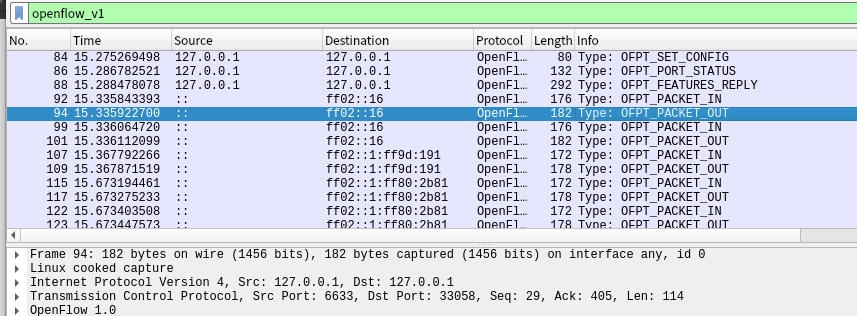
OFTP_PACKET_IN交换机33058端口(有数据包进来,请指示)--- 控制器6633端口
![]()
-
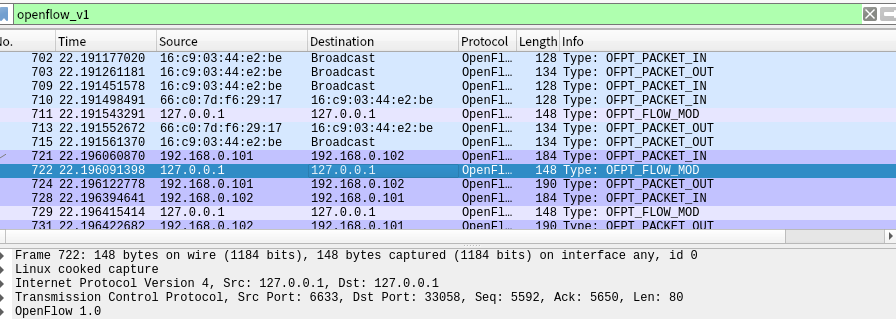
OFTP_FLOW_MOD分析抓取的flow_mod数据包,控制器通过6633端口向交换机33058端口下发流表项,指导数据的转发处理
![]()
-
OFTP_PACKET_OUT控制器6633端口 ---> 交换机33058端口
![]()
-
回答:交换机与控制器建立通信时是使用TCP协议还是UDP协议?
TCP协议 -
流程图
![]()




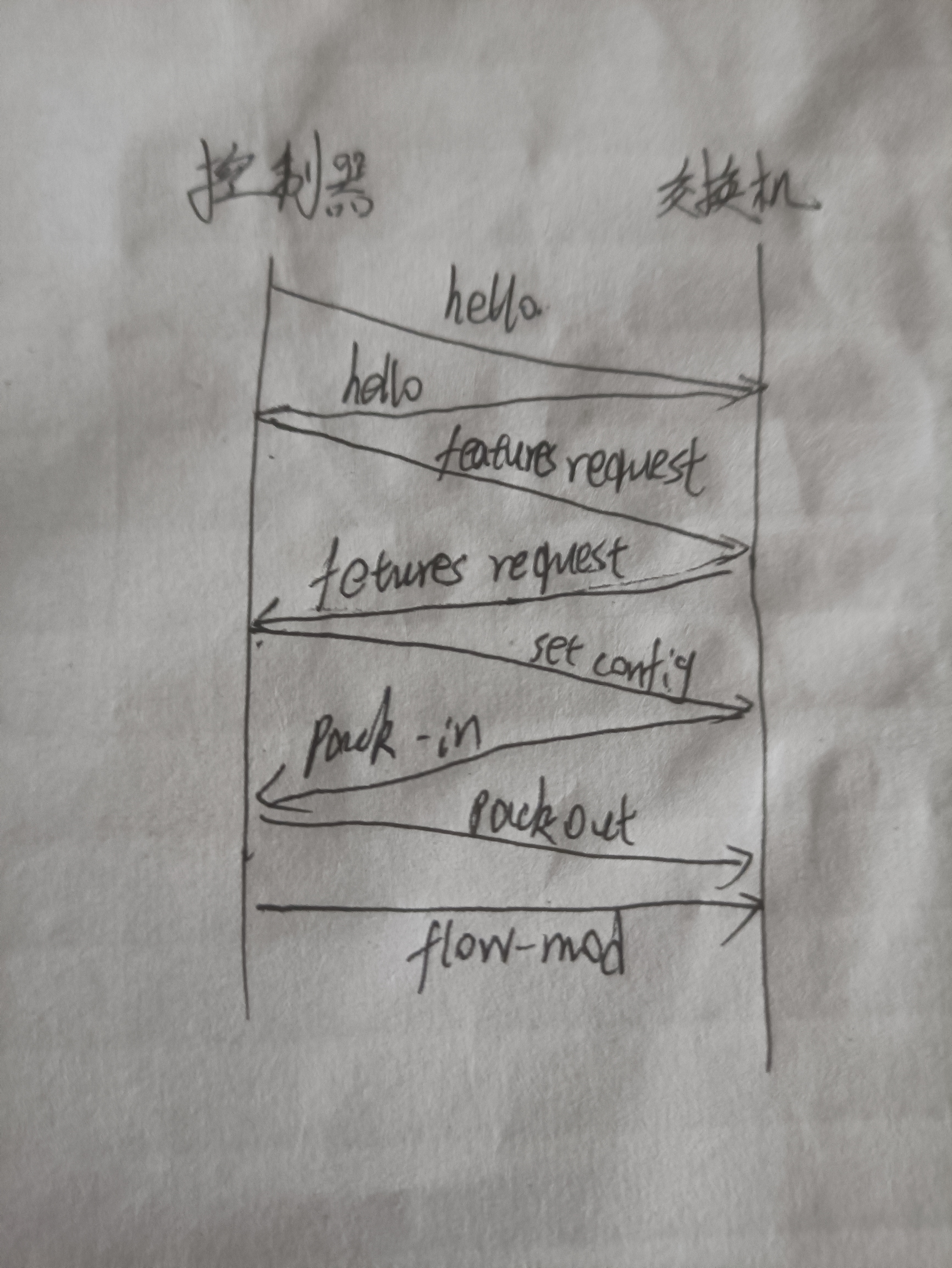
二、进阶要求
- 将抓包结果对照OpenFlow源码,了解OpenFlow主要消息类型对应的数据结构定义。相关数据结构可在openflow安装目录openflow/include/openflow当中的openflow.h头文件中查询到。
- HELLO
![]()

/* Header on all OpenFlow packets. */
struct ofp_header {
    uint8_t version;    /* OFP_VERSION. */
    uint8_t type;       /* One of the OFPT_ constants. */
    uint16_t length;    /* Length including this ofp_header. */
    uint32_t xid;       /* Transaction id associated with this packet.
                           Replies use the same id as was in the request
                           to facilitate pairing. */
};
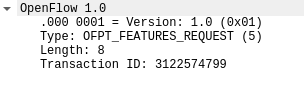
- FEATURES_REQUEST
![]()
与HELLO的代码段一致
3. SET_CONFIG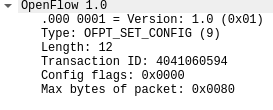
/* Switch configuration. */
struct ofp_switch_config {
    struct ofp_header header;
    uint16_t flags;             /* OFPC_* flags. */
    uint16_t miss_send_len;     /* Max bytes of new flow that datapath should
                                   send to the controller. */
};
- PORT_STATUS
![]()
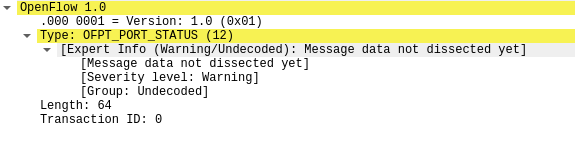
/* A physical port has changed in the datapath */
struct ofp_port_status {
    struct ofp_header header;
    uint8_t reason;          /* One of OFPPR_*. */
    uint8_t pad[7];          /* Align to 64-bits. */
    struct ofp_phy_port desc;
};
- FEATURES_REPLAY
![]()
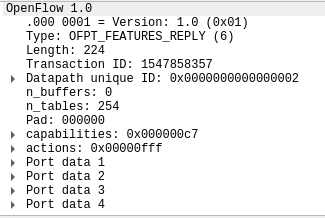
/* Description of a physical port */
struct ofp_phy_port {
    uint16_t port_no;
    uint8_t hw_addr[OFP_ETH_ALEN];
    char name[OFP_MAX_PORT_NAME_LEN]; /* Null-terminated */

    uint32_t config;        /* Bitmap of OFPPC_* flags. */
    uint32_t state;         /* Bitmap of OFPPS_* flags. */

    /* Bitmaps of OFPPF_* that describe features.  All bits zeroed if
     * unsupported or unavailable. */
    uint32_t curr;          /* Current features. */
    uint32_t advertised;    /* Features being advertised by the port. */
    uint32_t supported;     /* Features supported by the port. */
    uint32_t peer;          /* Features advertised by peer. */
};
/* Switch features. */
struct ofp_switch_features {
    struct ofp_header header;
    uint64_t datapath_id;   /* Datapath unique ID.  The lower 48-bits are for
                               a MAC address, while the upper 16-bits are
                               implementer-defined. */

    uint32_t n_buffers;     /* Max packets buffered at once. */

    uint8_t n_tables;       /* Number of tables supported by datapath. */
    uint8_t pad[3];         /* Align to 64-bits. */

    /* Features. */
    uint32_t capabilities;  /* Bitmap of support "ofp_capabilities". */
    uint32_t actions;       /* Bitmap of supported "ofp_action_type"s. */

    /* Port info.*/
    struct ofp_phy_port ports[0];  /* Port definitions.  The number of ports
                                      is inferred from the length field in
                                      the header. */
};
- PACKET_IN
![]()

/* Packet received on port (datapath -> controller). */
struct ofp_packet_in {
    struct ofp_header header;
    uint32_t buffer_id;     /* ID assigned by datapath. */
    uint16_t total_len;     /* Full length of frame. */
    uint16_t in_port;       /* Port on which frame was received. */
    uint8_t reason;         /* Reason packet is being sent (one of OFPR_*) */
    uint8_t pad;
    uint8_t data[0];        /* Ethernet frame, halfway through 32-bit word,
                               so the IP header is 32-bit aligned.  The
                               amount of data is inferred from the length
                               field in the header.  Because of padding,
                               offsetof(struct ofp_packet_in, data) ==
                               sizeof(struct ofp_packet_in) - 2. */
};
- PACKET_OUT
![]()
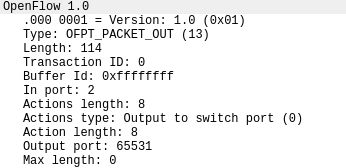
/* Send packet (controller -> datapath). */
struct ofp_packet_out {
    struct ofp_header header;
    uint32_t buffer_id;           /* ID assigned by datapath (-1 if none). */
    uint16_t in_port;             /* Packet's input port (OFPP_NONE if none). */
    uint16_t actions_len;         /* Size of action array in bytes. */
    struct ofp_action_header actions[0]; /* Actions. */
    /* uint8_t data[0]; */        /* Packet data.  The length is inferred
                                     from the length field in the header.
                                     (Only meaningful if buffer_id == -1.) */
};
- FLOW_MOD
![]()
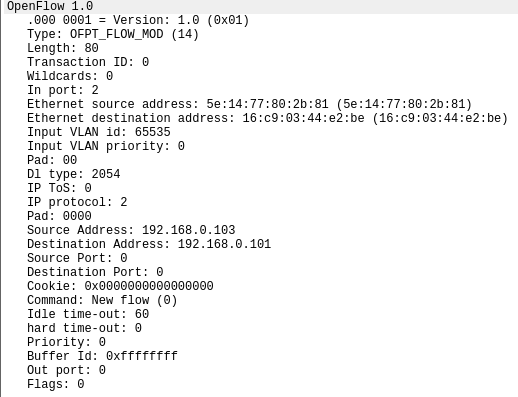
/* Flow setup and teardown (controller -> datapath). */
struct ofp_flow_mod {
    struct ofp_header header;
    struct ofp_match match;      /* Fields to match */
    uint64_t cookie;             /* Opaque controller-issued identifier. */

    /* Flow actions. */
    uint16_t command;             /* One of OFPFC_*. */
    uint16_t idle_timeout;        /* Idle time before discarding (seconds). */
    uint16_t hard_timeout;        /* Max time before discarding (seconds). */
    uint16_t priority;            /* Priority level of flow entry. */
    uint32_t buffer_id;           /* Buffered packet to apply to (or -1).
                                     Not meaningful for OFPFC_DELETE*. */
    uint16_t out_port;            /* For OFPFC_DELETE* commands, require
                                     matching entries to include this as an
                                     output port.  A value of OFPP_NONE
                                     indicates no restriction. */
    uint16_t flags;               /* One of OFPFF_*. */
    struct ofp_action_header actions[0]; /* The action length is inferred
                                            from the length field in the
                                            header. */
};
实验总结
- 遇到的问题:在实验过程遇到的问题是,wireshark抓包时出现了权限问题,用sudo启动即可解决。中途遇见了端口不一致的情况,发现时筛选时条件选错了。
- 实验难度:中等。只要按步骤操作即可,筛选wireshark的信息时要细心筛选条件。
- 实验感想:这次实验难度适中,因为是验证性质实验,所有按照步骤来做的比较顺畅,也更加熟悉了wiresahrk的使用,这不论是在linux还是windows中都十分实用的网络工具。

 浙公网安备 33010602011771号