
location.href用法
location.href的用法
一:提出问题
location.href 指的是某window对象的URL地址
但是在js中关于location.href的用法究竟有哪几种,究竟有哪些区别,估计很多人都不知道了。
二:常见的几种形式
目前在开发中经常要用到的几种形式有:

//var url = "www.baidu.com";
self.location.href="url"; //1.仅在本页面打开url
你从字面上就可以理解到 window 指的是当前窗口 而 self 指的是自己在HTML 中 由于页面可以镶嵌页面 所以这2个就有了
区别 比如说 我有个页面A.HTML 里面嵌套了度一个B.HTML 在A中使用 window.location 跳转就把整个页面跳转了而在A中镶嵌B页面的位置
使用了self跳转 就只是把B界面跳转了 A页面其他地方没有内变化 就拿 很简单的 百度搜索页面来比 你输入不同的搜索内容容
变化的只是下面的内容 而搜索栏本身没有变化 就是self实现下面的跳转
window.location.href="url"; //2.当前页面打开URL页面
this.location.href="url"; //3.用法和self.location.href一样
location.href="url"; //4.当前页面打开URL页面
parent.location.href="url"; //5.在父窗口打开此url窗口
top.location.href="url";//6.在顶层页面打开url(跳出框架)
三:代码部分
那么,这几种形式的跳转究竟有什么区别呢?
直接讲定义,你肯定不会理解透彻,下面我来贴四个html代码,用实际的例子讲解。
a.html:
<form id="form1" action="">
<div><strong>这是a.html页面<strong>
<iframe src="b.html" width="500px" height="300px"></iframe> </strong></strong></div>
</form>
<pre>
b.html:
<span>这是b.html</span><span id="span1"></span><br />
<iframe src="c.html" width="500px" height="300px"></iframe>
c.html:
<span><strong>这是c.html:<strong></span><span id="span1"></span><br />
<iframe src="d.html" width="500px" height="300px"></iframe>
d.html:
<span>这是d.html:</span><span id="span1"></span><br />
<input type='button' onclick='jump();' value='跳转'>
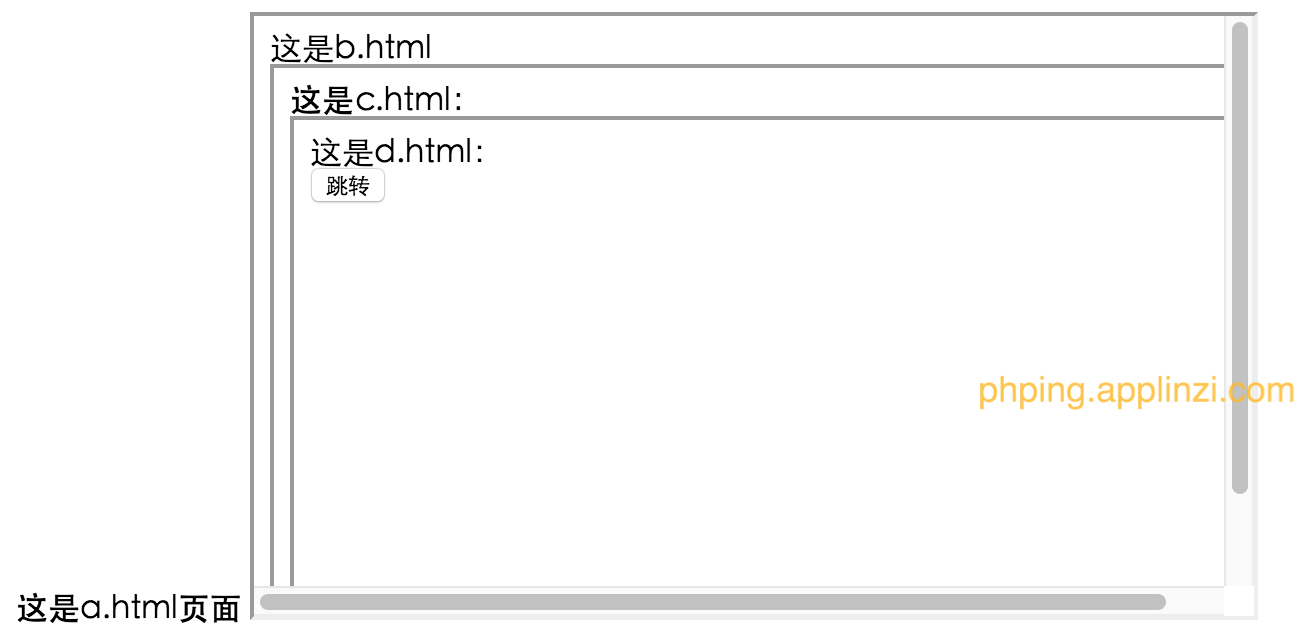
a.html,b.html,c.html,d.html通过iframe给联系到了一起,那么它们有什么的联系呢?
观察代码,我们可以看出:
a.html里面嵌着b.html; b.html里面嵌着c.html; c.html里面嵌着d.html
运行a.html,贴图一如下:
四:测试几种用法
下面来测试上述几种写法.
在d.html里面head部分写js:
function jump() {
//经测试:window.location.href与location.href,self.location.href,location.href都是本页面跳转
//作用一样
window.location.href="http://www.baidu.com";
//location.href="http://www.baidu.com";
//self.location.href="http://www.baidu.com"; //this.location.href="http://www.baidu.com";
//location.href="http://www.baidu.com"; }
再次运行a.html,点击那个"跳转" 按钮,运行结果贴图二如下:

对比图一和图二的变化,你会发现d.html部分已经跳转到了百度的首页,而其它地方没有发生变化。这也就解释了"本页跳转"是什么意思。
好,再来修改d.html里面的js部分为:
function jump()
{
parent.location.href='http://www.baidu.com';
}
运行a.html后,再次点击"跳转" 按钮,运行结果贴图三如下:

对比图一和图三,你会发现a.html中嵌套的c.html部分已经跳转到了百度首页。
分析:我点击的是a.html中嵌套的d.html部分的跳转按钮,结果是a.html中嵌套的c.html部分跳转到了百度首页,这就解释了"parent.location.href是上一层页面跳转"的意思。 再次修改d.html里面的js部分为:
function jump()
{
top.location.href='http://www.baidu.com';
}
运行a.html后,再次点击"跳转" 按钮,
你会发现,a.html已经跳转到了百度首页。
分析:我点击的是a.html中嵌套的d.html部分的跳转按钮,结果是a.html中跳转到了百度首页,这就解释了"top.location.href是最外层的页面跳转"的意思。
五:总结
看完上面的讲解之后,在来看看下面的定义你就会非常明白了:
"top.location.href"是最外层的页面跳转
"window.location.href"、"location.href"是本页面跳转
"parent.location.href"是上一层页面跳转.

 浙公网安备 33010602011771号