QColorDialog
完整代码
# Form implementation generated from reading ui file 'colorDialog.ui'
#
# Created by: PyQt6 UI code generator 6.3.0
#
# WARNING: Any manual changes made to this file will be lost when pyuic6 is
# run again.  Do not edit this file unless you know what you are doing.


from PyQt6 import QtCore, QtGui, QtWidgets
from PyQt6.QtWidgets import QColorDialog


class Ui_Dialog(object):
    def setupUi(self, Dialog):
        Dialog.setObjectName("Dialog")
        Dialog.resize(400, 300)
        self.verticalLayout = QtWidgets.QVBoxLayout(Dialog)
        self.verticalLayout.setObjectName("verticalLayout")
        self.textEdit = QtWidgets.QTextEdit(Dialog)
        self.textEdit.setObjectName("textEdit")
        self.verticalLayout.addWidget(self.textEdit)
        self.pushButton = QtWidgets.QPushButton(Dialog)
        self.pushButton.setObjectName("pushButton")

        # connect signal
        self.pushButton.clicked.connect(self.choose_color)

        self.verticalLayout.addWidget(self.pushButton)
        self.label = QtWidgets.QLabel(Dialog)
        self.label.setObjectName("")
        self.verticalLayout.addWidget(self.label)

        self.retranslateUi(Dialog)
        QtCore.QMetaObject.connectSlotsByName(Dialog)

    def choose_color(self):
        color = QColorDialog.getColor()

        if color.isValid():
            self.textEdit.setTextColor(color)
            self.label.setText('You have selected color with code: ' + str(color.name()))

    def retranslateUi(self, Dialog):
        _translate = QtCore.QCoreApplication.translate
        Dialog.setWindowTitle(_translate("Dialog", "Dialog"))
        self.pushButton.setText(_translate("Dialog", "choose the color what you want"))
        self.label.setText(_translate("Dialog", "TextLabel"))


if __name__ == "__main__":
    import sys
    app = QtWidgets.QApplication(sys.argv)
    Dialog = QtWidgets.QDialog()
    ui = Ui_Dialog()
    ui.setupUi(Dialog)
    Dialog.show()
    sys.exit(app.exec())
程序截图
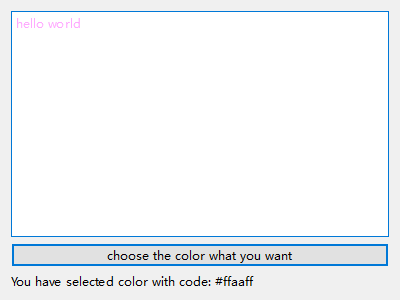
QFontDialog
完整代码
# Form implementation generated from reading ui file 'QFontDialog.ui'
#
# Created by: PyQt6 UI code generator 6.3.0
#
# WARNING: Any manual changes made to this file will be lost when pyuic6 is
# run again.  Do not edit this file unless you know what you are doing.


from PyQt6 import QtCore, QtGui, QtWidgets
from PyQt6.QtWidgets import QDialog, QFontDialog

class Ui_Dialog(QDialog):
    def setupUi(self, Dialog):
        Dialog.setObjectName("Dialog")
        Dialog.resize(400, 300)
        self.verticalLayout = QtWidgets.QVBoxLayout(Dialog)
        self.verticalLayout.setObjectName("verticalLayout")
        self.textEdit = QtWidgets.QTextEdit(Dialog)
        self.textEdit.setObjectName("textEdit")
        self.verticalLayout.addWidget(self.textEdit)
        self.pushButton = QtWidgets.QPushButton(Dialog)
        self.pushButton.setObjectName("pushButton")

        # connect signal
        self.pushButton.clicked.connect(self.choose_font)
        self.verticalLayout.addWidget(self.pushButton)

        self.retranslateUi(Dialog)
        QtCore.QMetaObject.connectSlotsByName(Dialog)

    def choose_font(self):
        font, ok = QFontDialog.getFont()
        if ok:
            self.textEdit.setFont(font)

    def retranslateUi(self, Dialog):
        _translate = QtCore.QCoreApplication.translate
        Dialog.setWindowTitle(_translate("Dialog", "Dialog"))
        self.pushButton.setText(_translate("Dialog", "PushButton"))


if __name__ == "__main__":
    import sys
    app = QtWidgets.QApplication(sys.argv)
    Dialog = QtWidgets.QDialog()
    ui = Ui_Dialog()
    ui.setupUi(Dialog)
    Dialog.show()
    sys.exit(app.exec())
程序截图



 浙公网安备 33010602011771号