
04 2025 档案
摘要:多年前录制的Sharding-jdbc分库分表教程视频,西瓜视频网站搜索java客栈的小二用户 视频教程集合如下
阅读全文
摘要:mongod.conf配置文件 storage: dbPath: /data/db systemLog: path: /data/logs/mongod.log logAppend: false logRotate: rename destination: file security: author
阅读全文
摘要:安装 Ollama 下载地址 https://ollama.com 选择合适自己电脑的版本下载 这里我下载的是macOS版本,macOS安装比较简单下载解压后将app拖拽到应用程序中即可 打开ollama显示如下 点击Next显示如下 在点击Install,会让你输入密码,输入密码确认后显示如下 上
阅读全文
摘要:更新时间2026-01-22 { "registry-mirrors": [ "https://docker.1ms.run" ] }
阅读全文
摘要:安装脚步 正在终端中执行以下命令 /bin/zsh -c "$(curl -fsSL https://gitee.com/cunkai/HomebrewCN/raw/master/Homebrew.sh)" 在终端中执行 brew -v 确认安装成功 卸载脚步 /bin/zsh -c "$(curl
阅读全文
摘要:在 https://www.cnblogs.com/osinn/p/18813258 这篇文章中讲述了Hadoop使用MapReduce实现经典单词统计案例,这次写一篇如何使用Hive代替MapReduce实现单词统计 准备本地文本文件 首先本地磁盘创建一个wordcount.txt文件,并且添加以
阅读全文
摘要:Linux下通过防火墙一键屏蔽指定国家所有的IP访问 封禁 封禁列表 解封 使用root执行以下命令: wget https://www.moerats.com/usr/shell/block-ips.sh chmod +x block-ips.sh ./block-ips.sh block-ips
阅读全文
摘要:axure 导出 html页面,需要部署到内网通过Nginx转发访问 server { listen 9990; server_name 192.168.0.42; charset utf-8; # 解决中文目录显示乱码 location / { root /home/servers/axure/t
阅读全文
摘要:们需要根据url的前缀转发到不同的服务 比如: abc.com/user/profile.html转发到 用户服务localhost:8089/profile.html abc.com/order/details.html转发到 订单服务 localhost:8090/details.html 即,
阅读全文
摘要:http { geoip_country /usr/local/nginx/geoip.dat; map $geoip_country_code $allowed_country { default no; # 默认不允许,如果改为 yes 表示默认允许 CN yes; #区域允许,这个CN就是代表
阅读全文
摘要:Nginx的缓冲配置 请求缓冲在Nginx请求处理中扮演了重要的角色。当收到一条请求时,Nginx将请求写入缓冲当中。缓冲中的数据成为Nginx的变量,比如$request_body。如果缓冲容量比请求容量小,那么多出来的请求会被写入硬盘,这时便会有I/O操作。Nginx提供了多个directive
阅读全文
摘要:一、问题汇总 1、Nginx启动只有master进程而没有worker进程 2、Nginx启动有两个master进程而没有worker进程 3、Nginx启动报: …/storage/trunk_mgr/trunk_shared.c, line: 194"Permission denied" 4、N
阅读全文
摘要:server { listen 8089;#端口号 server_name dis;#本机 charset utf-8; #access_log logs/host.access.log main; location ~ .*\.(gif|jpg|jpeg|png|js)$ { expires 24
阅读全文
摘要:nginx命令一般有: 启动:start nginx 关闭:nginx -s stop 重启:nginx -s reload 查看Nginx的版本号:nginx -V 校验文件格式是否正确:nginx –t 配置文件修改重装载命令:nginx -s reload linux 重启:./nginx -
阅读全文
摘要:打开nginx.conf,在http节点里添加: upstream boot { server 127.0.0.1:8888 weight=1; #weight是权重的意思,权重越大,分配的概率越大 server 127.0.0.1:8080 weight=1; } server { listen
阅读全文
摘要:set $mobile_rewrite do_not_perform; if ($http_user_agent ~* "(android|bb\d+|meego).+mobile|avantgo|bada\/|blackberry|blazer|compal|elaine|fennec|hipto
阅读全文
摘要:server { listen 80; listen 443 ssl; server_name itczw.top www.itczw.top; ssl_certificate /home/ssl/baidu_ssl/itczw.top.crt; ssl_certificate_key /home/
阅读全文
摘要:worker_processes 1; events { worker_connections 1024; } http { # 必须要导入不然样式nginx加载不出来样式 include mime.types; # 必须要导入不然样式nginx加载不出来样式 default_type applic
阅读全文
摘要:方式一 指定IP 在nginx目录下创建blockips.conf 并添加 deny 42.200.167.4; 其中 42.200.167.4为屏蔽的ip地址 在nginx.conf中任何server{ ... }前 添加 include /etc/nginx/blockips.conf; 刷新配
阅读全文
摘要:执行 ./configure --prefix=/usr/local/nginx --with-http_ssl_module --with-http_sub_module --with-http_gzip_static_module --with-http_stub_status_module -
阅读全文
摘要:QuartzManager分组版 package net.fjyl.market.quartz; import org.quartz.*; import org.quartz.impl.StdSchedulerFactory; /** * @author caizw * @date 2018-08-
阅读全文
摘要:<template> <div class="wagerTable"> <el-table :data="tableData" style="width: 100%"> <el-table-column prop="wagerCode" label="下注号码"> </el-table-column
阅读全文
摘要:index.vue <!-- * 上传图片拖拽排序、底部显示图片原始名称 --> <template> <div class="uploadWrapper"> <vuedraggable class="vue-draggable" :class="{ single: isSingle, maxHid
阅读全文
摘要:/** * 精确加法 */ addNumber(num1, num2) { const num1Digits = (num1.toString().split('.')[1] || '').length; const num2Digits = (num2.toString().split('.')[
阅读全文
摘要:export function downloadByUrl(imgsrc, name) { var image = new Image() // 解决跨域 Canvas 污染问题 image.setAttribute('crossOrigin', 'anonymous') image.onload
阅读全文
摘要:自定义batchImportGoods.vue组件 <template> <span> <el-button type="success" size="mini" @click="batchImport"> 批量导入 </el-button> <el-dialog title="批量导入" appe
阅读全文
摘要:设置淘宝镜像 // 设置淘宝镜像,不然下载不了electron npm config set electron_mirror https://cdn.npm.taobao.org/dist/electron/ // 解决npm install 慢 npm config set registry ht
阅读全文
摘要:Unexpected end of JSON input while parsing near '...nterpret","version":"' 解决步骤 This solved it for me npm cache clean --force then run npm install -g
阅读全文
摘要:Blob 转base64 blobToBase64(blob) { return new Promise((resolve, reject) => { const fileReader = new FileReader(); fileReader.onload = (e) => { resolve(
阅读全文
摘要:// npm查看当前版本 npm -v // npm查看所有版本 npm view npm versions // npm更新到最新版 npm install -g npm // 查看当前配置 npm config list // 查看缓存路径 npm config get cache // 查看全
阅读全文
摘要:表单方式 const params = { keyword: this.listSearchKey.keyword }; const formEl = document.createElement('form'); formEl.setAttribute('action', url); formEl
阅读全文
摘要:uniapp开发,vue文件 微信小程序方式 let funName = 'testFun'; this[funName]() H5方式 let funName = 'testFun'; eval("this."+funName+"()"); 调用的是 testFun方法 methods: { te
阅读全文
摘要:<button bindtap="tomap" class="cu-btn line-blue sm">获取地址</button> tomap: function() { var t = this; wx.authorize({ scope: "scope.userLocation", succes
阅读全文
摘要:/* Windows服务 */ -- 启动MySQL net start mysql -- 创建Windows服务 sc create mysql binPath= mysqld_bin_path(注意:等号与值之间有空格) /* 连接与断开服务器 */ mysql -h 地址 -P 端口 -u 用
阅读全文
摘要:索引的本质 索引是帮助mysql高效获取数据的排好序的数据结构 索引存储在文件里 索引结构 二叉树(红黑树:二叉平衡树) hash BTREE B-Tree与B+Tree B+Tree是B-Tree的变种 B-Tree 度-节点的数据存储个数 叶节点具有相同的深度 叶节点的指针为空 节点中的数据ke
阅读全文
摘要:读未提交(Read uncommitted) 读提交(read committed) 可重复读(repeatable read) 串行化(Serializable) 读未提交(RU): 一个事务还没提交时, 它做的变更就能被别的事务看到.【可以看到未提交的数据(脏读)】 读提交(RC): 一个事务提
阅读全文
摘要:mysql 配置 [mysqld] lower_case_table_names=1 # 添加此行代码重启mysql即可
阅读全文
摘要:- 查询30天 select DATE_SUB(CURDATE(), INTERVAL 30 DAY) frm table; 今天 select * from 表名 where to_days(时间字段名) = to_days(now()); 昨天 SELECT * FROM 表名 WHERE DA
阅读全文
摘要:SELECT * FROM your_table WHERE date_column >= CURDATE() - INTERVAL 30 DAY
阅读全文
摘要:SELECT object_id, SUM(CASE WHEN date_column >= CURDATE() - INTERVAL 30 DAY AND date_column < CURDATE() THEN amount ELSE 0 END) AS amount_30_days, SUM(
阅读全文
摘要:/*获取指定id的上一条记录,我这里是以id=5为例的*/ select cid,cname from company order by cid>=5,cid desc limit 1 /*获取指定id的下一条记录,我这里是以id=5为例的*/ SELECT cid,cname from compa
阅读全文
摘要:SELECT * FROM tb_product WHERE create_date BETWEEN STR_TO_DATE( date_format( CURRENT_DATE (), '%Y-%m-01 00:00:00' ), '%Y-%m-%d %H:%i:%s' ) AND STR_TO_
阅读全文
摘要:创建表 Create table If Not Exists Scores (Id int, Score DECIMAL(3,2)); insert into Scores (Id, Score) values ('1', '3.5'); insert into Scores (Id, Score)
阅读全文
摘要:SELECT * FROM sys_menu WHERE id in ( select id from ( select t1.id, if(find_in_set(parent_id, @pids) > 0, @pids := concat(@pids, ',', id), 0) as ischi
阅读全文
摘要:分类递归查询子节点 delimiter $$ drop function if exists get_child_categoryt$$ create function get_child_categoryt(in_id varchar(10)) returns varchar(1000) begi
阅读全文
摘要://status = 0 为未支付状态 select * FROM order WHERE TIMESTAMPDIFF(MINUTE,create_date,now()) > 20 AND status = 0;
阅读全文
摘要:-- 返回的是某月某日的数量 SELECT monthDay, count( 0 ) AS numb FROM ( SELECT -- 返回的是月日 date_format( create_date, '%m-%d' ) monthDay FROM tb_product WHERE create_d
阅读全文
摘要:Logins table: + + + | user_id | login_date | + + + | 1 | 2019-07-20 | | 1 | 2019-07-20 | | 1 | 2019-07-20 | | 2 | 2019-07-20 | | 2 | 2019-07-21 | | 2
阅读全文
摘要:近 30天的每日活跃用户数(当天只要有一条活动记录,即为活跃用户)。 Activity table: + + + + + | user_id | session_id | activity_date | activity_type | + + + + + | 1 | 1 | 2019-07-20 |
阅读全文
摘要:这种查询会导致全表扫描 select id,name,create_date from sys_user a where not exists (select * from sys_user b where a.name = b.name and a.create_date < create_dat
阅读全文
摘要:drop procedure if exists init_group_val; delimiter $ create PROCEDURE init_group_val() BEGIN DECLARE group_id VARCHAR(64); -- 遍历数据结束标志 DECLARE done IN
阅读全文
摘要:select a.id,substring_index(substring_index(a.val,',',b.help_topic_id+1),',',-1) from tbl_brand_attr_group a join mysql.help_topic b on b.help_topic_i
阅读全文
摘要:delimiter $ create PROCEDURE phoneDeal() BEGIN DECLARE ids varchar(64); -- 遍历数据结束标志 DECLARE done INT DEFAULT FALSE; -- 游标 DECLARE cur_account CURSOR F
阅读全文
摘要:DELIMITER $$ drop procedure if exists getCategoryAndBrandRankByOrderId $$ CREATE PROCEDURE getCategoryAndBrandRankByOrderId ( _index int, size int ) B
阅读全文
摘要:解决MySQL sql_mode=only_full_group_by问题,this is incompatible with sql_mode=only_full_group_by错误 原因: 看一下group by的语法: select 选取分组中的列 + 聚合函数 from 表名称 group
阅读全文
摘要:create_time 时间不超过当前系统时间 7 天的数据 select create_time from incentive_activity_pub where DATEDIFF(CURDATE(), create_time)<=7
阅读全文
摘要:DELIMITER // drop procedure if exists sys_columns_nodes// create procedure sys_columns_nodes(in rootid int) begin declare stemp varchar(1000);/*定义一个临时
阅读全文
摘要:select FROM_UNIXTIME(1678723200000/1000,'%Y-%m-%d %H:%i:%S') as date 输出 2023-03-14 00:00:00
阅读全文
摘要:select exists ( SELECT * FROM hy_driver_car WHERE car_id=55 and driver_user_id <> 1 ) d
阅读全文
摘要:brew install nginx 卸载: /usr/local/Homebrew/bin/brew uninstall nginx 需要手动删除的目录: 1、cd /usr/local/var/ 目录下的 www目录 2、cd /usr/local/etc/ 目录下的 nginx目录 1.安装完
阅读全文
摘要:以安装node14为例 breww 安装node 使用 n 切换版本无效,去官网下载pkg 安装包没有这个问题 安装brew install node@14 卸载brew uninstall node@14 当执行brew install node@14命令。下载安装完成后会提升如下 If you
阅读全文
摘要: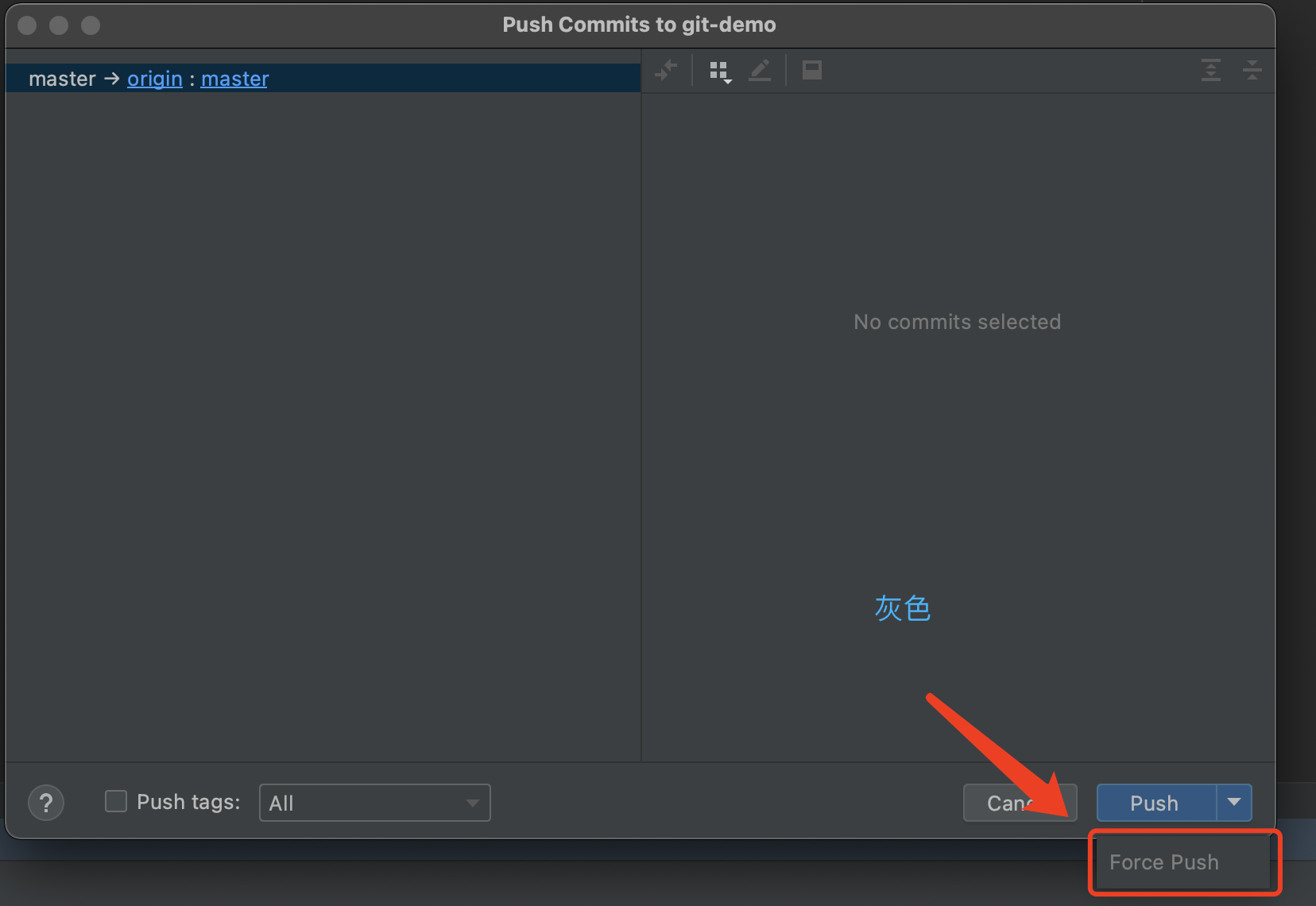 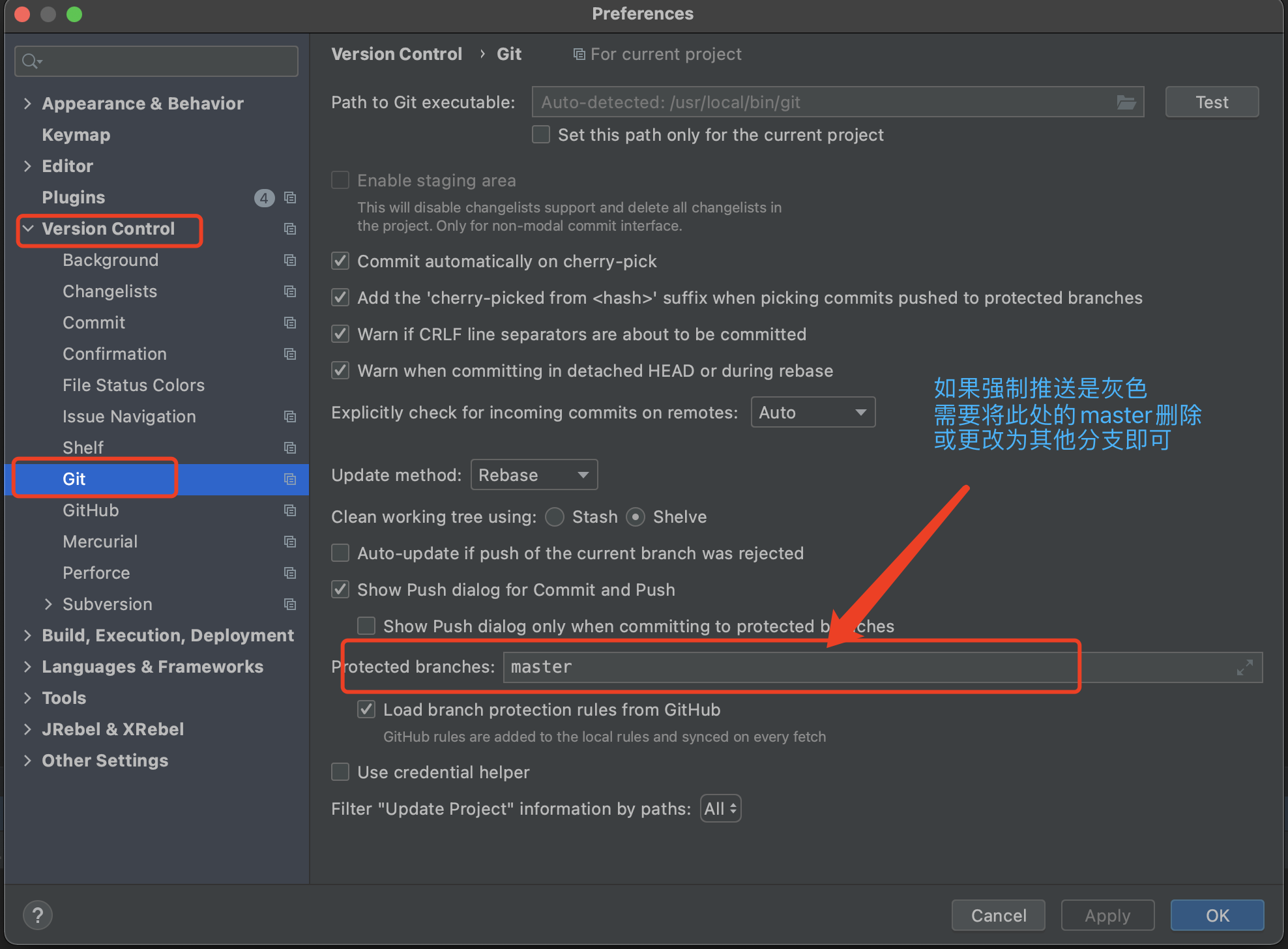
阅读全文
摘要:AiXcoder Code Completer github copilot AI根据注释自动生成代码 murphysec 检查maven依赖包版本漏洞 MOMO Code Sec Inspector plugin 检测代码漏洞,一键修复! GitToolBox 光标点击的代码行之后显示 git 用
阅读全文
摘要:debug模式下启动项目在Build阶段卡顿 在命令终端执行:hostname 将 打印出来的 hostname放入 /etc/hosts中, 如下 127.0.0.1 localhost iMac.local ::1 localhost iMac.local
阅读全文
摘要:在页面 html 标签添加style="filter: grayscale(100%)"样式即可 <html style="filter: grayscale(100%)"> 主要是在 html标签中加style="filter: grayscale(100%)"样式即可实现页面暗灰色,效果如图
阅读全文
摘要:jdk环境变量配置tools.jar # ./hadoop com.sun.tools.javac.Main WordCount.java 变量需要的环境变量配置 export HADOOP_CLASSPATH=${JAVA_HOME}/lib/tools.jar 命令方式编译java文件 创建Wo
阅读全文
摘要:字符串前面带有f作用 例如:f"Hello, {name}!" 其含义是使用 f - 字符串将变量值嵌入到字符串中,通熟易懂就是将字符串和变量拼接起来,如下 # 定义一个变量 name = "Python" # 使用 f - 字符串将变量值嵌入到字符串中 message = f"Hello, {na
阅读全文
摘要:加载本地驱动 连接提示缺少日志依赖包 将phoenix 目录下有个lib目录,将里面的log4j依赖包也加载加载进来即可,如图上图所示
阅读全文
摘要:Cell c3 = row.createCell(2); cellStyle3.setAlignment(HorizontalAlignment.LEFT); c3.setCellStyle(cellStyle3); c3.setCellType(CellType.FORMULA); // 设置列的
阅读全文
摘要:import lombok.AllArgsConstructor; import lombok.Builder; import lombok.Data; import lombok.NoArgsConstructor; import org.apache.poi.ss.usermodel.*; im
阅读全文
摘要:public void exportRecordResult(@RequestParam("templatesId") Long templatesId, HttpServletResponse response) throws Exception { List<RoutesTaskRecordRe
阅读全文
摘要:执行git clone报如下错误: fatal: unable to access 'https://github.com/xxx/xxx.git/': CONNECT tunnel failed, response 443 查资料发现可能是代理问题导致。 执行这个命令可以看到自己的代理设置: en
阅读全文
摘要:Git配置 Git安装完之后,需做最后一步配置。打开git bash,分别执行以下两句命令 git config --global user.name “用户名” git config --global user.email “邮箱” 用户名看自己喜欢起,一般都是起些容易记的,亦或者某个简称,邮箱选
阅读全文
摘要:#sudo apt-get -y install mysql-server mysql-client // 登录MySQL,MySQL的root用户密码默认空 #sudo mysql -u root 如果遇到ERROR 1698 (28000): Access denied for user 'ro
阅读全文
摘要:设置root用户允许任何地址访问 update user set host = '%' where user = 'root'; 刷新生效 FLUSH PRIVILEGES;
阅读全文
摘要:安装环境CentOS 6,理论其他环境一样,下载对应版本即可 安装mysql 下载mysql wget https://dev.mysql.com/get/Downloads/MySQL-5.7/mysql-5.7.36-linux-glibc2.12-x86_64.tar.gz 解压 tar xz
阅读全文
摘要:vmw虚拟机 CentOS 7 安装oracle 参考:http://blog.itpub.net/69975956/viewspace-2706044/ wget https://yum.oracle.com/repo/OracleLinux/OL7/latest/x86_64/getPackag
阅读全文
摘要:下载node.js 解压 配置 /etc/profile 环境变量 export PATH=$PATH:/home/czw/mysoft/node-v10.15.3/bin 验证 $ node -v && npm -v
阅读全文
摘要:版本 CentOS 7.3 Redis 4.0.2 下载redis wget http://download.redis.io/releases/redis-4.0.2.tar.gz #创建目录 sudo mkdir /usr/redis #解压 sudo tar -zvxf redis-4.0.2
阅读全文
摘要:安装环境CentOS 6,理论其他环境一样,下载对应版本即可 安装 下载wget https://fastdl.mongodb.org/linux/mongodb-linux-x86_64-rhel62-4.4.16.tgz 解压tar -zxvf mongodb-linux-x86_64-rhel
阅读全文
摘要:在Linux下 执行以下命令一键安装docker curl -fsSL https://get.docker.com | bash -s docker --mirror Aliyun
阅读全文
摘要:以下脚本文件必须执行 chmod +x xxx.sh 设置为可执行文件,否则执行刷新环境变量配置文件时会提示命令不存在 source: not found 一键配置jdk脚本 #!/bin/bash # 查找当前目录下的JDK安装包 jdk_package=$(ls | grep -i "jdk.*
阅读全文
摘要:环境 deepin linux系统 MySQL 5.7.18 步骤 cd /etc/mysql/mysql.conf.d (不一定我这个目录下,看自己安装的) skip-grant-tables 意思是在启动mysql时不启动grant-tables,授权表,当忘记密码后可以跳过授权验证 vi my
阅读全文
摘要:/etc/systemd/system下创建nginx.service 设置为可执行脚本chmod +x nginx.service [Unit] Description=nginx service After=network.target [Service] Type=forking ExecSt
阅读全文
摘要:/etc/systemd/system下创建nexus.service 设置为可执行脚本chmod +x nexus.service [Unit] Description=nexus After=network.target [Service] Type=forking ExecStart=/usr
阅读全文
摘要:/etc/systemd/system下创建redis.service 设置为可执行脚本chmod +x redis.service [Unit] Description=Redis Server Manager After=network.target [Service] Type=simple
阅读全文
摘要:在启动Spring boot 应用程序时,通常会将日志输出到 catalina.out 文件中,当时间久了catalina.out文件会占用很大空间,这时需要清理掉,可以使用以下命令清空文件内容 : > catalina.out 或 cat /dev/null > catalina.out
阅读全文
摘要:备份数据库 #!/bin/bash MYSQL_HOST="127.0.0.1" MYSQL_PORT="3306" MYSQL_USER="root" MYSQL_PASSWORD="123456" BACKUP=/home/.backupsql DATETIME=$(date +%Y%m%d%H
阅读全文
摘要:deepin在启动器上制作启动图标放在/usr/share/applications下 # cd /usr/share/applications # cgedit sublime_text_3.desktop 输入以下内容 [Desktop Entry] Version=1.0 Name=Subli
阅读全文
摘要:#!/bin/bash # 定义要检查的端口号 PORT=9912 # 定义超时时间(秒),这里定义的是10秒,超过10还没启动就结束脚本 TIMEOUT=10 # 初始化计时器 elapsed=0 # 循环检查端口是否启动 while [ $elapsed -lt $TIMEOUT ]; do i
阅读全文
摘要:查看登录认证记录 CentOS 7为例,执行命令tail -f /var/log/secure可实时查看 查看iptables设置的规则 iptables -L INPUT -n --line-numbers 保存iptables设置的规则 service iptables save 清空iptab
阅读全文
摘要:生成ssh密钥 # 执行生成公钥、密钥,生成保存目录为 ~/.ssh ssh-keygen -t rsa # 如果不需要修改生成目录,设置密码等可一路回车即可 我用root用户登录, 阿里云服务器在 /root下已经存在 .ssh 如果不存在手动建.ssh # mkdir .ssh # chmod
阅读全文
摘要: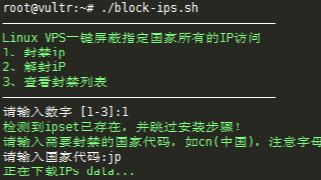 说明:对于屏蔽指定国家所有的IP的手动教程已经讲了,查看:Linux VPS使用ipset快速屏蔽指定国家的IP访问,虽然步骤很简单,但为了更白的小白,博主写了个一键脚本,这里分享下。 提示:据一些同学需求,博主也发了个白名单教程,查看:使用ipset设置防火墙端口白名单,只让指定国家访问。 使用
阅读全文
说明:对于屏蔽指定国家所有的IP的手动教程已经讲了,查看:Linux VPS使用ipset快速屏蔽指定国家的IP访问,虽然步骤很简单,但为了更白的小白,博主写了个一键脚本,这里分享下。 提示:据一些同学需求,博主也发了个白名单教程,查看:使用ipset设置防火墙端口白名单,只让指定国家访问。 使用
阅读全文
说明:对于屏蔽指定国家所有的IP的手动教程已经讲了,查看:Linux VPS使用ipset快速屏蔽指定国家的IP访问,虽然步骤很简单,但为了更白的小白,博主写了个一键脚本,这里分享下。 提示:据一些同学需求,博主也发了个白名单教程,查看:使用ipset设置防火墙端口白名单,只让指定国家访问。 使用
阅读全文
摘要:直接通过 ollama run deepseek-r1:14b 下载AI模型会发现很慢很慢,通过以下脚本可以提高下载速度 #!/bin/bash # 这里指定 需要下载的模型,这里我下载的是 deepseek-r1:14b MODEL_NAME="deepseek-r1:14b" while tru
阅读全文
 浙公网安备 33010602011771号