
使用SSE发送和接收流式数据
背景
早期去玩了一下各个Ai厂商的免费额度(主要是国内的),虽然不是很给力,但是还是蛮好玩的。
建立长连接我们通常使用WebSocket,而对于流式数据发送,只需要服务器返回数据,而不需要客户端发送数据的情况下,SSE是一个不错的选择。
介绍
SSE(Server-Sent Events)。
数据格式大致如下,如果不写明event,那么默认为message事件。
\n是必须的,可以看看阮一峰的文章,讲得比较详细。
https://www.ruanyifeng.com/blog/2017/05/server-sent_events.html
id: 12\n
event: myEvent\n
retry: 10000\n
data: {name: zhangsan, age: 18, sex: male}\n\n
demo
node服务端
const http = require("http");
const fs = require("fs");

http
  .createServer((req, res) => {
    const url = req.url;
    if (url.includes("/sse")) {
      res.writeHead(200, {
        "Content-Type": "text/event-stream",
        "Cache-Control": "no-cache",
        Connection: "keep-alive",
        "Access-Control-Allow-Origin": "*", // 允许跨域
      });

      // 每隔 1 秒发送一条消息
      let id = 0;
      const intervalId = setInterval(() => {
        // 这是我们想要返回的数据
        const data = {
          id,
          time: new Date(),
          body: "哈喽",
        };
        res.write(`id: ${id}\n\n`);
        res.write("event: message\n\n");
        res.write("retry: 10000\n\n");
        res.write("data: " + JSON.stringify(data) + "\n\n");
        console.log("当前id是: ", id);
        // 0到4,发送5条消息打算关闭连接
        if (id >= 4) {
          clearInterval(intervalId);
          res.write(`id: ${id}\n`);
          res.write("event: close\n");
          res.write("retry: 10000\n");
          res.write("data: " + JSON.stringify(data) + "\n\n");
          console.log("服务端发送完毕,请求关闭");
          res.end();
        }
        id++;
      }, 1000);

      // 当客户端关闭连接时停止发送消息
      req.on("close", () => {
        clearInterval(intervalId);
        id = 0;
        res.end();
      });
    } else {
      // 如果请求的路径无效,返回 404 状态码
      res.writeHead(404);
      res.end();
    }
  })
  .listen(3001);

console.log("Server listening on port 3001");
客户端
<!doctype html>
<html lang="en">
  <head>
    <meta charset="UTF-8" />
    <meta name="viewport" content="width=device-width, initial-scale=1.0" />
    <title>Document</title>
  </head>
  <body>
    <script>

      let eventSource;
      // 断开 SSE 连接
      const closeSSE = () => {
        eventSource.close();
        console.log(`SSE 连接关闭,状态${eventSource.readyState}`);
      };
      // 建立 SSE 连接
      const connectSSE = () => {
        eventSource = new EventSource("http://127.0.0.1:3001/sse");
        eventSource.onopen = () => {
          console.log(`SSE 连接成功,状态${eventSource.readyState}`);
        };

        eventSource.onerror = () => {
          console.log(`SSE 连接错误,状态${eventSource.readyState}`);
          eventSource.close();
        };
        eventSource.onmessage = (event) => {
          console.log('将字符串转化为json对象:',JSON.parse(event.data))
        };
        eventSource.addEventListener("close", (event) => {
          console.log('close事件: ',event);
          closeSSE();
        });
      };
      connectSSE()
    </script>
  </body>
</html>
测试
服务端文件为server.js,在当前文件夹打开终端,输入如下命令可以开启服务器。
node ./server.js
使用live-server等方式,打开index.html,这个应该都熟悉。

打开浏览器,打开控制台
注意
可以看到eventSource对象没有onclose钩子,因此存在一些问题。
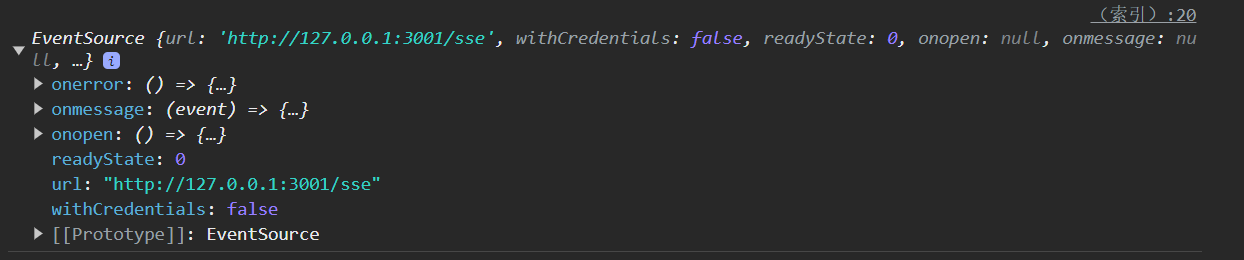
当服务端发送完消息后,断开连接,而客户端却认为消息没发送完,于是重连,这样会造成不断的重连,而且还会判定为error,触发onerror钩子。
解决重连问题
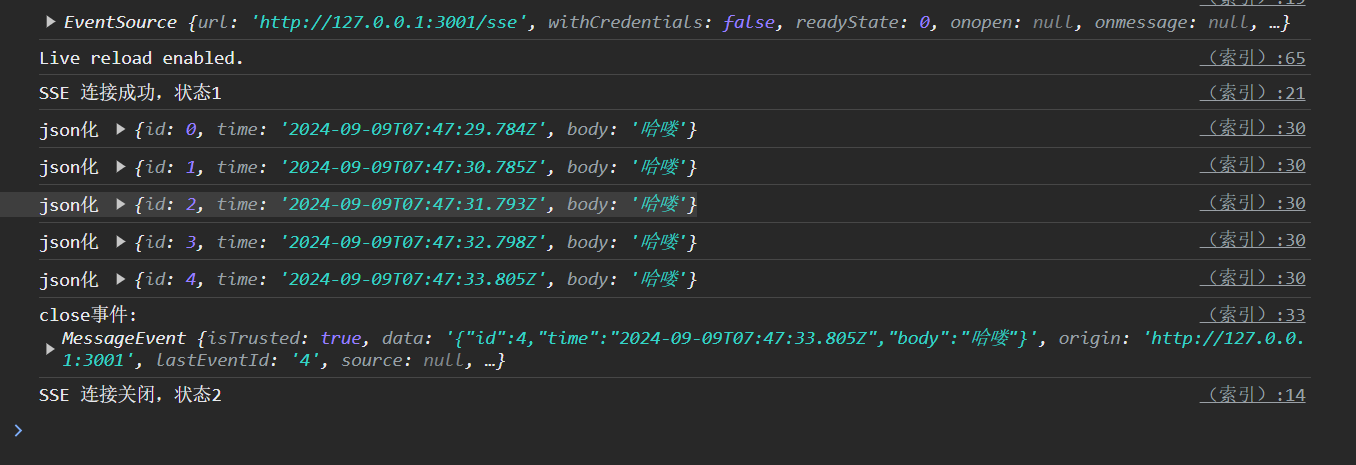
解决这个方法,我们可以自定义一个close事件,让服务端发送消息,提醒客户端应该断开连接。
以下为关键代码
// 服务端
res.write("event: close\n");
res.write("data: " + JSON.stringify(data) + "\n\n");
注意closeSSE是前面自定义的方法,并不是标准API
// 客户端
eventSource.addEventListener("close", (event) => {
	console.log("close事件: ", event);
	closeSSE();
});
效果
结语
当初踩了些坑,希望之后能少踩一点。
Fetch + ReadableStream + SSE
2026-3-3 更新
传统的SSE eventSource有很多缺陷:
- 只能使用GET请求(因为这个,导致没法发送请求体)
- 无法自定义header
- 难以预测的自动错误处理和重连
而fetch方案解决了这些问题,他对于eventSource原生方案的唯一缺陷是需要手动处理服务器的响应,不会自动处理SSE格式。
是否还需要使用SSE
SSE的核心是协议,也就是那个content-type: text/event-stream。
有多条消息发送的机制。
然后我们可以看看ReadableStream流式响应处理普通文本。

流式响应会有Transfer-Encoding: chunked响应头。其核心还是连贯的字符串。(content-type: text/plain; charset=utf-8)

而content-type: appilication/json就更不合适了,json拆开没有意义。
- SSE: 每次响应都是一条消息
- text/plain: 每次更新是在完善前面的内容
不管使用什么样的格式,都应该有一种区分多条消息的方式。
比如sse使用的text/event-stream他定义的方式是每条data:是一个消息。
除非是简单的发一段话,没有其他逻辑,那么直接使用text/plain+ReadableStream即可,无需处理。
SSE的优势:
- 浏览器原生支持,开发者工具可以看到EventSource的每一条消息。

text/plain+json
可以看到,还是比较乱的,相比于SSE没有优势。

application/x-ndjson
jsonl和ndjson其实是一个东西。从流行度来说,jsonl更加广为人知。
这样传来的数据清晰很多。

可以看到几乎是一致的

json-seq
莫名其妙的,没有使用的必要

结论
SSE依然有使用的必要,工具集成广泛,使用程度广。浏览器开发者工具能直接看,api测试工具也有相关集成。
而如果是使用ndjson或是jsonl,那么相对来说没有那么方便。
至于text/plain,如果不是临时的简单需求就用不上,因为需求会变化,而如果有消息类型的需要,那么还是得转向json。
评价和排名是我写的,其他的是AI判断的。

无论是SSE还是JSONL,apifox对响应数据结构的定义似乎都不太完善,需要手动给AI描述。

 浙公网安备 33010602011771号