


WordCount (结对)
序言
合作伙伴
201631062328 ,201631062303
项目码云地址:
https://gitee.com/mmmmx/WordCount
作业详细要求
正文
1.概述
该项目的PSP表格如下

2.互审代码
夏星 TO 张丽媛:代码和思路的逻辑写的还不错,唯一不足的是注释有点少,希望以后多写注释
张丽媛 TO 夏星 :思路很清楚,感觉还不错
基本功能基本一样,扩展功能主要是分成几个class,都有点困扰,代码不是那么清楚,都有所改动,最后基本一致
3.程序设计实现过程
1.结构图
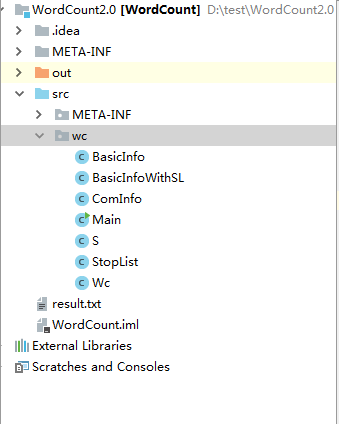
2.UML类图

3.属性方法
属性
WC

public int chars;
    public int words;
    public int lines;
    public int codeLines;        //代码行数
    public int empLines;        //空行数
    public int comLines;        //注释行数

    public int getChars() {
        return chars;
    }

    public int getWords() {
        return words;
    }

    public int getLines() {
        return lines;
    }

    public int getCodeLines() {
        return codeLines;
    }

    public int getEmpLines() {
        return empLines;
    }

    public int getComLines() {
        return comLines;
    }
Main

public static String inputFile;
    public static String outputFile;
    public static boolean needC;
    public static boolean needW;
    public static boolean needL;
    public static boolean needO;
    public static boolean needS;        //输入参数中是否有“-s”
    public static boolean needA;        //输入参数中是否有“-a”
    public static boolean needE;        //输入参数中是否有“-e”
方法
//实现参数的选择
Main方法

package wc;

import java.io.*;
import java.util.ArrayList;


public class Main {
    public static String inputFile;
    public static String outputFile;
    public static boolean needC;
    public static boolean needW;
    public static boolean needL;
    public static boolean needO;
    public static boolean needS;        //输入参数中是否有“-s”
    public static boolean needA;        //输入参数中是否有“-a”
    public static boolean needE;        //输入参数中是否有“-e”

    public static void main(String[] args) {
        inputFile = "";
        StopList.stopList="";
        for (int i = 0; i < args.length; i++) {
            System.out.println(args[i]);
            if ("-c".equals(args[i])) {
                needC = true;
            } else if ("-w".equals(args[i])) {
                needW = true;
            } else if ("-l".equals(args[i])) {
                needL = true;
            } else if ("-s".equals(args[i])) {
                needS = true;
            } else if ("-a".equals(args[i])) {
                needA = true;
            } else if ("-e".equals(args[i])) {
                needE = true;
                StopList.stopList = args[i + 1];
            } else if ("-o".equals(args[i])) {
                needO = true;
                outputFile = args[i + 1];
            } else {
                if (!args[i - 1].equals("-e") && !args[i - 1].equals("-o")) {

                    inputFile = args[i];
                }
            }

        }
        String outputStr = "";
        ArrayList<String> fileNames = new ArrayList<String>();
        if (!needS) {
            fileNames.add(inputFile);
        } else {
            S.s(fileNames);
        }
        int len = fileNames.size();
        String fn;

        for (int i = 0; i < len; i++) {
            fn = fileNames.get(i);
            System.out.println(fn);
            String fileShortName = fn.substring(fn.lastIndexOf("\\") + 1, fn.length());
            Wc wc;
            if (needC || needW || needL) {
                //统计基本信息
                if (needE) {
                    wc=BasicInfoWithSL.getBasicInfoWithSL(fn,StopList.stopList);
                } else {
                    wc=BasicInfo.basicInfo(fn);
                }

                if (needC) {

                    outputStr += fileShortName;
                    outputStr += ", 字符数: ";
                    outputStr += wc.getChars();
                    outputStr += "\r\n";
                }
                if (needW) {

                    outputStr += fileShortName;
                    outputStr += ", 单词数: ";
                    outputStr += wc.getWords();
                    outputStr += "\r\n";
                }
                if (needL) {

                    outputStr += fileShortName;
                    outputStr += ", 行数: ";
                    outputStr += wc.getLines();
                    outputStr += "\r\n";
                }
            }
            if (needA) {
                 wc = ComInfo.comInfo(fn);//统计复杂信息
                //file1.c, 代码行/空行/注释行: 5/2/3
                outputStr += fileShortName;
                outputStr += ", 代码行/空行/注释行: ";
                outputStr += wc.codeLines;
                outputStr += "/";
                outputStr += wc.empLines;
                outputStr += "/";
                outputStr += wc.comLines;
                outputStr += "\r\n";
            }

        }

        System.out.println(outputStr);
        if (!needO) {
            outputFile = "result.txt";
        }
        try {

            File writename = new File(outputFile);
            writename.createNewFile();
            BufferedWriter out = new BufferedWriter(new FileWriter(writename));
            out.write(outputStr);
            out.flush();
            out.close();
        } catch (IOException e) {
            e.printStackTrace();
        }


    }

}
//基本功能的实现
基本功能统计

package wc;


import java.io.*;

public class BasicInfo {
    public static Wc basicInfo(String fileName)
    {
        Wc wc=new Wc();
        char charNow;
        try
        {
            File filename = new File(fileName);
            InputStreamReader reader = new InputStreamReader(
                    new FileInputStream(filename));
            BufferedReader br = new BufferedReader(reader);
            String line ;
            line = br.readLine();
            boolean partition=true;
            while (line != null)
            {

                wc.chars+=line.length();
                wc.lines++;


                for(int i=0;i<line.length();i++)
                {
                    charNow=line.charAt(i);
                    if(partition==true&&charNow!='/'&&charNow!='*'&&charNow!='{'&&charNow!='}'&&charNow!='c'&&charNow!='('&&charNow!=')'&&charNow!='\t'&&charNow!=','&&charNow!='.'&&charNow!='?')
                    {
                        wc.words++;
                    }
                    if(charNow==' '||charNow=='\t'||charNow==','||charNow==',')
                    {
                        partition=true;
                    }

                }
                line = br.readLine();
            }
            wc.chars+=wc.lines-1;
            br.close();
        }
        catch (IOException e)
        {
            e.printStackTrace();
        }
        return wc;
    }
}
//扩展功能的实现(停用表) 递归的调用
扩展功能

package wc;


import java.io.*;

public class BasicInfo {
    public static Wc basicInfo(String fileName)
    {
        Wc wc=new Wc();
        char charNow;
        try
        {
            File filename = new File(fileName);
            InputStreamReader reader = new InputStreamReader(
                    new FileInputStream(filename));
            BufferedReader br = new BufferedReader(reader);
            String line ;
            line = br.readLine();
            boolean partition=true;
            while (line != null)
            {

                wc.chars+=line.length();
                wc.lines++;


                for(int i=0;i<line.length();i++)
                {
                    charNow=line.charAt(i);
                    if(partition==true&&charNow!='/'&&charNow!='*'&&charNow!='{'&&charNow!='}'&&charNow!='c'&&charNow!='('&&charNow!=')'&&charNow!='\t'&&charNow!=','&&charNow!='.'&&charNow!='?')
                    {
                        wc.words++;
                    }
                    if(charNow==' '||charNow=='\t'||charNow==','||charNow==',')
                    {
                        partition=true;
                    }

                }
                line = br.readLine();
            }
            wc.chars+=wc.lines-1;
            br.close();
        }
        catch (IOException e)
        {
            e.printStackTrace();
        }
        return wc;
    }
}
stopList

package wc;

import java.io.*;
import java.util.ArrayList;


public class StopList {
    public static String stopList;
    //停用词表
    public static void getStopList(ArrayList<String> wordsIgnored)
    {

        try
        { // 防止文件建立或读取失败,用catch捕捉错误并打印,也可以throw

            /* 读入stopList */
            File filename = new File(stopList); // 要读取以上路径的input。txt文件
            InputStreamReader reader = new InputStreamReader(
                    new FileInputStream(filename)); // 建立一个输入流对象reader
            BufferedReader br = new BufferedReader(reader); // 建立一个对象,它把文件内容转成计算机能读懂的语言
            String line ;
            line = br.readLine();

            String reg1 = " +";
            while (line != null)
            {
                //将读取的行分割成各个单词
                String str[] = line.split(reg1);

                for(int i=0;i<str.length;i++)
                {
                    wordsIgnored.add(str[i]);  //将停用词表中的单词放入数组wordsIgnored
                }
                line = br.readLine(); // 一次读入一行数据
            }
            br.close();
        }
        catch (IOException e)
        {
            e.printStackTrace();
        }


    }
}
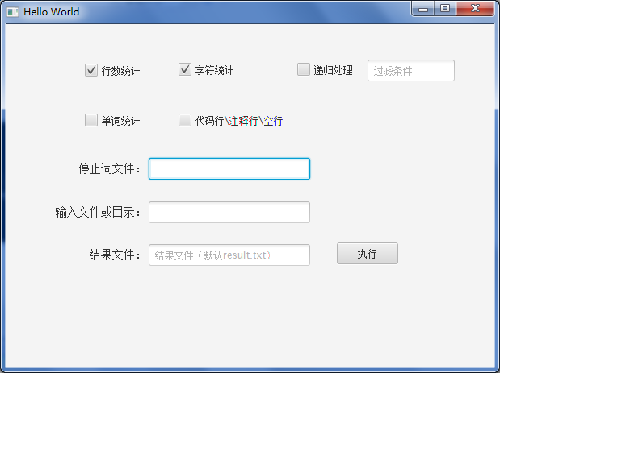
//高级功能,只做了个界面,基本没有实现(时间有限)
//利用了javaFx

//ui,fxml代码(一些简单设计)
ui.fxml

<?xml version="1.0" encoding="UTF-8"?>

<?import java.lang.*?>
<?import java.util.*?>
<?import javafx.scene.*?>
<?import javafx.scene.control.*?>
<?import javafx.scene.layout.*?>

<?import javafx.scene.text.Font?>
<AnchorPane id="AnchorPane" prefHeight="200" prefWidth="320" xmlns:fx="http://javafx.com/fxml"
            fx:controller="sample.Controller">
    <children>
        <CheckBox fx:id="isCountLine" layoutX="97.0" layoutY="49.0" mnemonicParsing="false" selected="false"
                  text="行数统计"/>
        <CheckBox fx:id="isCountChar" layoutX="213.0" layoutY="48.0" mnemonicParsing="false" text="字符统计"/>
        <CheckBox fx:id="isCountWord" layoutX="97.0" layoutY="111.0" mnemonicParsing="false" text="单词统计"/>
        <CheckBox fx:id="countCodeInfo" layoutX="213.0" layoutY="111.0" mnemonicParsing="false" text="代码行\注释行\空行"/>
        <CheckBox fx:id="isRecursion" layoutX="360.0" layoutY="48.0" mnemonicParsing="false" onAction="#changeTextState"
                  text="递归处理"/>
        <Button layoutX="409.0" layoutY="271.0" minHeight="15.999908447265625" mnemonicParsing="false" onAction="#textProcess"
                 prefHeight="27.0" prefWidth="76.0" text="执行" textAlignment="LEFT"/>
        <TextField fx:id="regexField" editable="false" layoutX="447.0" layoutY="44.0" onMouseClicked="#isCheckRecursion"
                   prefHeight="27.0" prefWidth="108.0" promptText="过滤条件"/>
        <TextField fx:id="resultFile" layoutX="176.0" layoutY="273.0" prefHeight="27.0" prefWidth="200.0"
                   promptText="结果文件(默认result.txt)"/>
        <Label layoutX="103.0" layoutY="277.0" text="结果文件:">
            <font>
                <Font size="14.0" fx:id="x1"/>
            </font>
        </Label>
        <Label font="$x1" layoutX="89.0" layoutY="170.0" text="停止词文件:"/>
        <Label ellipsisString="" font="$x1" layoutX="61.0" layoutY="224.0" text="输入文件或目录:" textAlignment="LEFT"
               textOverrun="ELLIPSIS" underline="false"/>
        <TextField fx:id="stopFile" layoutX="176.0" layoutY="166.0" onMouseClicked="#chooseStopFile" prefHeight="27.0"
                   prefWidth="200.0" promptText=""/>
        <TextField id="stopFile" fx:id="inputFile" layoutX="176.0" layoutY="220.0" onMouseClicked="#chooseInput"
                   prefHeight="27.0" prefWidth="200.0" promptText=""/>
    </children>
</AnchorPane>
4.测试
1.测试脚本
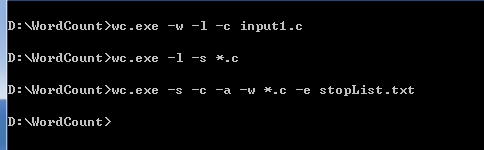
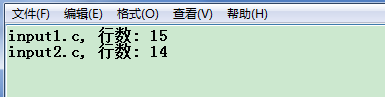
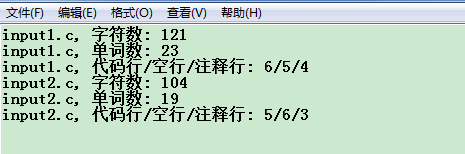
2.测试效果
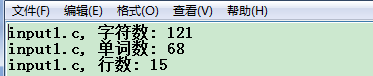
3.测试评价
这次的作业由于组队和准备的时间太长,完成时,高级功能没有实现,但是扩展功能的实现已经完成的较好了,设计到的东西有很多,而且经过测试,效果还是不错的。
以后有时间继续完成

 浙公网安备 33010602011771号