UpdatePanel 笔记 04 UpdatePanel 控件--触发机制Triggers
第四篇: UpdatePanel 控件--触发机制Triggers
之前,我们都是通过把控件放到UpdatePanel控件里的,若想要把控件放到UpdatePanel 外呢?就可以通过Triggers 来实现.
我们通过一个例子来说明:
1.新建三个控件:ScriptManager,UpdataPanel,2个Label,DropDownList(DropDownList 控件放到UpdataPanel 外)
Label1.Text = "选择你最喜欢的宠物" (Label2 放到UpdataPanel 里)
DropDownList 启用 AutoPostBack
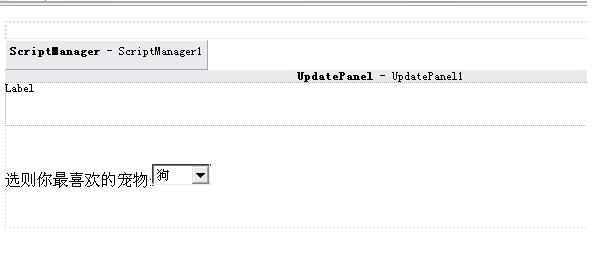
图8
2.接着选择UpdataPanel 属性里的Triggers
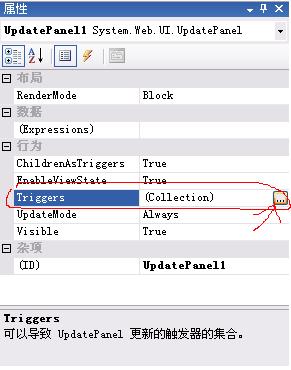 图9
图9然后在出现的UpdataPanelTrigger 集合编辑器里,点添加,在ControlID 里选 DropDownList1
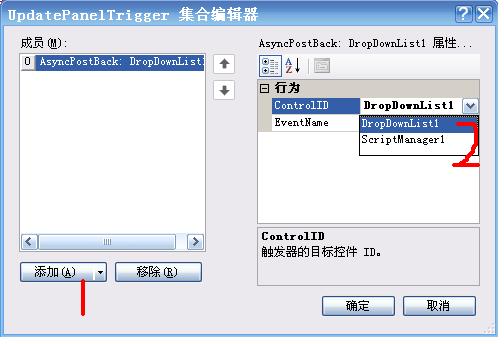
3. 双击DropDownList1,键入以下代码:


 protected void DropDownList1_SelectedIndexChanged(object sender, EventArgs e) {
 Label2.Text = DropDownList1.SelectedValue.ToString();
 }
}4.OK, try agan!!
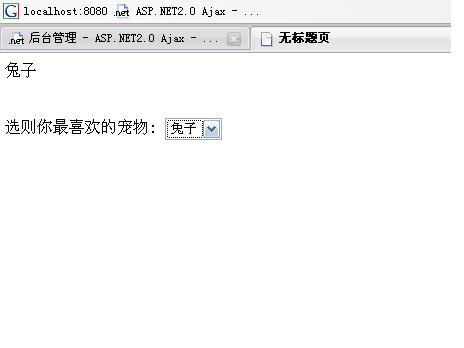
图11


 浙公网安备 33010602011771号