
10-外键的变种 三种关系、11-数据的增删改、12-单表查询、13-多表查询
10-外键的变种 三种关系
本节重点:
- 如何找出两张表之间的关系
- 表的三种关系
一、介绍
因为有foreign key的约束,使得两张表形成了三种了关系:
- 多对一
- 多对多
- 一对一
二、重点理解如果找出两张表之间的关系

分析步骤:
#1、先站在左表的角度去找
是否左表的多条记录可以对应右表的一条记录,如果是,则证明左表的一个字段foreign key 右表一个字段(通常是id)

#2、再站在右表的角度去找
是否右表的多条记录可以对应左表的一条记录,如果是,则证明右表的一个字段foreign key 左表一个字段(通常是id)

#3、总结:
#多对一:
如果只有步骤1成立,则是左表多对一右表
如果只有步骤2成立,则是右表多对一左表

#多对多
如果步骤1和2同时成立,则证明这两张表时一个双向的多对一,即多对多,需要定义一个这两张表的关系表来专门存放二者的关系

#一对一:
如果1和2都不成立,而是左表的一条记录唯一对应右表的一条记录,反之亦然。这种情况很简单,就是在左表foreign key右表的基础上,将左表的外键字段设置成unique即可
三、表的三种关系
(1)书和出版社
一对多(或多对一):一个出版社可以出版多本书。看图说话。
关联方式:foreign key
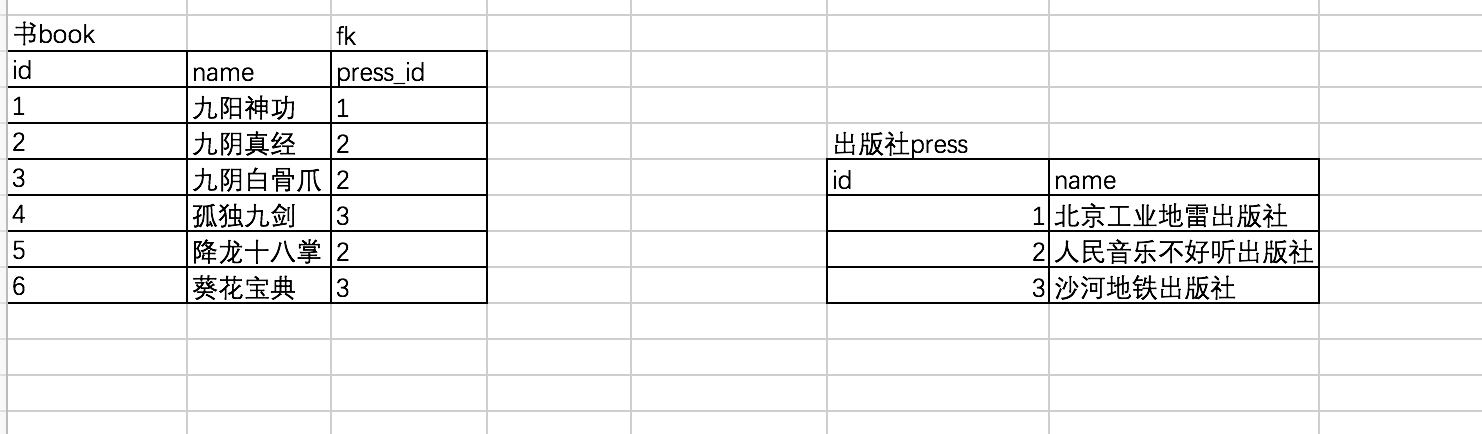


create table press(
    id int primary key auto_increment,
    name varchar(20)
);

create table book(
    id int primary key auto_increment,
    name varchar(20),
    press_id int not null,
         constraint fk_book_press foreign key(press_id) references press(id)
    on delete cascade
    on update cascade
);

# 先往被关联表中插入记录
insert into press(name) values
('北京工业地雷出版社'),
('人民音乐不好听出版社'),
('知识产权没有用出版社')
;

# 再往关联表中插入记录
insert into book(name,press_id) values
('九阳神功',1),
('九阴真经',2),
('九阴白骨爪',2),
('独孤九剑',3),
('降龙十巴掌',2),
('葵花宝典',3)
;

查询结果:
mysql> select * from book;
+----+-----------------+----------+
| id | name            | press_id |
+----+-----------------+----------+
|  1 | 九阳神功        |        1 |
|  2 | 九阴真经        |        2 |
|  3 | 九阴白骨爪      |        2 |
|  4 | 独孤九剑        |        3 |
|  5 | 降龙十巴掌      |        2 |
|  6 | 葵花宝典        |        3 |
+----+-----------------+----------+
6 rows in set (0.00 sec)

mysql> select * from press;
+----+--------------------------------+
| id | name                           |
+----+--------------------------------+
|  1 | 北京工业地雷出版社             |
|  2 | 人民音乐不好听出版社           |
|  3 | 知识产权没有用出版社           |
+----+--------------------------------+
3 rows in set (0.00 sec)
(2)作者和书籍的关系
多对多:一个作者可以写多本书,一本书也可以有多个作者,双向的一对多,即多对多。看图说话。
关联方式:foreign key+一张新的表

# 创建被关联表author表,之前的book表在讲多对一的关系已创建
create table author(
    id int primary key auto_increment,
    name varchar(20)
);
#这张表就存放了author表和book表的关系,即查询二者的关系查这表就可以了
create table author2book(
    id int not null unique auto_increment,
    author_id int not null,
    book_id int not null,
    constraint fk_author foreign key(author_id) references author(id)
    on delete cascade
    on update cascade,
    constraint fk_book foreign key(book_id) references book(id)
    on delete cascade
    on update cascade,
    primary key(author_id,book_id)
);
#插入四个作者,id依次排开
insert into author(name) values('egon'),('alex'),('wusir'),('yuanhao');

# 每个作者的代表作
egon: 九阳神功、九阴真经、九阴白骨爪、独孤九剑、降龙十巴掌、葵花宝典
alex: 九阳神功、葵花宝典
wusir:独孤九剑、降龙十巴掌、葵花宝典
yuanhao:九阳神功

# 在author2book表中插入相应的数据

insert into author2book(author_id,book_id) values
(1,1),
(1,2),
(1,3),
(1,4),
(1,5),
(1,6),
(2,1),
(2,6),
(3,4),
(3,5),
(3,6),
(4,1)
;
# 现在就可以查author2book对应的作者和书的关系了
mysql> select * from author2book;
+----+-----------+---------+
| id | author_id | book_id |
+----+-----------+---------+
|  1 |         1 |       1 |
|  2 |         1 |       2 |
|  3 |         1 |       3 |
|  4 |         1 |       4 |
|  5 |         1 |       5 |
|  6 |         1 |       6 |
|  7 |         2 |       1 |
|  8 |         2 |       6 |
|  9 |         3 |       4 |
| 10 |         3 |       5 |
| 11 |         3 |       6 |
| 12 |         4 |       1 |
+----+-----------+---------+
12 rows in set (0.00 sec)
(3)用户和博客
一对一:一个用户只能注册一个博客,即一对一的关系。看图说话
关联方式:foreign key+unique

#例如: 一个用户只能注册一个博客

#两张表: 用户表 (user)和 博客表(blog)
# 创建用户表
create table user(
    id int primary key auto_increment,
    name varchar(20)
);
# 创建博客表
create table blog(
    id int primary key auto_increment,
    url varchar(100),
    user_id int unique,
    constraint fk_user foreign key(user_id) references user(id)
    on delete cascade
    on update cascade
);
#插入用户表中的记录
insert into user(name) values
('alex'),
('wusir'),
('egon'),
('xiaoma')
;
# 插入博客表的记录
insert into blog(url,user_id) values
('http://www.cnblog/alex',1),
('http://www.cnblog/wusir',2),
('http://www.cnblog/egon',3),
('http://www.cnblog/xiaoma',4)
;
# 查询wusir的博客地址
select url from blog where user_id=2;
11-数据的增删改
本节重点:
- 插入数据 INSERT
- 更新数据 UPDATE
- 删除数据 DELETE
再来回顾一下之前我们练过的一些操作,相信大家都对插入数据、更新数据、删除数据有了全面的认识。那么在mysql中其实最重要的不是这三大操作,而是查数据最重要,下节课知晓
一、
在MySQL管理软件中,可以通过SQL语句中的DML语言来实现数据的操作,包括

1.使用INSERT实现数据的插入
2.UPDATE实现数据的更新
3.使用DELETE实现数据的删除
4.使用SELECT查询数据以及。


二、插入数据 INSERT
1. 插入完整数据(顺序插入)
    语法一:
    INSERT INTO 表名(字段1,字段2,字段3…字段n) VALUES(值1,值2,值3…值n);

    语法二:
    INSERT INTO 表名 VALUES (值1,值2,值3…值n);

2. 指定字段插入数据
    语法:
    INSERT INTO 表名(字段1,字段2,字段3…) VALUES (值1,值2,值3…);

3. 插入多条记录
    语法:
    INSERT INTO 表名 VALUES
        (值1,值2,值3…值n),
        (值1,值2,值3…值n),
        (值1,值2,值3…值n);

 4. 插入查询结果
    语法:
    INSERT INTO 表名(字段1,字段2,字段3…字段n)
                    SELECT (字段1,字段2,字段3…字段n) FROM 表2
                    WHERE …;

三、更新数据UPDATE
语法:
    UPDATE 表名 SET
        字段1=值1,
        字段2=值2,
        WHERE CONDITION;

示例:
    UPDATE mysql.user SET password=password(‘123’)
        where user=’root’ and host=’localhost’;
四、删除数据DELETE
语法:
    DELETE FROM 表名
        WHERE CONITION;

示例:
    DELETE FROM mysql.user
        WHERE password=’’;
12-单表查询
本节重点:
单表查询
语法:
一、单表查询的语法
   SELECT 字段1,字段2... FROM 表名
                  WHERE 条件
                  GROUP BY field
                  HAVING 筛选
                  ORDER BY field
                  LIMIT 限制条数
二、关键字的执行优先级(重点)

重点中的重点:关键字的执行优先级
from
where
group by
having
select
distinct
order by
limit
1.找到表:from
2.拿着where指定的约束条件,去文件/表中取出一条条记录
3.将取出的一条条记录进行分组group by,如果没有group by,则整体作为一组
4.将分组的结果进行having过滤
5.执行select
6.去重
7.将结果按条件排序:order by
8.限制结果的显示条数
创建公司员工表,表的字段和数据类型
company.employee
    员工id          id                          int
    姓名            name                        varchar
    性别            sex                         enum
    年龄            age                         int
    入职日期         hire_date                   date
    岗位            post                        varchar
    职位描述         post_comment             varchar
    薪水            salary                    double
    办公室           office                     int
    部门编号         depart_id                   int
#创建表,设置字段的约束条件
create table employee(
    id int primary key auto_increment,
    name  varchar(20) not null,
    sex enum('male','female') not null default 'male', #大部分是男的
    age int(3) unsigned not null default 28,
    hire_date date not null,
    post varchar(50),
    post_comment varchar(100),
    salary  double(15,2),
    office int,#一个部门一个屋
    depart_id int
);
# 查看表结构
mysql> desc employee;
+--------------+-----------------------+------+-----+---------+----------------+
| Field                | Type                              | Null | Key     | Default | Extra          |
+--------------+-----------------------+------+-----+---------+----------------+
| id                      | int(11)                            | NO   | PRI     | NULL    | auto_increment |
| emp_name             | varchar(20)                   | NO   |             | NULL    |                |
| sex                  | enum('male','female')   | NO   |             | male    |                |
| age                  | int(3) unsigned               | NO   |             | 28         |                |
| hire_date        | date                              | NO   |             | NULL    |                |
| post                 | varchar(50)                   | YES  |         | NULL    |                |
| post_comment     | varchar(100)                  | YES  |         | NULL    |                |
| salart               | double(15,2)                  | YES  |         | NULL    |                |
| office              | int(11)                           | YES  |         | NULL    |                |
| depart_id        | int(11)                           | YES  |         | NULL    |                |
+--------------+-----------------------+------+-----+---------+----------------+
10 rows in set (0.08 sec)

#插入记录
#三个部门:教学,销售,运营
insert into employee(name ,sex,age,hire_date,post,salary,office,depart_id) values
('egon','male',18,'20170301','老男孩驻沙河办事处外交大使',7300.33,401,1), #以下是教学部
('alex','male',78,'20150302','teacher',1000000.31,401,1),
('wupeiqi','male',81,'20130305','teacher',8300,401,1),
('yuanhao','male',73,'20140701','teacher',3500,401,1),
('liwenzhou','male',28,'20121101','teacher',2100,401,1),
('jingliyang','female',18,'20110211','teacher',9000,401,1),
('jinxin','male',18,'19000301','teacher',30000,401,1),
('xiaomage','male',48,'20101111','teacher',10000,401,1),

('歪歪','female',48,'20150311','sale',3000.13,402,2),#以下是销售部门
('丫丫','female',38,'20101101','sale',2000.35,402,2),
('丁丁','female',18,'20110312','sale',1000.37,402,2),
('星星','female',18,'20160513','sale',3000.29,402,2),
('格格','female',28,'20170127','sale',4000.33,402,2),

('张野','male',28,'20160311','operation',10000.13,403,3), #以下是运营部门
('程咬金','male',18,'19970312','operation',20000,403,3),
('程咬银','female',18,'20130311','operation',19000,403,3),
('程咬铜','male',18,'20150411','operation',18000,403,3),
('程咬铁','female',18,'20140512','operation',17000,403,3)
;
(1)where 约束
where子句中可以使用
1.比较运算符:>、<、>=、<=、<>、!=
2.between 80 and 100 :值在80到100之间
3.in(80,90,100)值是10或20或30
4.like 'xiaomagepattern': pattern可以是%或者_。%小时任意多字符,_表示一个字符
5.逻辑运算符:在多个条件直接可以使用逻辑运算符 and or not
验证结果:
#1 :单条件查询
mysql> select id,emp_name from employee where id > 5;
+----+------------+
| id | emp_name   |
+----+------------+
|  6 | jingliyang |
|  7 | jinxin     |
|  8 | xiaomage   |
|  9 | 歪歪       |
| 10 | 丫丫       |
| 11 | 丁丁       |
| 12 | 星星       |
| 13 | 格格       |
| 14 | 张野       |
| 15 | 程咬金     |
| 16 | 程咬银     |
| 17 | 程咬铜     |
| 18 | 程咬铁     |

#2 多条件查询
mysql> select emp_name from employee where post='teacher' and salary>10000;
+----------+
| emp_name |
+----------+
| alex         |
| jinxin     |
+----------+

#3.关键字BETWEEN AND
 SELECT name,salary FROM employee
        WHERE salary BETWEEN 10000 AND 20000;

 SELECT name,salary FROM employee
        WHERE salary NOT BETWEEN 10000 AND 20000;

#注意''是空字符串,不是null
 SELECT name,post_comment FROM employee WHERE post_comment='';
 ps:
        执行
        update employee set post_comment='' where id=2;
        再用上条查看,就会有结果了
#5:关键字IN集合查询
mysql>  SELECT name,salary FROM employee WHERE salary=3000 OR salary=3500 OR salary=4000 OR salary=9000 ;
+------------+---------+
| name       | salary  |
+------------+---------+
| yuanhao    | 3500.00 |
| jingliyang | 9000.00 |
+------------+---------+
2 rows in set (0.00 sec)

mysql>  SELECT name,salary FROM employee  WHERE salary IN (3000,3500,4000,9000) ;
+------------+---------+
| name       | salary  |
+------------+---------+
| yuanhao    | 3500.00 |
| jingliyang | 9000.00 |
+------------+---------+
mysql>  SELECT name,salary FROM employee  WHERE salary NOT IN (3000,3500,4000,9000) ;
+-----------+------------+
| name      | salary     |
+-----------+------------+
| egon      |    7300.33 |
| alex      | 1000000.31 |
| wupeiqi   |    8300.00 |
| liwenzhou |    2100.00 |
| jinxin    |   30000.00 |
| xiaomage  |   10000.00 |
| 歪歪      |    3000.13 |
| 丫丫      |    2000.35 |
| 丁丁      |    1000.37 |
| 星星      |    3000.29 |
| 格格      |    4000.33 |
| 张野      |   10000.13 |
| 程咬金    |   20000.00 |
| 程咬银    |   19000.00 |
| 程咬铜    |   18000.00 |
| 程咬铁    |   17000.00 |
+-----------+------------+
16 rows in set (0.00 sec)

#6:关键字LIKE模糊查询
通配符’%’
mysql> SELECT * FROM employee WHERE name LIKE 'jin%';
+----+------------+--------+-----+------------+---------+--------------+----------+--------+-----------+
| id | name       | sex    | age | hire_date  | post    | post_comment | salary   | office | depart_id |
+----+------------+--------+-----+------------+---------+--------------+----------+--------+-----------+
|  6 | jingliyang | female |  18 | 2011-02-11 | teacher | NULL         |  9000.00 |    401 |         1 |
|  7 | jinxin     | male   |  18 | 1900-03-01 | teacher | NULL         | 30000.00 |    401 |         1 |
+----+------------+--------+-----+------------+---------+--------------+----------+--------+-----------+
2 rows in set (0.00 sec)


通配符'_'

mysql> SELECT  age FROM employee WHERE name LIKE 'ale_';
+-----+
| age |
+-----+
|  78 |
+-----+
1 row in set (0.00 sec)

练习:
1. 查看岗位是teacher的员工姓名、年龄
2. 查看岗位是teacher且年龄大于30岁的员工姓名、年龄
3. 查看岗位是teacher且薪资在9000-1000范围内的员工姓名、年龄、薪资
4. 查看岗位描述不为NULL的员工信息
5. 查看岗位是teacher且薪资是10000或9000或30000的员工姓名、年龄、薪资
6. 查看岗位是teacher且薪资不是10000或9000或30000的员工姓名、年龄、薪资
7. 查看岗位是teacher且名字是jin开头的员工姓名、年薪

#对应的sql语句
select name,age from employee where post = 'teacher';
select name,age from employee where post='teacher' and age > 30;
select name,age,salary from employee where post='teacher' and salary between 9000 and 10000;
select * from employee where post_comment is not null;
select name,age,salary from employee where post='teacher' and salary in (10000,9000,30000);
select name,age,salary from employee where post='teacher' and salary not in (10000,9000,30000);
select name,salary*12 from employee where post='teacher' and name like 'jin%';
(2)group by 分组查询
#1、首先明确一点:分组发生在where之后,即分组是基于where之后得到的记录而进行的

#2、分组指的是:将所有记录按照某个相同字段进行归类,比如针对员工信息表的职位分组,或者按照性别进行分组等

#3、为何要分组呢?
    取每个部门的最高工资
    取每个部门的员工数
    取男人数和女人数

小窍门:‘每’这个字后面的字段,就是我们分组的依据

#4、大前提:
    可以按照任意字段分组,但是分组完毕后,比如group by post,只能查看post字段,如果想查看组内信息,需要借助于聚合函数
当执行以下sql语句的时候,是以post字段查询了组中的第一条数据,没有任何意义,因为我们现在想查出当前组的多条记录。
mysql> select * from employee group by post;
+----+--------+--------+-----+------------+-----------------------------------------+--------------+------------+--------+-----------+
| id | name   | sex    | age | hire_date  | post                                    | post_comment | salary     | office | depart_id |
+----+--------+--------+-----+------------+-----------------------------------------+--------------+------------+--------+-----------+
| 14 | 张野   | male   |  28 | 2016-03-11 | operation                               | NULL         |   10000.13 |    403 |         3 |
|  9 | 歪歪   | female |  48 | 2015-03-11 | sale                                    | NULL         |    3000.13 |    402 |         2 |
|  2 | alex   | male   |  78 | 2015-03-02 | teacher                                 |              | 1000000.31 |    401 |         1 |
|  1 | egon   | male   |  18 | 2017-03-01 | 老男孩驻沙河办事处外交大使              | NULL         |    7300.33 |    401 |         1 |
+----+--------+--------+-----+------------+-----------------------------------------+--------------+------------+--------+-----------+
4 rows in set (0.00 sec)

#由于没有设置ONLY_FULL_GROUP_BY,于是也可以有结果,默认都是组内的第一条记录,但其实这是没有意义的
如果想分组,则必须要设置全局的sql的模式为ONLY_FULL_GROUP_BY
mysql> set global sql_mode='ONLY_FULL_GROUP_BY';
Query OK, 0 rows affected (0.00 sec)

#查看MySQL 5.7默认的sql_mode如下:
mysql> select @@global.sql_mode;
+--------------------+
| @@global.sql_mode  |
+--------------------+
| ONLY_FULL_GROUP_BY |
+--------------------+
1 row in set (0.00 sec)

mysql> exit;#设置成功后,一定要退出,然后重新登录方可生效
Bye
继续验证通过group by分组之后,只能查看当前字段,如果想查看组内信息,需要借助于聚合函数
mysql> select * from emp group by post;# 报错
ERROR 1054 (42S22): Unknown column 'post' in 'group statement'


mysql>  select post from employee group by post;
+-----------------------------------------+
| post                                    |
+-----------------------------------------+
| operation                               |
| sale                                    |
| teacher                                 |
| 老男孩驻沙河办事处外交大使              |
+-----------------------------------------+
4 rows in set (0.00 sec)
(3)聚合函数
max()求最大值
min()求最小值
avg()求平均值
sum() 求和
count() 求总个数

#强调:聚合函数聚合的是组的内容,若是没有分组,则默认一组
# 每个部门有多少个员工
select post,count(id) from employee group by post;
# 每个部门的最高薪水
select post,max(salary) from employee group by post;
# 每个部门的最低薪水
select post,min(salary) from employee group by post;
# 每个部门的平均薪水
select post,avg(salary) from employee group by post;
# 每个部门的所有薪水
select post,sum(age) from employee group by post;
1. 查询岗位名以及岗位包含的所有员工名字
2. 查询岗位名以及各岗位内包含的员工个数
3. 查询公司内男员工和女员工的个数
4. 查询岗位名以及各岗位的平均薪资
5. 查询岗位名以及各岗位的最高薪资
6. 查询岗位名以及各岗位的最低薪资
7. 查询男员工与男员工的平均薪资,女员工与女员工的平均薪资
(4)HAVING过滤
HAVING与WHERE不一样的地方在于

#!!!执行优先级从高到低:where > group by > having
#1. Where 发生在分组group by之前,因而Where中可以有任意字段,但是绝对不能使用聚合函数。

#2. Having发生在分组group by之后,因而Having中可以使用分组的字段,无法直接取到其他字段,可以使用聚合函数
验证:
验证:
mysql> select * from employee where salary>1000000;
+----+------+------+-----+------------+---------+--------------+------------+--------+-----------+
| id | name | sex  | age | hire_date  | post    | post_comment | salary     | office | depart_id |
+----+------+------+-----+------------+---------+--------------+------------+--------+-----------+
|  2 | alex | male |  78 | 2015-03-02 | teacher |              | 1000000.31 |    401 |         1 |
+----+------+------+-----+------------+---------+--------------+------------+--------+-----------+
1 row in set (0.00 sec)

mysql> select * from employee having salary>1000000;
ERROR 1463 (42000): Non-grouping field 'salary' is used in HAVING clause

# 必须使用group by才能使用group_concat()函数,将所有的name值连接
mysql> select post,group_concat(name) from emp group by post having salary > 10000; ##错误,分组后无法直接取到salary字段
ERROR 1054 (42S22): Unknown column 'post' in 'field list'
小练习:
1. 查询各岗位内包含的员工个数小于2的岗位名、岗位内包含员工名字、个数
2. 查询各岗位平均薪资大于10000的岗位名、平均工资
3. 查询各岗位平均薪资大于10000且小于20000的岗位名、平均工资
小练习答案:
# 题1:
mysql> select post,group_concat(name),count(id) from employee group by post;
+-----------------------------------------+-----------------------------------------------------------+-----------+
| post                                    | group_concat(name)                                        | count(id) |
+-----------------------------------------+-----------------------------------------------------------+-----------+
| operation                               | 程咬铁,程咬铜,程咬银,程咬金,张野                          |         5 |
| sale                                    | 格格,星星,丁丁,丫丫,歪歪                                  |         5 |
| teacher                                 | xiaomage,jinxin,jingliyang,liwenzhou,yuanhao,wupeiqi,alex |         7 |
| 老男孩驻沙河办事处外交大使              | egon                                                      |         1 |
+-----------------------------------------+-----------------------------------------------------------+-----------+
4 rows in set (0.00 sec)

mysql> select post,group_concat(name),count(id) from employee group by post having count(id)<2;
+-----------------------------------------+--------------------+-----------+
| post                                    | group_concat(name) | count(id) |
+-----------------------------------------+--------------------+-----------+
| 老男孩驻沙河办事处外交大使              | egon               |         1 |
+-----------------------------------------+--------------------+-----------+
1 row in set (0.00 sec)


#题2:
mysql> select post,avg(salary) from employee group by post having avg(salary) > 10000;
+-----------+---------------+
| post      | avg(salary)   |
+-----------+---------------+
| operation |  16800.026000 |
| teacher   | 151842.901429 |
+-----------+---------------+
2 rows in set (0.00 sec)

#题3:
mysql> select post,avg(salary) from employee group by post having avg(salary) > 10000 and avg(salary) <20000;
+-----------+--------------+
| post      | avg(salary)  |
+-----------+--------------+
| operation | 16800.026000 |
+-----------+--------------+
1 row in set (0.00 sec)
(5)order by 查询排序
按单列排序
    SELECT * FROM employee ORDER BY age;
    SELECT * FROM employee ORDER BY age ASC;
    SELECT * FROM employee ORDER BY age DESC;
按多列排序:先按照age升序排序,如果年纪相同,则按照id降序
    SELECT * from employee
        ORDER BY age ASC,
        id DESC;
验证多列排序:
SELECT * from employee ORDER BY age ASC,id DESC;
mysql> SELECT * from employee ORDER BY age ASC,id DESC;
+----+------------+--------+-----+------------+-----------------------------------------+--------------+------------+--------+-----------+
| id | name       | sex    | age | hire_date  | post                                    | post_comment | salary     | office | depart_id |
+----+------------+--------+-----+------------+-----------------------------------------+--------------+------------+--------+-----------+
| 18 | 程咬铁     | female |  18 | 2014-05-12 | operation                               | NULL         |   17000.00 |    403 |         3 |
| 17 | 程咬铜     | male   |  18 | 2015-04-11 | operation                               | NULL         |   18000.00 |    403 |         3 |
| 16 | 程咬银     | female |  18 | 2013-03-11 | operation                               | NULL         |   19000.00 |    403 |         3 |
| 15 | 程咬金     | male   |  18 | 1997-03-12 | operation                               | NULL         |   20000.00 |    403 |         3 |
| 12 | 星星       | female |  18 | 2016-05-13 | sale                                    | NULL         |    3000.29 |    402 |         2 |
| 11 | 丁丁       | female |  18 | 2011-03-12 | sale                                    | NULL         |    1000.37 |    402 |         2 |
|  7 | jinxin     | male   |  18 | 1900-03-01 | teacher                                 | NULL         |   30000.00 |    401 |         1 |
|  6 | jingliyang | female |  18 | 2011-02-11 | teacher                                 | NULL         |    9000.00 |    401 |         1 |
|  1 | egon       | male   |  18 | 2017-03-01 | 老男孩驻沙河办事处外交大使              | NULL         |    7300.33 |    401 |         1 |
| 14 | 张野       | male   |  28 | 2016-03-11 | operation                               | NULL         |   10000.13 |    403 |         3 |
| 13 | 格格       | female |  28 | 2017-01-27 | sale                                    | NULL         |    4000.33 |    402 |         2 |
|  5 | liwenzhou  | male   |  28 | 2012-11-01 | teacher                                 | NULL         |    2100.00 |    401 |         1 |
| 10 | 丫丫       | female |  38 | 2010-11-01 | sale                                    | NULL         |    2000.35 |    402 |         2 |
|  9 | 歪歪       | female |  48 | 2015-03-11 | sale                                    | NULL         |    3000.13 |    402 |         2 |
|  8 | xiaomage   | male   |  48 | 2010-11-11 | teacher                                 | NULL         |   10000.00 |    401 |         1 |
|  4 | yuanhao    | male   |  73 | 2014-07-01 | teacher                                 | NULL         |    3500.00 |    401 |         1 |
|  2 | alex       | male   |  78 | 2015-03-02 | teacher                                 |              | 1000000.31 |    401 |         1 |
|  3 | wupeiqi    | male   |  81 | 2013-03-05 | teacher                                 | NULL         |    8300.00 |    401 |         1 |
+----+------------+--------+-----+------------+-----------------------------------------+--------------+------------+--------+-----------+
18 rows in set (0.01 sec)

mysql>
小练习:
1. 查询所有员工信息,先按照age升序排序,如果age相同则按照hire_date降序排序
2. 查询各岗位平均薪资大于10000的岗位名、平均工资,结果按平均薪资升序排列
3. 查询各岗位平均薪资大于10000的岗位名、平均工资,结果按平均薪资降序排列
# 题目1
select * from employee ORDER BY age asc,hire_date desc;

# 题目2
mysql> select post,avg(salary) from employee group by post having avg(salary) > 10000 order by avg(salary) asc;
+-----------+---------------+
| post      | avg(salary)   |
+-----------+---------------+
| operation |  16800.026000 |
| teacher   | 151842.901429 |
+-----------+---------------+
2 rows in set (0.00 sec)

# 题目3
mysql> select post,avg(salary) from employee group by post having avg(salary) > 10000 order by avg(salary) desc;
+-----------+---------------+
| post      | avg(salary)   |
+-----------+---------------+
| teacher   | 151842.901429 |
| operation |  16800.026000 |
+-----------+---------------+
2 rows in set (0.00 sec)

mysql>
(5)limit 限制查询的记录数:
示例:
    SELECT * FROM employee ORDER BY salary DESC
     LIMIT 3;                    #默认初始位置为0

    SELECT * FROM employee ORDER BY salary DESC
        LIMIT 0,5; #从第0开始,即先查询出第一条,然后包含这一条在内往后查5条

    SELECT * FROM employee ORDER BY salary DESC
        LIMIT 5,5; #从第5开始,即先查询出第6条,然后包含这一条在内往后查5条
小练习:
分页显示,每页5条
# 第1页数据
  mysql> select * from  employee limit 0,5;
+----+-----------+------+-----+------------+-----------------------------------------+--------------+------------+--------+-----------+
| id | name      | sex  | age | hire_date  | post                                    | post_comment | salary     | office | depart_id |
+----+-----------+------+-----+------------+-----------------------------------------+--------------+------------+--------+-----------+
|  1 | egon      | male |  18 | 2017-03-01 | 老男孩驻沙河办事处外交大使              | NULL         |    7300.33 |    401 |         1 |
|  2 | alex      | male |  78 | 2015-03-02 | teacher                                 |              | 1000000.31 |    401 |         1 |
|  3 | wupeiqi   | male |  81 | 2013-03-05 | teacher                                 | NULL         |    8300.00 |    401 |         1 |
|  4 | yuanhao   | male |  73 | 2014-07-01 | teacher                                 | NULL         |    3500.00 |    401 |         1 |
|  5 | liwenzhou | male |  28 | 2012-11-01 | teacher                                 | NULL         |    2100.00 |    401 |         1 |
+----+-----------+------+-----+------------+-----------------------------------------+--------------+------------+--------+-----------+
5 rows in set (0.00 sec)
# 第2页数据
mysql> select * from  employee limit 5,5;
+----+------------+--------+-----+------------+---------+--------------+----------+--------+-----------+
| id | name       | sex    | age | hire_date  | post    | post_comment | salary   | office | depart_id |
+----+------------+--------+-----+------------+---------+--------------+----------+--------+-----------+
|  6 | jingliyang | female |  18 | 2011-02-11 | teacher | NULL         |  9000.00 |    401 |         1 |
|  7 | jinxin     | male   |  18 | 1900-03-01 | teacher | NULL         | 30000.00 |    401 |         1 |
|  8 | xiaomage   | male   |  48 | 2010-11-11 | teacher | NULL         | 10000.00 |    401 |         1 |
|  9 | 歪歪       | female |  48 | 2015-03-11 | sale    | NULL         |  3000.13 |    402 |         2 |
| 10 | 丫丫       | female |  38 | 2010-11-01 | sale    | NULL         |  2000.35 |    402 |         2 |
+----+------------+--------+-----+------------+---------+--------------+----------+--------+-----------+
5 rows in set (0.00 sec)
# 第3页数据
mysql> select * from  employee limit 10,5;
+----+-----------+--------+-----+------------+-----------+--------------+----------+--------+-----------+
| id | name      | sex    | age | hire_date  | post      | post_comment | salary   | office | depart_id |
+----+-----------+--------+-----+------------+-----------+--------------+----------+--------+-----------+
| 11 | 丁丁      | female |  18 | 2011-03-12 | sale      | NULL         |  1000.37 |    402 |         2 |
| 12 | 星星      | female |  18 | 2016-05-13 | sale      | NULL         |  3000.29 |    402 |         2 |
| 13 | 格格      | female |  28 | 2017-01-27 | sale      | NULL         |  4000.33 |    402 |         2 |
| 14 | 张野      | male   |  28 | 2016-03-11 | operation | NULL         | 10000.13 |    403 |         3 |
| 15 | 程咬金    | male   |  18 | 1997-03-12 | operation | NULL         | 20000.00 |    403 |         3 |
+----+-----------+--------+-----+------------+-----------+--------------+----------+--------+-----------+
5 rows in set (0.00 sec)
13-多表查询
本节重点:
- 多表连接查询
- 符合条件连接查询
- 子查询
准备工作:准备两张表,部门表(department)、员工表(employee)
create table department(
id int,
name varchar(20)
);

create table employee(
id int primary key auto_increment,
name varchar(20),
sex enum('male','female') not null default 'male',
age int,
dep_id int
);

#插入数据
insert into department values
(200,'技术'),
(201,'人力资源'),
(202,'销售'),
(203,'运营');

insert into employee(name,sex,age,dep_id) values
('egon','male',18,200),
('alex','female',48,201),
('wupeiqi','male',38,201),
('yuanhao','female',28,202),
('nvshen','male',18,200),
('xiaomage','female',18,204)
;

# 查看表结构和数据
mysql> desc department;
+-------+-------------+------+-----+---------+-------+
| Field | Type        | Null | Key | Default | Extra |
+-------+-------------+------+-----+---------+-------+
| id    | int(11)     | YES  |     | NULL    |       |
| name  | varchar(20) | YES  |     | NULL    |       |
+-------+-------------+------+-----+---------+-------+
2 rows in set (0.19 sec)

mysql> desc employee;
+--------+-----------------------+------+-----+---------+----------------+
| Field  | Type                  | Null | Key | Default | Extra          |
+--------+-----------------------+------+-----+---------+----------------+
| id     | int(11)               | NO   | PRI | NULL    | auto_increment |
| name   | varchar(20)           | YES  |     | NULL    |                |
| sex    | enum('male','female') | NO   |     | male    |                |
| age    | int(11)               | YES  |     | NULL    |                |
| dep_id | int(11)               | YES  |     | NULL    |                |
+--------+-----------------------+------+-----+---------+----------------+
5 rows in set (0.01 sec)

mysql> select * from department;
+------+--------------+
| id   | name         |
+------+--------------+
|  200 | 技术         |
|  201 | 人力资源     |
|  202 | 销售         |
|  203 | 运营         |
+------+--------------+
4 rows in set (0.02 sec)

mysql> select * from employee;
+----+----------+--------+------+--------+
| id | name     | sex    | age  | dep_id |
+----+----------+--------+------+--------+
|  1 | egon     | male   |   18 |    200 |
|  2 | alex     | female |   48 |    201 |
|  3 | wupeiqi  | male   |   38 |    201 |
|  4 | yuanhao  | female |   28 |    202 |
|  5 | nvshen   | male   |   18 |    200 |
|  6 | xiaomage | female |   18 |    204 |
+----+----------+--------+------+--------+
6 rows in set (0.00 sec)
ps:观察两张表,发现department表中id=203部门在employee中没有对应的员工,发现employee中id=6的员工在department表中没有对应关系。
一、多表连接查询
两张表的准备工作已完成,比如现在我要查询的员工信息以及该员工所在的部门。从该题中,我们看出既要查员工又要查该员工的部门,肯定要将两张表进行连接查询,多表连接查询。
重点:外链接语法
语法:
SELECT 字段列表
    FROM 表1 INNER|LEFT|RIGHT JOIN 表2
    ON 表1.字段 = 表2.字段;
(1)先看第一种情况交叉连接:不适用任何匹配条件。生成笛卡尔积(关于笛卡尔积的含义,大家百度自行补脑)。
mysql> select * from employee,department;
+----+----------+--------+------+--------+------+--------------+
| id | name     | sex    | age  | dep_id | id   | name         |
+----+----------+--------+------+--------+------+--------------+
|  1 | egon     | male   |   18 |    200 |  200 | 技术         |
|  1 | egon     | male   |   18 |    200 |  201 | 人力资源     |
|  1 | egon     | male   |   18 |    200 |  202 | 销售         |
|  1 | egon     | male   |   18 |    200 |  203 | 运营         |
|  2 | alex     | female |   48 |    201 |  200 | 技术         |
|  2 | alex     | female |   48 |    201 |  201 | 人力资源     |
|  2 | alex     | female |   48 |    201 |  202 | 销售         |
|  2 | alex     | female |   48 |    201 |  203 | 运营         |
|  3 | wupeiqi  | male   |   38 |    201 |  200 | 技术         |
|  3 | wupeiqi  | male   |   38 |    201 |  201 | 人力资源     |
|  3 | wupeiqi  | male   |   38 |    201 |  202 | 销售         |
|  3 | wupeiqi  | male   |   38 |    201 |  203 | 运营         |
|  4 | yuanhao  | female |   28 |    202 |  200 | 技术         |
|  4 | yuanhao  | female |   28 |    202 |  201 | 人力资源     |
|  4 | yuanhao  | female |   28 |    202 |  202 | 销售         |
|  4 | yuanhao  | female |   28 |    202 |  203 | 运营         |
|  5 | nvshen   | male   |   18 |    200 |  200 | 技术         |
|  5 | nvshen   | male   |   18 |    200 |  201 | 人力资源     |
|  5 | nvshen   | male   |   18 |    200 |  202 | 销售         |
|  5 | nvshen   | male   |   18 |    200 |  203 | 运营         |
|  6 | xiaomage | female |   18 |    204 |  200 | 技术         |
|  6 | xiaomage | female |   18 |    204 |  201 | 人力资源     |
|  6 | xiaomage | female |   18 |    204 |  202 | 销售         |
|  6 | xiaomage | female |   18 |    204 |  203 | 运营         |
(2)内连接:只连接匹配的行
#找两张表共有的部分,相当于利用条件从笛卡尔积结果中筛选出了匹配的结果
#department没有204这个部门,因而employee表中关于204这条员工信息没有匹配出来
mysql> select employee.id,employee.name,employee.age,employee.sex,department.name from employee inner join department on employee.dep_id=department.id;
+----+---------+------+--------+--------------+
| id | name    | age  | sex    | name         |
+----+---------+------+--------+--------------+
|  1 | egon    |   18 | male   | 技术         |
|  2 | alex    |   48 | female | 人力资源     |
|  3 | wupeiqi |   38 | male   | 人力资源     |
|  4 | yuanhao |   28 | female | 销售         |
|  5 | nvshen  |   18 | male   | 技术         |
+----+---------+------+--------+--------------+
5 rows in set (0.00 sec)

#上述sql等同于
mysql> select employee.id,employee.name,employee.age,employee.sex,department.name from employee,department where employee.dep_id=department.id;
(3)外链接之左连接:优先显示左表全部记录
#以左表为准,即找出所有员工信息,当然包括没有部门的员工
#本质就是:在内连接的基础上增加左边有,右边没有的结果
mysql> select employee.id,employee.name,department.name as depart_name from employee left join department on employee.dep_id=department.id;
+----+----------+--------------+
| id | name     | depart_name  |
+----+----------+--------------+
|  1 | egon     | 技术         |
|  5 | nvshen   | 技术         |
|  2 | alex     | 人力资源     |
|  3 | wupeiqi  | 人力资源     |
|  4 | yuanhao  | 销售         |
|  6 | xiaomage | NULL         |
+----+----------+--------------+
6 rows in set (0.00 sec)
(4) 外链接之右连接:优先显示右表全部记录
#以右表为准,即找出所有部门信息,包括没有员工的部门
#本质就是:在内连接的基础上增加右边有,左边没有的结果
mysql> select employee.id,employee.name,department.name as depart_name from employee right join department on employee.dep_id=department.id;
+------+---------+--------------+
| id   | name    | depart_name  |
+------+---------+--------------+
|    1 | egon    | 技术         |
|    2 | alex    | 人力资源     |
|    3 | wupeiqi | 人力资源     |
|    4 | yuanhao | 销售         |
|    5 | nvshen  | 技术         |
| NULL | NULL    | 运营         |
+------+---------+--------------+
6 rows in set (0.00 sec)
(5) 全外连接:显示左右两个表全部记录(了解)
#外连接:在内连接的基础上增加左边有右边没有的和右边有左边没有的结果
#注意:mysql不支持全外连接 full JOIN
#强调:mysql可以使用此种方式间接实现全外连接
语法:select * from employee left join department on employee.dep_id = department.id
       union all
      select * from employee right join department on employee.dep_id = department.id;

 mysql> select * from employee left join department on employee.dep_id = department.id
          union
        select * from employee right join department on employee.dep_id = department.id
           ;
+------+----------+--------+------+--------+------+--------------+
| id   | name     | sex    | age  | dep_id | id   | name         |
+------+----------+--------+------+--------+------+--------------+
|    1 | egon     | male   |   18 |    200 |  200 | 技术         |
|    5 | nvshen   | male   |   18 |    200 |  200 | 技术         |
|    2 | alex     | female |   48 |    201 |  201 | 人力资源     |
|    3 | wupeiqi  | male   |   38 |    201 |  201 | 人力资源     |
|    4 | yuanhao  | female |   28 |    202 |  202 | 销售         |
|    6 | xiaomage | female |   18 |    204 | NULL | NULL         |
| NULL | NULL     | NULL   | NULL |   NULL |  203 | 运营         |
+------+----------+--------+------+--------+------+--------------+
7 rows in set (0.01 sec)

#注意 union与union all的区别:union会去掉相同的纪录
二、符合条件连接查询
示例1:以内连接的方式查询employee和department表,并且employee表中的age字段值必须大于25,即找出年龄大于25岁的员工以及员工所在的部门
select employee.name,department.name from employee inner join department
  on employee.dep_id = department.id
  where age > 25;
示例2:以内连接的方式查询employee和department表,并且以age字段的升序方式显示。
select employee.id,employee.name,employee.age,department.name from employee,department
    where employee.dep_id = department.id
    and age > 25
    order by age asc;
三、子查询
#1:子查询是将一个查询语句嵌套在另一个查询语句中。
#2:内层查询语句的查询结果,可以为外层查询语句提供查询条件。
#3:子查询中可以包含:IN、NOT IN、ANY、ALL、EXISTS 和 NOT EXISTS等关键字
#4:还可以包含比较运算符:= 、 !=、> 、<等
例子:
(1)带in关键字的子查询
#查询平均年龄在25岁以上的部门名
select id,name from department
    where id in
        (select dep_id from employee group by dep_id having avg(age) > 25);
# 查看技术部员工姓名
select name from employee
    where dep_id in
        (select id from department where name='技术');
#查看不足1人的部门名
select name from department
    where id not in
        (select dep_id from employee group by dep_id);
(2)带比较运算符的子查询
#比较运算符:=、!=、>、>=、<、<=、<>
#查询大于所有人平均年龄的员工名与年龄
mysql> select name,age from employee where age > (select avg(age) from employee);
+---------+------+
| name    | age  |
+---------+------+
| alex    |   48 |
| wupeiqi |   38 |
+---------+------+

#查询大于部门内平均年龄的员工名、年龄
思路:
      (1)先对员工表(employee)中的人员分组(group by),查询出dep_id以及平均年龄。
       (2)将查出的结果作为临时表,再对根据临时表的dep_id和employee的dep_id作为筛选条件将employee表和临时表进行内连接。
       (3)最后再将employee员工的年龄是大于平均年龄的员工名字和年龄筛选。


mysql> select t1.name,t1.age from employee as t1
             inner join
            (select dep_id,avg(age) as avg_age from employee group by dep_id) as t2
            on t1.dep_id = t2.dep_id
            where t1.age > t2.avg_age;
+------+------+
| name | age  |
+------+------+
| alex |   48 |
(3)带EXISTS关键字的子查询
#EXISTS关字键字表示存在。在使用EXISTS关键字时,内层查询语句不返回查询的记录。而是返回一个真假值。True或False
#当返回True时,外层查询语句将进行查询;当返回值为False时,外层查询语句不进行查询
#department表中存在dept_id=203,Ture
mysql> select * from employee  where exists (select id from department where id=200);
+----+----------+--------+------+--------+
| id | name     | sex    | age  | dep_id |
+----+----------+--------+------+--------+
|  1 | egon     | male   |   18 |    200 |
|  2 | alex     | female |   48 |    201 |
|  3 | wupeiqi  | male   |   38 |    201 |
|  4 | yuanhao  | female |   28 |    202 |
|  5 | nvshen   | male   |   18 |    200 |
|  6 | xiaomage | female |   18 |    204 |
+----+----------+--------+------+--------+
#department表中存在dept_id=205,False
mysql> select * from employee  where exists (select id from department where id=204);
Empty set (0.00 sec)
小练习:
查询每个部门最新入职的那位员工
#创建表
create table employee(
id int not null unique auto_increment,
name varchar(20) not null,
sex enum('male','female') not null default 'male', #大部分是男的
age int(3) unsigned not null default 28,
hire_date date not null,
post varchar(50),
post_comment varchar(100),
salary double(15,2),
office int, #一个部门一个屋子
depart_id int
);


#查看表结构
mysql> desc employee;
+--------------+-----------------------+------+-----+---------+----------------+
| Field        | Type                  | Null | Key | Default | Extra          |
+--------------+-----------------------+------+-----+---------+----------------+
| id           | int(11)               | NO   | PRI | NULL    | auto_increment |
| name         | varchar(20)           | NO   |     | NULL    |                |
| sex          | enum('male','female') | NO   |     | male    |                |
| age          | int(3) unsigned       | NO   |     | 28      |                |
| hire_date    | date                  | NO   |     | NULL    |                |
| post         | varchar(50)           | YES  |     | NULL    |                |
| post_comment | varchar(100)          | YES  |     | NULL    |                |
| salary       | double(15,2)          | YES  |     | NULL    |                |
| office       | int(11)               | YES  |     | NULL    |                |
| depart_id    | int(11)               | YES  |     | NULL    |                |
+--------------+-----------------------+------+-----+---------+----------------+

#插入记录
#三个部门:教学,销售,运营
insert into employee(name,sex,age,hire_date,post,salary,office,depart_id) values
('egon','male',18,'20170301','老男孩驻沙河办事处外交大使',7300.33,401,1), #以下是教学部
('alex','male',78,'20150302','teacher',1000000.31,401,1),
('wupeiqi','male',81,'20130305','teacher',8300,401,1),
('yuanhao','male',73,'20140701','teacher',3500,401,1),
('liwenzhou','male',28,'20121101','teacher',2100,401,1),
('jingliyang','female',18,'20110211','teacher',9000,401,1),
('jinxin','male',18,'19000301','teacher',30000,401,1),
('成龙','male',48,'20101111','teacher',10000,401,1),

('歪歪','female',48,'20150311','sale',3000.13,402,2),#以下是销售部门
('丫丫','female',38,'20101101','sale',2000.35,402,2),
('丁丁','female',18,'20110312','sale',1000.37,402,2),
('星星','female',18,'20160513','sale',3000.29,402,2),
('格格','female',28,'20170127','sale',4000.33,402,2),

('张野','male',28,'20160311','operation',10000.13,403,3), #以下是运营部门
('程咬金','male',18,'19970312','operation',20000,403,3),
('程咬银','female',18,'20130311','operation',19000,403,3),
('程咬铜','male',18,'20150411','operation',18000,403,3),
('程咬铁','female',18,'20140512','operation',17000,403,3)
;
select * from employee as t1
inner join
(select post,max(hire_date) as new_date from employee group by post) as t2
on t1.post=t2.post
where t1.hire_date=t2.new_date;

 浙公网安备 33010602011771号