
SpringBoot集成Jersey
SpringBoot集成Jersey
添加依赖
添加配置
①新建JerseyConfig.java
@Component
@ApplicationPath("/jersey")
public class JerseyConfig extends ResourceConfig{
public JerseyConfig(){
//packages("com.example.study");
register(UserResource.class);
}
}
建议用register添加资源
注意ApplicationPath,如果不添加无法访问,因为默认为/*,由于本项目无web.xml,所以在这里配置(配置文件里也可以)
②输出的json数据格式化(方便使用,不添加也可访问)
在application.yml中Spring块下添加
jackson:
default-property-inclusion: non_null
serialization:
indent-output: true
date-format: yyyy-MM-dd HH:mm:ss
parser:
allow-missing-values: true
测试使用
新建UserResource.java
@Component
@Path("/users")
public class UserResource {
@Autowired
private UserMappers userMapper;
@GET
@Produces(MediaType.APPLICATION_JSON)
public User get(){
List
return users.get(0);
}
}
记得在JerseyConfig中注册
访问
http://localhost:8088/jersey/users

其它
注意:此时原来搭建的SpringMVC也可以访问

SpringMVC 与jersey就一起工作了,附上项目目录供大家参考项目异同。
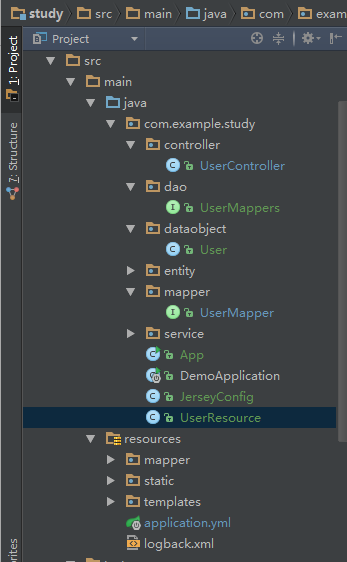
这是我使用了jersey的项目,其余配置还有:
mybatis,mybatis generator
slf4+logback
thymeleaf模板引擎
alibaba的druid数据库连接池
https://github.com/Lifan1998/study
供初学者参考。

 浙公网安备 33010602011771号