
到目前为止在本书中我们已经看到了用一些不同的方式启动支持TinkerPOP的图存储。起初, 我们聚焦于在本地内存中保存数据运行廷克图或者杰森图。我们也看了如何配置 Cassandra 和杰森图,这样您就可以从小精灵控制台连接它。您会回忆起来, Cassandra 可以运行在本地或远端,但是要成功的连接到它,需要知道后端配置的一些细节。这包括知道IP地址,端口号和使用的协议。
So far in this book we have looked at a few different ways to setup a TinkerPop enabled graph
store. Initially we focussed on running a TinkerGraph or a JanusGraph graph locally with the data
kept in memory. We also looked at how to configure Cassandra with JanusGraph so that you could
connect to it from the Gremlin Console. As you will recall, Cassandra could be running locally or
remotely but either way successfully making the connection to it required knowing the specific
details of the back end configuration. This included knowing the IP addresses, ports and protocols
being used.
在一些情况下,图用户有这一级的权限,可以访问后端,这样是可以接受的。还有一些情况,需要隐藏绝大多数的实现细节,安全的访问。这时候就需要小精灵服务器了。小精灵服务器如它的名称所暗示的。它提供了一种设置访问图的方式,可以通过前端服务器来实现。在这种方式中,图的用户只需知tuhp小精灵服务器的IP地址或名称就可以与图进行通信了。您可以在您的本地机器上启动小精灵服务器,这主要用于测试,但是您也可以在远程的服务器上启动一个图并允许用户访问它。小精灵服务器支持多种不同的连接协议和方法。您可以从小精灵控制台连接它,也可以在命令行使用curl命令或者从您的应用程序连接它。小精灵服务器的第二个优点就是它隐藏了图的实现细节。它允许人们使用还没有绑定阿帕奇Tinkerpop语言的编程语言通过简单的HTTP协议来进行图的处理。
While this may be acceptable in scenarios where it is OK for the user of the graph to have this level
of insight and access into the back end。 there are many scenarios where it is desirable to keep most
of the implementation detail hidden and access secured. This is where Gremlin Server comes in.
Gremlin Server, as its name suggests, offers a way of setting up access to a graph that goes via a
front end web server. In this way the user of the graph only has to know the name or IP address of
the Gremlin Server in order to communicate with a graph. You can set Gremlin Server up on your
local machine, which is useful for testing but you can also use it to setup a graph on a remote server
and allow users to access it. Gremlin Server supports a number of different connection protocols
and methods. You can connect to it from a Gremlin console, from a command line using curl
commands or from an application. Gremlin Server has a second advantage over allowing us to hide
the graph implementation details. It allows people using programming languages that do not yet
have Apache TinkerPop language bindings to work with a graph using simple HTTP protocols.
阿帕奇TinkerPop文档包含了详细的配置和使用小精灵服务器的内容。http://tinkerpop.apache.org/docs/current/reference/#gremlin-server
The official Apache TinkerPop documentation includes in depth coverage of
configuring and using Gremlin Server. http://tinkerpop.apache.org/docs/current/
reference/#gremlin-server
小精灵服务器提供了大量有用的功能。在本节中,笔者将解释如何利用我们前边构建的以Cassandra 为后端的杰森图,把它通过小精灵服务器暴露出去。有多种其它的有用的方式可以配置、布署和使用小精灵服务器。如果您计划进一步地研究小精灵服务器,笔者非常鼓励您阅读官方文档。
Gremlin Server offers a lot of valuable capabilities. In this section I am going to explain how to take
the JanusGraph backed by Cassandra that we built earlier and expose it via Gremlin Server. There
are many other useful ways that Gremlin Server can be configured, deployed and used. If you plan
to experiment further with Gremlin Server I very much encourage you to read the official
documentation.
在本书第一次发布的时候,大量“真实”的用例是关注在了直接附着或者在内存图中。随着阿帕奇TinkerPop的发展,通过小精灵服务器连接到远程的图变成了一种更通用的作法。
When this book was first released, the majority of "real world" use cases focussed
on directly attached or even in memory graphs. As Apache TinkerPop has evolved,
it has become a lot more common to connect to a graph remotely via a Gremlin
Server.
7.1. 配置小精灵服务器 Configuring Gremlin Server
小精灵服务器运行时,是一个独立的下载,可以从阿帕奇TinkerPop网站中下载。然而,如果您打算使用小精灵服务器连接到杰森图,您应当使用杰森图的安装包中包含的那个版本的小精灵服务器。这个杰森图版本的小精灵服务器有一些预置,可以更轻松地处理杰森较长的运行时,更容易连接到由类似Cassandra这样的后端存储管理的杰森图。使用YAML是最简单的配置小精灵服务器的方式,属性文件已做为小精灵服务器或杰森图下载的一部分给出了。取决于您的配置,您可能需要编辑这些文件。
The Gremlin Server runtime is a separate download available from the Apache TinkerPop Web site.
However, if you are going to be using Gremlin Server in conjunction with JanusGraph you should
use the version of Gremlin Server that comes bundled as part of the JanusGraph download. The
JanusGraph version comes preconfigured to work more easily with the JanusGraph runtimes and
connect more easily to JanusGraph managed back end stores like Cassandra. The simplest way to
configure Gremlin Server is to use the YAML and properties files that are delivered as part of the
Gremlin Server or JanusGraph downloads. Depending on your configuration, you may need to edit
these files.
阿帕奇TinkerPop文档有一些详细说明和解释 说明了小精灵服务器几种配置方式的不同。在本节,笔者将关注启动一个可以做为前端的小精灵服务器,它是我们之前配置的,杰森图和Docker容器化的Cassandra 实例。
The Apache TinkerPop documentation has detailed instructions and examples showing different
ways of configuring a Gremlin Server. In this section I am going to focus on setting up a Gremlin
Server that can front end the JanusGraph and Dockerized Cassandra instance that we configured
earlier.
当您解压下载的杰森图,如果您看一看安装在您本地的文件,您会发现路径conf/gremlin-server. 在这个目录,您会找到一系列的YAML 和属性文件,它们可以用来启动小精灵服务器,处理杰森图或者各种不同的后端存储。
If you look at the files that were installed on your machine when you unzipped the JanusGraph
download, you will find a path of conf/gremlin-server. Inside this directory you will find a set of
YAML and properties files that can be used to start a Gremlin Server working with JanusGraph and
a variety of different back end stores.
在本次讨论的其余部分,笔者将使用gremlin-server.yaml 文件做为笔者的起始点,并对它稍稍的修改。
For the rest of this discussion I am going to use the gremlin-server.yaml file as my starting point and
make minor modifications to it.
小精灵服务器默认是使用WebSockets 连接,这也是小精灵控制台连接它的方式。当需要双工长连接时,使用WebSockets是推荐的方案。然而有很多种情况支持HTTP连接是更理想的方式。也有第三个选项,就是WebSockets和HTTP连接都支持。在启动小精灵服务器时使用的YAML中,您需要说明下列中的任一个。
org.apache.tinkerpop.gremlin.server.channel.WebSocketChannelizer
• 服务器需要一个WebSockets连接(默认的)
org.apache.tinkerpop.gremlin.server.channel.HttpChannelizer
• 服务器需要一个HTTP 连接.
org.apache.tinkerpop.gremlin.server.channel.WsAndHttpChannelizer
• 服务器接收 WebSockets和 HTTP连接都可以.
The Gremlin Server by default is configured for a WebSockets connection and that is how the
Gremlin Console connects to it. Using WebSockets is the recommended approach when possible as
it allows for a long running full duplex connection. However, there are still many use cases where
supporting an HTTP connection is desirable. There is also a third option that allows both
WebSockets and HTTP connections. In the YAML file that is used when starting a Gremlin Server
you need to specify one of the following.
org.apache.tinkerpop.gremlin.server.channel.WebSocketChannelizer
• The server will expect a WebSockets connection (this is the default).
org.apache.tinkerpop.gremlin.server.channel.HttpChannelizer
• The server will expect an HTTP connection.
org.apache.tinkerpop.gremlin.server.channel.WsAndHttpChannelizer
• The server will accept both WebSockets and HTTP connections.
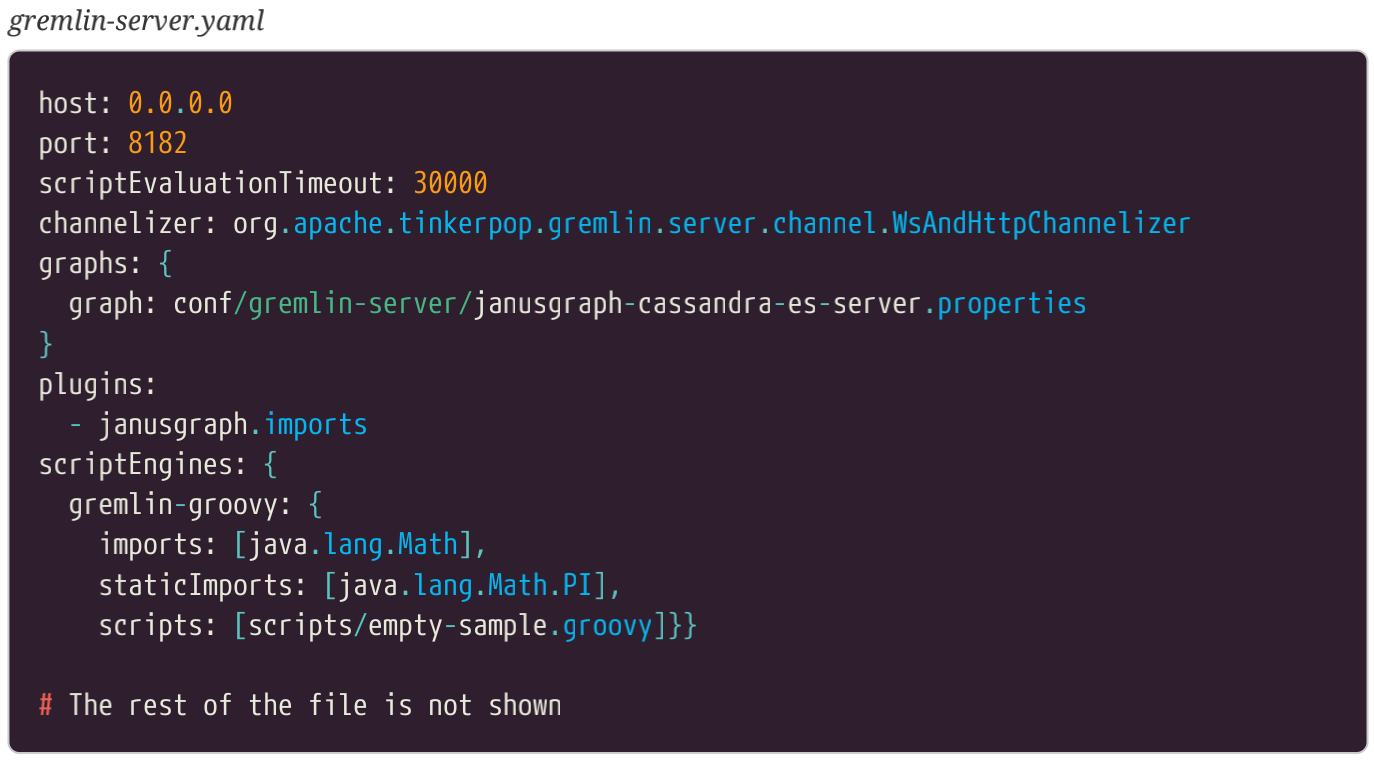
gremlin-server.yaml 文件的第一部分,修改为了满足我们的需求,如下所示。笔者没有修改的文件的内容就没有呈现出来,但是笔者推荐您阅读整个文件学习这些配置。对于我们现在的需求,默认的就可以了。然而,在您的环境中,默认的可能不满足您的需求。TinkerPop 的文档有这些设置和怎么使用它们的详细的说明。
The first part of the gremlin-server.yaml file, modified to meet our needs is shown below. I did not
modify the parts of the file that are not shown but I encourage you to look at the whole file and
study the settings. For our current needs the defaults are fine. However, in your environment the
defaults may not meet your needs. The TinkerPop documentation has detailed coverage of the
settings and what they do.
现在,让我们看YAML文件与这个实验相关的一些部分。注意笔者选择使用WsAndHttpChannelizer.这是因为笔者想既通过WebSocket连接小精灵控制台,也可以curl,Ruby这样的其它应用通过HTTP连接到我们的新的小精灵服务器。
OK so let’s look at the parts of the YAML file that are relevant to this experiment. Note that I have
chosen to use the WsAndHttpChannelizer. This is because I want to allow both the Gremlin Console
over WebSockets and other applications such as curl and Ruby over HTTP to connect to my new
Gremlin Server.
注意在图的章节中指定的 janusgraph-cassandra-es.server.properties文件。这个文件做为杰森图下载的一部分被提供。小精灵服务器会用到这个文件来连接到后端是Cassandra的杰森图。注意属性文件名中的-es指的是Elasticsearch。当我们启动杰森图时,如果我们没有配置一个外部索引,在属性文件中引用Elasticsearch的那行需要被注释掉。
Notice also that the janusgraph-cassandra-es.server.properties file is specified in the graphs section.
This is a file that is provided as part of the JanusGraph download. This is the file that Gremlin
Server will use to connect to our JanusGraph backed by Cassandra. Note that the "-es" in the
properties file name refers to Elasticsearch. As we did not configure an external index when we
setup our JanusGraph the lines referring to Elasticsearch inside the properties file should be
commented out.
scriptEvaluationTimeout 这个设置很重要。它告诉小精灵服务器让一个查询运行多长时间就可以终止它。这实质上是建立了任意查询可以被运行的最长时间,不管它有没有运行完成。在这个实验中,默认的设置是30000,应当足够用了。这个值表示的是允许的数量单位是毫秒。如果您想让发送到服务器的查询运行更长的时间,您可以增加这个值。只要记得,如果您有多个用户使用同一小精灵服务器,您可能不想让某些人运行特别复杂的查询这可能会花费很长的时间才能完成。顺带提示:笔者看到一些人增加这个值来让查询完成,事实上他们应当做的是在图中创建一个索引,从而让图运和的更快,从而花费更少的时间。如果您想要禁掉超时功能,您可以通过指定超时值为0.
The scriptEvaluationTimeout setting is important. It tells the Gremlin Server how long to let a query
run before terminating it. This essentially establishes the maximum amount of time any query will
be allowed to run, regardless of whether it has completed or not. For this experiment the default
setting of 30000 should be more than adequate. The value represents the number of milliseconds
allowed. If you want to allow queries sent to the server to run for longer you can increase this
value. Just keep in mind that if you have multiple users using the same Gremlin Server you may not
want to allow someone to run a really complex query that might take a long time to complete. As a
side note, I have seen people increase this value to allow queries to complete when in fact what
they should have been doing is creating an index in the graph to allow the query to run faster and
hence take less time! If you want to disable the timeout feature you can do that by specifying a
timeout value of 0 (zero).
有YAML,属性文件一样,在启动一台小精灵服务器时,有第三个文件我们需要提供。这个文件包括了Groovy 代码,它可以在服务启动时运行。为了我们的目标,默认文件是我们需要的。这些文件应当在scripts脚本目录中,做为独立的小精灵服务器或者杰森图安装的一部分。很快我们将看到默认的脚本。
As well as the YAML file and the properties file, there is a third file that we need to provide when
starting a Gremlin Server. This file can contain Groovy code that will be run when the server starts.
For our purposes the default file is all we need. These files should be placed in the scripts directory
that is part of the standard Gremlin Server or JanusGraph install. We will take a look at the default
script in a moment.
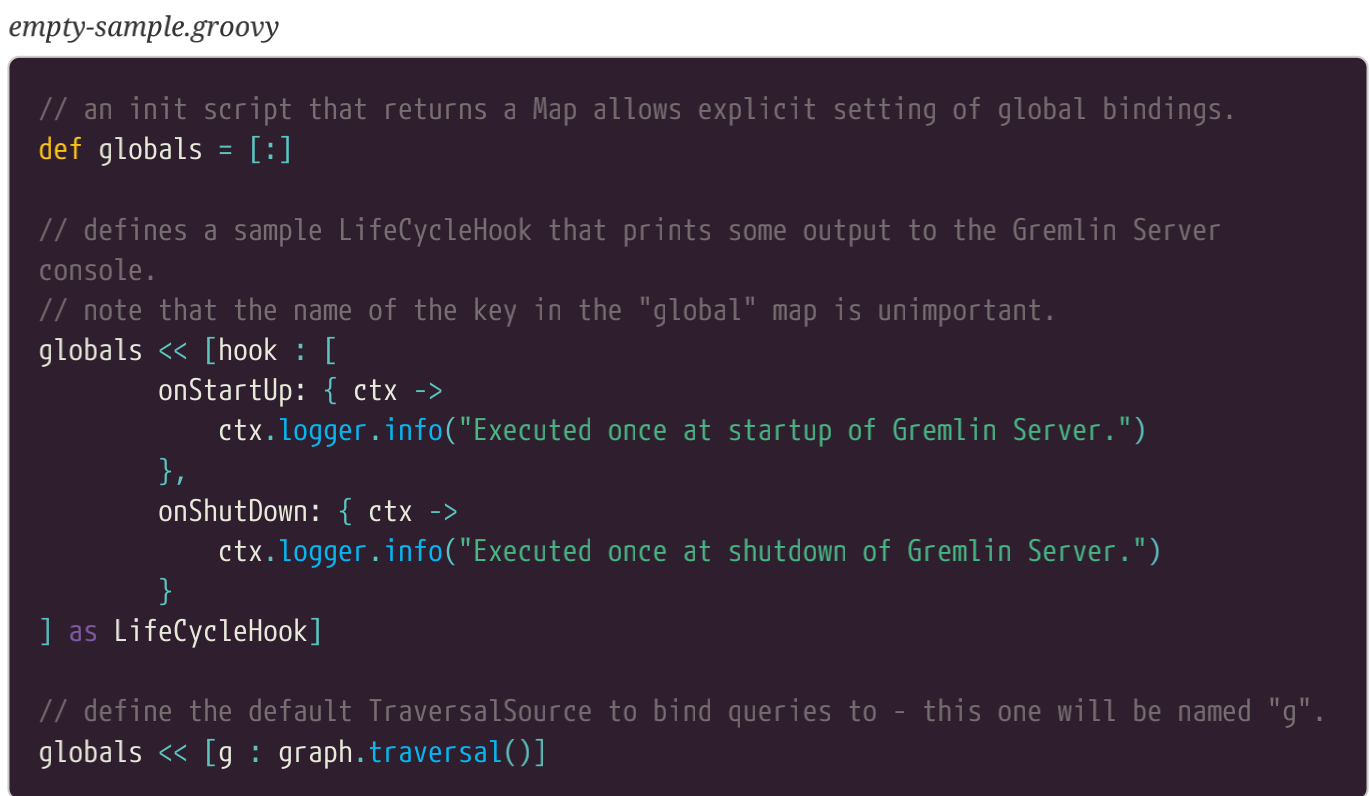
小精灵服务器和杰森图默认都包含一个名为empty-sample.groovy.和Groovy脚本。这个名称有点误导人,因为文件实事上做了一些有趣的事情。这个脚本做的最有用的事情就是配置并让小精灵控制台,图遍历源,对于我们来说是可用的。图对象,希望到现在您已经很熟悉了。它为我们提供了其它全局变量的模板,您可能想让其它连接到您的小精灵服务器的用户使用的那些变量。这个文件也配置了一些默认的日志消息,可以在服务器启动或停止时生成这些消息。注意,佻可以增加您自己的代码到这个脚本中,或者用您自己的脚本完全替代它。您会从小精灵服务器的下载中找到额外的一些样例脚本。这些脚本做的事情如:创建一个廷克图实例,加载图数据,并把它们做为服务器启动过程的一部分。使用这些技术,我们可以快速地增加一行代码到脚本中,这样服务器启动时一个新的廷克图会创建,并加载航线图数据。
By default both Gremlin Server and JanusGraph include a Groovy script called empty-sample.groovy.
That name is a bit misleading as the file actually does some interesting things. For our purposes the
most useful thing that the script does is to configure and make available to us in the Gremlin
Console, the graph traversal source, g object that hopefully by now you are very familiar with. This
provides you with a template for any other global variables that you may want to make available to
the user of the console connected to your Gremlin Server. The file also configures some default log
messages that will be generated when the server starts and stops. Note that you can add your own
code to this script or replace it with your own script entirely. You will find additional example
scripts included as part of the Gremlin Server download. These scripts do things such as create a
TinkerGraph instance and load some graph data as part of the server startup process. Using this
technique, we could easily add a line to the script so that when the server starts an empty
TinkerGraph is created and the air-routes data loaded.
我们的所有配置文件已就绪,通过在终端窗口键入下面的命令,我们可以启动小精灵服务器。 gremlin-server.sh这个文件在小精灵服务器或杰森图安装包的bin目录下。
Now that we have all of our configuration files in place we can start the Gremlin Server by typing
the following command into a terminal window. The gremlin-server.sh file is located in the bin
directory of your Gremlin Server or JanusGraph installation.

如果一切顺利,您将看到小精灵服务器显示的输出。服务器将保持运行状态,直到您停掉它。在这个例子中,您只需一个简单的CTRL-C 就可以停止服务器。在您按了CTRL-C 之后,服务器就会做一些清理工作。
If all goes well you should see output from the Gremlin Server displayed. The server will keep
running until you kill it. In this case a simple CTRL-C is all you need to do to kill the server. After
you press CTRL-C the server will do a bit of cleaning up.
您可以使用start关键字让小精灵服务器做为一个后端任务启动。
You can use the start keyword to start the Gremlin Server as a background task.
您也可以在后台启动小精灵服务器,而不是让它出现在您的终端窗口,通过增加start关键字做为调用命令的一部分,像下面这样。下面的例子假设您从安装小精灵服务器的安装包那启动您的服务器。
You can also start the Gremlin Server in the background rather than have it take over your current
terminal window by adding the start keyword as part of the invocation command as shown below.
The examples below assume that you are starting the server from the place where you installed the
Gremlin Server zip file.

服务器启动的配置信息默认将会查看conf/gremlin-server.yaml文件。如果您想要重写这个值,您可以在启动服务器前提供一个名为GREMLIN_YAML的环境变量,像下面这样。
By default the configuration information for the server being started will be looked for in the file
conf/gremlin-server.yaml. If you want to override this value you need to provide an environment
variable called GREMLIN_YAML before starting the server as shown below.

为了定义环境变量,您可以创建一个名为bin/gremlin-server.conf 的文件,并把您的YAML文件放在它里边。例子如下所示。
As an alternative to defining an environment variable, you can instead create a file called
bin/gremlin-server.conf and put the name of your YAML file in it. An example is shown below.

如果您想查看小精灵服务器现在是否运行,您可以使用status关键字。
If you want to check whether or not the Gremlin Server is currently running you can use the status
keyword.

为了终止服务器,您可以像下面这样使用stop关键字。
To stop the server you can use the stop keyword as follows.


 浙公网安备 33010602011771号