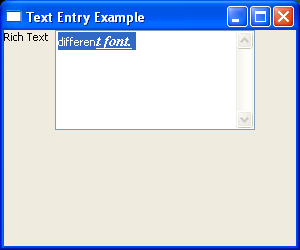
![Change font and color]()
import wx

class TextFrame(wx.Frame):
    def __init__(self):
        wx.Frame.__init__(self, None, -1, 'Text Entry Example', size=(300, 250))
        panel = wx.Panel(self, -1)

        richLabel = wx.StaticText(panel, -1, "Rich Text")
        richText = wx.TextCtrl(panel, -1,"different font.",size=(200, 100), style=wx.TE_MULTILINE|wx.TE_RICH2)
        richText.SetInsertionPoint(0)
        richText.SetStyle(4, 10, wx.TextAttr("white", "black"))
        points = richText.GetFont().GetPointSize()
        f = wx.Font(points + 3, wx.ROMAN, wx.ITALIC, wx.BOLD, True)
        richText.SetStyle(28, 8, wx.TextAttr("blue", wx.NullColour, f))

        sizer = wx.FlexGridSizer(cols=2, hgap=6, vgap=6)
        sizer.AddMany([richLabel, richText])
        panel.SetSizer(sizer)

app = wx.PySimpleApp()
frame = TextFrame()
frame.Show()
app.MainLoop()
Add text control to frame : Text « wxPython
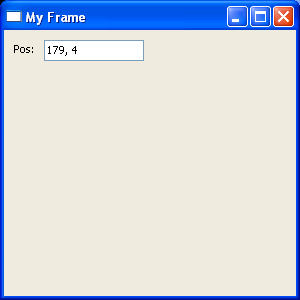
![Add text control to frame]()
import wx

class MyFrame(wx.Frame):

    def __init__(self):
        wx.Frame.__init__(self, None, -1, "My Frame", size=(300, 300))
        panel = wx.Panel(self, -1)
        panel.Bind(wx.EVT_MOTION,  self.OnMove)
        wx.StaticText(panel, -1, "Pos:", pos=(10, 12))
        self.posCtrl = wx.TextCtrl(panel, -1, "", pos=(40, 10))

    def OnMove(self, event):
        pos = event.GetPosition()
        self.posCtrl.SetValue("%s, %s" % (pos.x, pos.y))

app = wx.PySimpleApp()
frame = MyFrame()
frame.Show(True)
app.MainLoop()



 浙公网安备 33010602011771号