springmvc文件上传
1、
文件的上传与下载基本上是web项目中会用到的技术,在web学习中我们用到的是 Apache fileupload这个组件来实现上传,在springmvc中对它进行了封装,让我们使用起来比较方便,但是底层还是由Apache fileupload来实现的。springmvc中由MultipartFile接口来实现文件上传。
2、MultipartFile接口
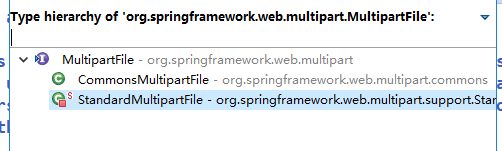
该接口用来实现springmvc中的文件上传操作,它有两个实现类:
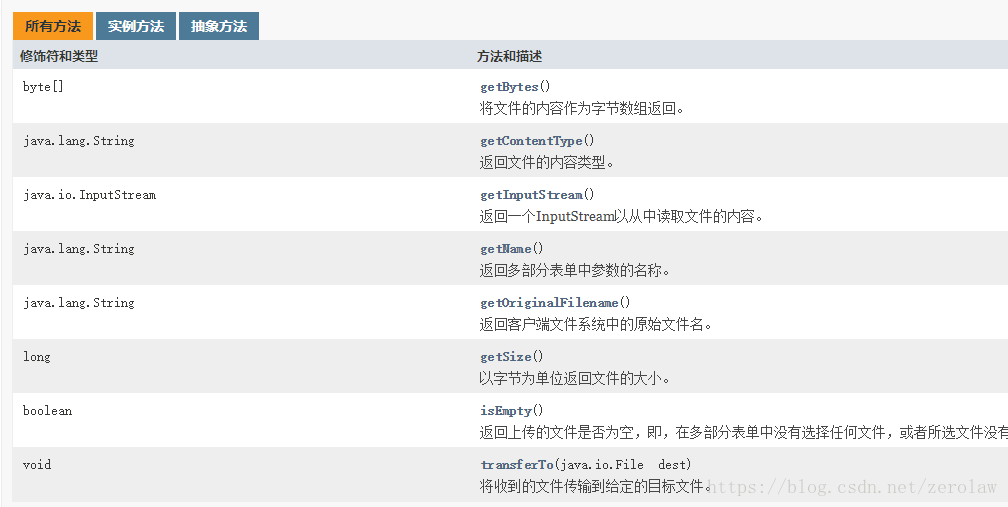
接口定义的方法:
3、实现文件上传
3.1 导入jar包
- commons-fileupload
- commons-io
commons-io可以不用自己导入,maven会自动导入对应版本的jar
3.2 前端jsp页面
-
input的type设置为file
-
form表单的method设为post,
-
form表单的enctype设置为multipart/form-data,以二进制的形式传输数据。
<%@ page language="java" contentType="text/html; charset=UTF-8"
pageEncoding="UTF-8"%>
Insert title here
3.3 Controller层接收
使用MultipartFile对象作为参数,接收前端发送过来的文件,将文件写入本地文件中,就完成了上传操作
@RequestMapping("/upload")
public String upload(@RequestParam("file") MultipartFile file, HttpServletRequest req)
throws IllegalStateException, IOException {
// 判断文件是否为空,空则返回失败页面
if (file.isEmpty()) {
return "failed";
}
// 获取文件存储路径(绝对路径)
String path = req.getServletContext().getRealPath("/WEB-INF/file");
// 获取原文件名
String fileName = file.getOriginalFilename();
// 创建文件实例
File filePath = new File(path, fileName);
// 如果文件目录不存在,创建目录
if (!filePath.getParentFile().exists()) {
filePath.getParentFile().mkdirs();
System.out.println("创建目录" + filePath);
}
// 写入文件
file.transferTo(filePath);
return "success";
}
3.4 springmvc.xml配置CommonsMultipartResolver。

 浙公网安备 33010602011771号