
Summary of Amazon Marketplace Web Service
Overview
Here I want to summarize Amazon marketplace web service (MWS or AMWS) that can be used for e-commerce data integration. It is based on Amazon online documents. The developer guide describes the basic functions and features of Amazon MWS.
Features
Amazon MWS provides the following features: * Product and Inventory management: you can add/edit products, update inventory, price and other product and inventory management tasks. * Order management: you can download Amazon order information and payment data. You can update order status and shipping information. * Reports management: you can query and download different reports.
* Fulfillment by Amazon (FBA) management: you can create inbound shipments,
check shipment status, submit fulfillment orders and manage outbound shipments.
Authentication
After registering as a developer, you receive three credentials to make API calls:
- A Developer Account Identifier that is a 12-digit identifier.
- An Access Key ID that is a 20-character, alphanumeric identifier.
- A Secret Key that is a 40-character identifier.
The access key ID is not a secret. It is used as an Id of a request. The secrete key is used to calculate a digital signature from one's access key ID. Amazon MWS uses this signature to authenticate a seller account.
Building Robust AMWS apps
Because AMWS AIPs are evolving, it is important to handle response data gracefully to build a robust AMWS app.
- Don't break for new element and element values in reports or responses.
- Log unrecognized elements or values to find changes.
- Expect response elements in any order.
Throttling
AMWS has a limits on how often you can submit API requests. You should know the limits, check the throttling error, and have a back-off re-try implementation.
A request quota represents the number of requests that on can submit at one time without throttling. It decreases with each request and increases at a restore rate. The restore rate is the rate at which the request quota increases over time, up to the maximum request quota.
Using NextToken
Some AMWS APIs have a page size that only returns a limited number of elements. You should check the HasNext element to find if there are more elements. If the HasNext response element returns true, use a NextToken in response to call a ByNextToken operation.
Some operations returns a MoreResultsAvailable element. This element should be checked regularly and if it is true, call the ByNextToken operation with the NextToken to get data till the MoreResultsAvailable is false. Then start checking it again.
Some operations do not return HasNext or MoreResultsAvailable, use the existence of the NextToken to find if there are more data available.
If a "ByNextToken" operation fails with a "NextTokenCorrupted" error, call the original operation.
Response
AMWS returns an XML file that contains the results of a request. For a successful request, it returns a result and a request id. For an unsuccessful request, it returns an "ErrorResponse" element that has a list of errors and a request id.
It is suggested that one should log the request timestamp and the request id in case an error happens and these data are used by Amazon support services.
Feed API and XML Schema
Feed API
The MWS Feeds API allows you to submit a feed, cancel a feed and check submit status and errors. It supports the following operations:
- SubmitFeed: Upload a feed
- GetFeedSubmiisionList: Get a list of feed submissions in the previous 90 days
- GetFeedSubmissionListByNextToken: Get a list of feed submissions using the NextToken parameter
- GetFeedSubmissionCount: Get a count of the feeds submitted in the previous 90 days
- CancelFeedSubmissions: Cancel one or more feed submissions
- GetFeedSubmissionResult: Get the feed processing report and the content MD5 header
XML Schemas
MWS defines a core schema and a feed type schema. The core schema includes an envelope schema that includes a head schema and a feed-specific schema.
All schemas can be downloaded by following the path of
Seller Center help, XML & Data Exchange, Reference, XSDs.
The Envelope Schema
The envelope is used to wrap all other data with message-level protocol data. The envelope consists of a header and one or more messages. Each message contains a specific data object and must be of the same type in the same envelope.
The envelope schema defines the following elements in the
root element <AmazonEnvelope>:
- A
<Header>element - A
<MessageType>element. Can be a values ofFulfillmentCenter, Inventory, Listings, OrderAcknowledgement, OrderAdjustment, OrderFulfillment, Override, Price, Processing Report, Product, ProductImage, Relationship, SettlementReport. - A
<MarketplaceName>element used only in Override feed - A
<PurgeAndReplace>element. It is not recommended because purging existing products loses all history and listing positions in Amazon. - A
<EffectiveDate>element used by inventory feed. - Multiple
<Message>elements.
Below are elements defined inside the <Message> element:
1. A <MessageID> element: A unique number inside within the envelop.
It is used for reconciliation of errors and warnings. It is a
number that can have 1 to 18 digits.
2. An <OperationType> element: Update, Delete, or PartialUpdate.
PartialUpdate is only used for product feed.
3. A feed-specific data element that matches the
<MessageType> element value.
The Header Schema
This schema only has two elements as shown below:
<Header>
    <DocumentVersion>1.01</DocumentVersion>
    <MerchantIdentifier>MerchantId</MerchantIdentifier>
</Header>
The Base Schema
The base XSD defines basic data types and values used by other XML schemas. Basic data types include address, phone number, SKU, standard product ID, SKU, currency, time, etc.
Product Feeds API
There are six product feeds in AMWS: 1. Product feed: product catalog information that allows Amazon to assign an ASIN (Amazon Standard Identification Number) for each SKU. 2. Inventory feed: current stock level, restock date and fulfillment latency. 3. Price feed: current price, standard price or sales price 4. ProductImage feed: URLs for product images 5. Relationship feed: two product relationships: variation and accessory. 6. Override feed: setting SKU-level shipping data
Feed Submission Workflow
The feed submission workflow is depicted in the following diagram. 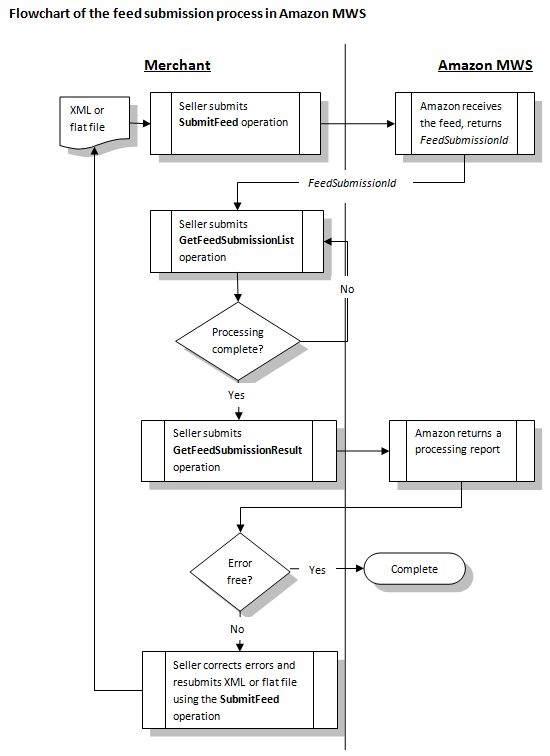
AMWS uses a batch processing model that has the following steps:
- Submit a feed and get a "FeedSubmissionId".
- Check processing status using "GetFeedSubmissionList".
- When a feed processing is completed, the "FeedProcessingStatus" element has a value of
_DONE_. Use the "GetFeedSubmissionResult" operation to receive a processing report that describes which records are successful and which records are wrong. - For unsuccessful records, fix errors and retry.
XML Schemas
Product Schema
The product feed is the first step in setting up products. Subsequent feeds are dependent upon the success of this feed. The Product element has the following elements. If not explicitly marked as required, an element is optional.
SKU: Required. ASKUTypevalue is a string with up to 40 chars.StandardProductID:Type: a value fromISBN, UPC, EAN, ASIN, GTIN, GCID, PZNValue: a string with 8 to 16 chars
GtinExemptionReason: a value frombundle, part.RelatedProductID: used for a product bundle or replacement part.Type: a value fromUPC, EAN, GTINValue: a string with 8 to 16 chars
ProductTaxCode: an Amazon standard code for US-only product tax. A value fromA_GEN_TAX, A_GEN_NOTAXfor most products. Books have special codes.LaunchDate: when the product appears in Amazon siteDiscontinueDateReleaseDate: release for sale dateExternalProductUrl: ??OffAmazonChannel: ??. a value ofadvertise, excludeOnAmazonChannel: ??. a value ofsell, advertise, excludeCondition: has two elements: is a value ofNew, UsedLikeNew, UsedVeryGood, UsedGood, UsedAcceptable, CollectibleLikeNew, CollectibleVeryGood, CollectibleGood, CollectibleAcceptable, Refurbished, Club. is a 2000-char string note.Rebate: a rebate with start date, end date, message and name.ItemPackageQuantity: number of units in a package.NumberOfItems: number of discrete items in the product.DescriptionData: product description defined belowPromoTag: type of promotion, start and end date.DiscoveryData: browse priority, exclusionProductData: category-specific product data, defined belowShippedByFreight: ?? a boolean valueEnhancedImageURL: ?? up to two urlsAmazon-Vendor-Only: ??Amazon-Only: ??RegisteredParameter: ?? a value fromPrivateLabel, Specialized, NonConsumer, PreConfigured.
The DescriptionData element has the following elements:
Title: Required. aLongStringNotNullvalue (1-500)Brand: aHundredStringvalue (0-100)Designer: aStringNotNullvalue (1-50)Description:xsd:normalizedStringmax length 2000- 0 to 5
BulletPoint: aLongStringNotNullvalue describing features. ItemDimensions: defined inDimensionsType that has four elementsLength: typeLengthDimensionadds an attribute toDimensionthat is a type derived fromxsd:decimalwith total 12 digits and 2 fraction digits- Attribute
unitOfMeasure: aLengthUnitOfMeasuretype value fromMM, CM, M, IN, FT, inches, feet, meters, decimeters, centimeters, millimeters, micrometers, nanometers, picometers.
- Attribute
Width: aLengthDimensionvalueHeight: aLengthDimensionvalueWeight: typeWeightDimensionadds an attribute- Attribute
unitOfMeasure: aWeightUnitOfMeasuretype value fromGR, KG< OZ, LB, MG.
- Attribute
PackageDimensions: dimensions of the package. ADimensionstype valuePackageWeight: aPositiveWeightDimensionvalueShippingWeight: aPositiveWeightDimensionvalue for shipping packageMerchantCatalogNumber: aFortyStringNotNullif it is different fromSKUMSRP: ABaseCurrencyAmountvalue withcurrencyattribute.
ABaseCurrencyAmountvalue is a number with total 20 digits, 2 are fraction digits. Acurrencyattribute value is from a list ofUSD, GBP, EUR, JPY, CAD, CNY, INR.MSRPWithTax: taxed amount of typeBaseCurrencyAmountMaxOrderQuantity: a positive integerSerialNumberRequired: a boolean value indicating if a serial number is requiredProp65: a boolean value for California Prop 65 regulations- 0 to 4
CPSIAWarning: a value fromchoking_hazard_balloon, choking_hazard_contains_a_marble choking_hazard_contains_small_ball, choking_hazard_is_a_marble, choking_hazard_is_a_small_ball choking_hazard_small_parts, no_warning_applicable. CPSIAWarningDescription: aTwoFiftyStringNotNullvalueLegalDisclaimer: axsd:normalizedStringup to 2500 charsManufacturer: aHundredStringvalueMfrPartNumber: aFortyStringNotNullvalue for manufacture part number- 0 to 5
SearchTerms: aStringNotNullvalue for search keywords - 0 to 20
PlatinumKeywords: aStringNotNullvalue to map a product to nodes in a custom browse structure. Memorabilia: a boolean valueAutographed: a boolean value- 0 to 5
UsedFor: aStringNotNullvalue. ItemType: aLongStringNotNullvalue showing where to put in Amazon browse structure.- 0 to 5
OtherItemAttributes: aLongStringNotNullvalue for further classification. - 0 to 4
TargetAudience: aStringNotNullvalue for classification - 0 to 5
SubjectContent: aStringNotNullvalue for merchandising ideas IsGiftWrapAvailable: a boolean valueIsGiftMessageAvailable: a boolean value- 0 to 10
PromotionKeywords: aStringNotNullvalue IsDiscontinuedByManufacturer: a boolean value for classificationDeliveryScheduleGroupID: ?? aStringNotNullvalue- 0 to 2
DeliveryChannel: a value fromin_store, direct_ship - 0 to 2
PurchasingChannel: a value fromin_store, online MaxAggregateShipQuantity: a positive integerIsCustomizable: true or falseCustomizableTemplateName: aStringNotNullvalueTSDAgeWarning: toy safety directive age warning. A value from anot_suitable_under_36_months, not_suitable_under_3_years_supervision, ..., not_suitable_under_14_years_supervision, no_warning_applicable.- 0 to 8
TSDWarning: a value fromonly_domestic_use, adult_supervision_required, protective_equipment_required, water_adult_supervision_required, toy_inside, no_protective_equipment, risk_of_entanglement, fragrances_allergy_risk, no_warning_applicable. - 0 to 21
TSDLanguage: a value fromEnglish, French, ..., Swedish - 0 to 2
OptionalPaymentTypeExclusion: a value fromcash_on_delivery, csv, exclude_none, exclude cod, exclude cvs, exclude cod and cvs.
There are many types of product data element such as ClothingAccessories,
Clothing, Home, etc. Here is the details of the Shoes schema.
The Shoes schema has three elements: ClothingType,
VariationData, and ClassificationData.
The required ClothingType element is a value from Accessory, Bag, Shoes,
ShoeAccessory, Handbag, Eyewear.
The VariationData has the following elements:
Parentage: a value fromparent, childSize: aStringNotNullvalueColor: aStringNotNullvalueVariationTheme: a value fromSize, Color, SizeColor, ColorName-MagnificationStrength, ColorName-LensColor, ColorName-LensWidth, Material, SizeStyle, StyleName, PatternName, Size-Material, Size-PatternName, LensColor, LensColorShape, LensColorMaterial, ColorSize.
The ClassificationData has many elements but only a few applicable
to a specific product. Some sample elements are:
CountryOfOrigin: two-char country code orunknown.ColorMap: a aStringvalue for color (normalized string up to 50 chars)SizeMap: a size stringCareInstructions: a string of care instructionCountryProducedIn: a string of country that produces itDepartment: aStringNotNullvalueFabricType: aStringvalue- 0 to 3
MaterialType: aStringvalue WarrantyType: aStringNotNullvalueManufacturerWarrantyType: aStringNotNullvalueSellerWarrantyDescription: aStringNotNullvalueStyleName: aTwoThousandStringvalue
Inventory Schema
The Inventory schema has the following elements:
SKU: Required. ASKUTypevalueFulfillmentCenterID: AStringvalue for seller-defined fulfillment center. If useAFN, it isAMAZON_NA.- A choice of
Available, Quantity, Lookup. Just useQuantitythat is a non-negative integer. If useAFN, it is<Lookup>FulfillmentNetwork</Lookup>. RestockDate: a restock date if not currently availableFulfillmentLatency: a number between 1 and 30 showing the days between the order date and the ship date.SwitchFulfillmentTo: a value fromMFN, AFN.MFNmeans manufacturer fulfillment.AFNmeans Amazon fulfillment.
Price Schema
The Price schema has the following elements:
SKU: Required. ASKUTypevalueStandardPrice: aOverrideCurrencyAmountvalue. It extends theCurrencyAmountWithDefaulttype that has acurrencyattribute such ascurrency="USD"and a number that has a total of 20 digits in which 4 are faction digits.MAP: aOverrideCurrencyAmountvalue for minimum advertised price. Both the standard price and sale price must be higher than the MAP value. US-only.DepositAmount: aCurrencyAmountWithDefaultvalue for deposit.Sale: sale date and price information that has the following elements:StartDate:EndDate:SalePrice: aOverrideCurrencyAmountvalue
CompareAt: a dated price that has a start date, end date and a compare at price.Previous: aDatedPricevalue that has start, end date, price and previous price.- Rental prices from
Rental_0toRental_9. CostPerClickBidPrice: aOverrideCurrencyAmountvalue.
ProductImage Schema
The ProductImage schema has the following elements:
SKU: Required. ASKUTypevalueImageType: Required. a value fromMain, Swatch, PT1, PT2, ..., PT8, Search, ...ImageLocation: an HTTP (not HTTPS) url for a JPEG or GIF file.
Relationship
Before uploading relationship feed, all products should be uploaded and
VariationData values are specified.
The Relationship schema has the following elements:
ParentSKU: Required. ASKUTypevalue- 1 to many
Relation: Required. Child SKU and relationship information. It has the following elements:SKU: the child SKUChildDetailPageDisplay: a value fromindependently_displayable, display_only_on_parent.Type: a value fromVariation, Accessory, ....
Orders API
Order processing involves generating orders reports, submitting order acknowledgment feed, shipping feed, order adjustment (optional) and being paid.
The Orders API allows you to retrieve orders and order times during a specified time frame. The Orders API section supports the following operations:
- ListOrders: Get orders created or updated during a specified time frame.
- ListOrdersByNextToke: Use NextToken to get the next page of orders.
- GetOrder: Get orders using AmazonOrderId.
- ListOrderItems: Get order items using AmazonOrderId.
- ListOrderItemsByNextToken: Get the next page of order items.
- GetServiceStatus: Get the Orders API operational status.

 浙公网安备 33010602011771号