
21楼梯和扶手
楼梯和扶手
Autodesk.Revit.DB.Architecture命名空间中的Revit API中的类允许访问楼梯和相关构件(如平台和梯段)。可以使用Revit API创建或修改楼梯。Stairs类表示“由构件”创建的楼梯。不能在API中将通过草图创建的楼梯图元作为楼梯对象进行访问。静态方法Stairs.IsByComponent()可用于确定ElementId是否表示由构件创建的楼梯。
本节中的页面
- 创建和编辑楼梯
- 扶手
- 楼梯注释
- 楼梯构件
创建和编辑楼梯
StairsEditScope
与Revit文档中其他类型的元素一样,编辑楼梯和楼梯构件需要事务处理。但是,若要创建新构件(如梯段和平台)或创建新楼梯本身,则必须使用Autodesk.Revit.DB.StairsEditScope对象,该对象支持楼梯编辑任务。
StairsEditScope的作用类似于TransactionGroup。启动StairsEditScope后,可以启动事务并编辑楼梯。在StairsEditScope中创建的单个事务不会出现在撤消菜单中。在编辑模式下提交的所有事务将被合并为一个事务,该事务的名称由传递给 StairsEditScope 构造函数的参数指定。
StairsEditScope有两个Start方法。获取现有Stairs对象的ElementId,并为其启动楼梯编辑会话。第二个Start方法采用底部标高和顶部标高的ElementId,并在指定标高中创建具有默认楼梯类型的新空楼梯元素,然后为新楼梯启动楼梯编辑模式。
将梯段和平台添加到楼梯并完成编辑后,请调用 StairsEditScope.Commit() 方法结束楼梯编辑模式。
添加梯段
- StairsRun类有三个用于为Stairs对象创建新梯段的静态方法:
- CreateSketchedRun - 通过提供一组边界曲线和踢面曲线来创建草图梯段。
- CreateStraightRun - 创建直线梯段。
- CreateSpiralRun - 通过提供圆心、起始角度和夹角来创建螺旋梯段。
添加平台
可以在两个梯段之间添加自动平台或草图平台。静态方法StairsLanding. Canadian AutomaticLanding()将检查两个楼梯梯段是否满足创建自动平台的限制。静态StairsLanding. random AutomaticLanding()方法将返回在两个楼梯梯段之间创建的所有平台的Id。
静态StairsLanding. RightSketchedLanding方法通过提供平台的闭合边界曲线,在两个梯段之间创建自定义平台。基本高程的双精度值是CreateSketchedLanding方法的输入参数之一。标高有以下限制:
- 底部高程相对于楼梯的底部高程。
- 底部高程将自动舍入为踢面高度的倍数。
- 基础标高应等于或大于踢面高度的一半。
例子
下面的示例将创建一个新的Stairs对象、两个梯段(一个为草图梯段,一个为直线梯段)以及它们之间的平台。
代码区域:创建楼梯、楼梯平台和平台
// FailurePreprocessor class required for StairsEditScope
class StairsFailurePreprocessor : IFailuresPreprocessor
{
    public FailureProcessingResult PreprocessFailures(FailuresAccessor failuresAccessor)
    {
        // Use default failure processing
        return FailureProcessingResult.Continue;
    }
}

private ElementId CreateStairs(Document document, Level levelBottom, Level levelTop)
{
    ElementId newStairsId = null;

    using (StairsEditScope newStairsScope = new StairsEditScope(document, "New Stairs"))
    {
        newStairsId = newStairsScope.Start(levelBottom.Id, levelTop.Id);

        using (Transaction stairsTrans = new Transaction(document, "Add Runs and Landings to Stairs"))
        {
            stairsTrans.Start();

            // Create a sketched run for the stairs
            IList bdryCurves = new List();
            IList riserCurves = new List();
            IList pathCurves = new List();
            XYZ pnt1 = new XYZ(0, 0, 0);
            XYZ pnt2 = new XYZ(15, 0, 0);
            XYZ pnt3 = new XYZ(0, 10, 0);
            XYZ pnt4 = new XYZ(15, 10, 0);

            // boundaries
            bdryCurves.Add(Line.CreateBound(pnt1, pnt2));
            bdryCurves.Add(Line.CreateBound(pnt3, pnt4));

            // riser curves
            const int riserNum = 20;
            for (int ii = 0; ii <= riserNum; ii++)
            {
                XYZ end0 = (pnt1 + pnt2)  ii / (double)riserNum;
                XYZ end1 = (pnt3 + pnt4)  ii / (double)riserNum;
                XYZ end2 = new XYZ(end1.X, 10, 0);
                riserCurves.Add(Line.CreateBound(end0, end2));
            }

            //stairs path curves
            XYZ pathEnd0 = (pnt1 + pnt3) / 2.0;
            XYZ pathEnd1 = (pnt2 + pnt4) / 2.0;
            pathCurves.Add(Line.CreateBound(pathEnd0, pathEnd1));

            StairsRun newRun1 = StairsRun.CreateSketchedRun(document, newStairsId, levelBottom.Elevation, bdryCurves, riserCurves, pathCurves);

            // Add a straight run
            Line locationLine = Line.CreateBound(new XYZ(20, -5, newRun1.TopElevation), new XYZ(35, -5, newRun1.TopElevation));
            StairsRun newRun2 = StairsRun.CreateStraightRun(document, newStairsId, locationLine, StairsRunJustification.Center);
            newRun2.ActualRunWidth = 10;

            // Add a landing between the runs
            CurveLoop landingLoop = new CurveLoop();
            XYZ p1 = new XYZ(15, 10, 0);
            XYZ p2 = new XYZ(20, 10, 0);
            XYZ p3 = new XYZ(20, -10, 0);
            XYZ p4 = new XYZ(15, -10, 0);
            Line curve_1 = Line.CreateBound(p1, p2);
            Line curve_2 = Line.CreateBound(p2, p3);
            Line curve_3 = Line.CreateBound(p3, p4);
            Line curve_4 = Line.CreateBound(p4, p1);

            landingLoop.Append(curve_1);
            landingLoop.Append(curve_2);
            landingLoop.Append(curve_3);
            landingLoop.Append(curve_4);
            StairsLanding newLanding = StairsLanding.CreateSketchedLanding(document, newStairsId, landingLoop, newRun1.TopElevation);

            stairsTrans.Commit();
        }
        // A failure preprocessor is to handle possible failures during the edit mode commitment process.
        newStairsScope.Commit(new StairsFailurePreprocessor());
    }

    return newStairsId;
}
从上面的例子产生的楼梯: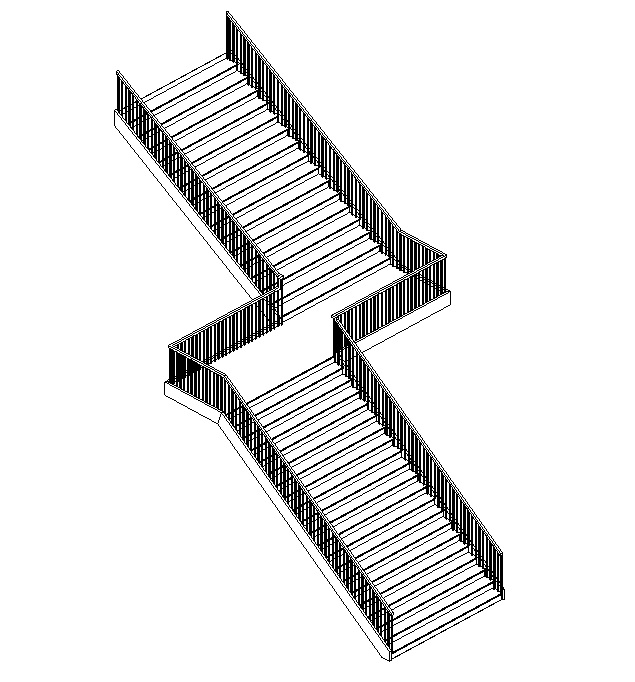
多层楼梯
MultistoryStairs类允许楼梯跨越多个标高。多层楼梯元素可以包含多个楼梯,这些楼梯的范围由底部标高和顶部标高控制。 此元素将包含一个或多个Stairs元素。楼梯元素是: 复制到由共享相同标高高度的相同楼梯实例组覆盖的每个标高的参考实例, 或未连接到具有相同标高高度的组的单个Stairs实例。 默认情况下,向多层楼梯添加新标高时,新楼梯将添加到组中。对于不同标高的重复楼梯组,实例可以作为Stairs元素的子元素找到。通过修改关联的Stairs实例,可以一起编辑连接组中的楼梯。对于需要特殊设计的特定楼层,可以使用“取消锁定”方法将楼梯从组中分离出来-对取消锁定的楼梯所做的更改不会影响图元中的其他任何实例。稍后可以使用“锁定”方法将楼梯添加回组中,但是对楼梯所做的任何更改都将丢失,因为楼梯的属性将被组规范覆盖。
代码区域:创建多层楼梯
// create new MultistoryStairs
MultistoryStairs multistoryStairs = MultistoryStairs.Create(stairs);

// get all levels that can be connected to this multistoryStairs
IEnumerable levelIds = new FilteredElementCollector(doc).OfClass(typeof(Level)).Cast().Where(q => multistoryStairs.CanConnectLevel(q.Id))
.Select(q => q.Id);

// Connect the levels to the multistoryStairs
// The input to ConnectLevels is a HashSet or SortedSet, so a HashSet is created from the IEnumerable returned by FilteredElementCollector
multistoryStairs.ConnectLevels(new HashSet(levelIds));
当使用StairsEditScope.Start(ElementId,ElementId)方法创建新楼梯时,它们具有与其关联的默认扶手。但是,Railing.Create()方法可用于在不带扶手的楼梯的楼梯元素的所有边上创建具有指定扶手类型的新扶手。与需要使用StairsEditScope创建梯段和平台不同,扶手创建不能在打开的楼梯编辑任务中执行。 由于无法为已具有关联扶手的楼梯创建扶手,因此下面的示例在创建新扶手之前删除与楼梯对象关联的现有扶手。
代码区域:创建扶手
private void CreateRailing(Document document, Stairs stairs)
{
    using (Transaction trans = new Transaction(document, "Create Railings"))
    {
        trans.Start();

        // Delete existing railings
        ICollection railingIds = stairs.GetAssociatedRailings();
        foreach (ElementId railingId in railingIds)
        {
            document.Delete(railingId);
        }
        // Find RailingType
        FilteredElementCollector collector = new FilteredElementCollector(document);
        ICollection RailingTypeIds = collector.OfClass(typeof(RailingType)).ToElementIds();
        Railing.Create(document, stairs.Id, RailingTypeIds.First(), RailingPlacementPosition.Treads);
        trans.Commit();
    }
}
扶手
Autodesk.Revit.DB.Architecture.Railing类表示Autodesk Revit项目中的扶手元素。尽管扶手与楼梯关联,但它们也可以与其他主体(如楼板)关联,也可以放置在空间中。扶手可以是连续的或不连续的。如果它们是不连续的,则仅提供有限的访问级别。
可以使用GetAssociatedRailings()方法从Stairs类中检索与楼梯关联的扶手。只有少数属性和方法专用于栏杆扶手,例如返回顶部栏杆的ElementId的TopRail属性和指示栏杆扶手是否翻转的Flipped属性。Railing.Flip()方法翻转扶手,而RemoveHost()方法将删除扶手与其主体之间的关联。
下面的示例检索与Stairs对象关联的所有栏杆扶手,并翻转系统生成的默认栏杆扶手。
代码区域:使用扶手
private void FlipDefaultRailings(Stairs stairs)
{
    ICollection<ElementId> railingIds = stairs.GetAssociatedRailings();
    Transaction trans = new Transaction(stairs.Document, "Flip Railings");
    trans.Start();
    foreach (ElementId railingId in railingIds)
    {
        Railing railing = stairs.Document.GetElement(railingId) as Railing;
        if (railing.IsDefault == true)
        {
            railing.Flip();
        }
    }
    trans.Commit();
}
Railing类具有Create方法,该方法可自动在楼梯元素的所有侧面上创建具有指定扶手类型的新扶手。扶手的创建将在“创建和编辑楼梯”部分中进行演示。
RailingType类表示生成扶手时使用的扶手类型。它包含许多关于扶手的属性,例如主扶手和次扶手以及顶部扶手的高度、横向偏移和类型。
代码区域:RailingType
private void GetRailingType(Stairs stairs)
{
    ICollection<ElementId> railingIds = stairs.GetAssociatedRailings();
    foreach (ElementId railingId in railingIds)
    {
        Railing railing = stairs.Document.GetElement(railingId) as Railing;
        RailingType railingType = stairs.Document.GetElement(railing.GetTypeId()) as RailingType;

        // Format railing type info for display
        string info = "Railing Type:  " + railingType.Name;
        info += "\nPrimary Handrail Height:  " + railingType.PrimaryHandrailHeight;
        info += "\nTop Rail Height:  " + railingType.TopRailHeight;

        TaskDialog.Show("Revit", info);
    }
}
楼梯注释
楼梯注释
StairsPath类可用于注释楼梯的坡度方向和行走线。静态StairsPath.Create()方法将在楼梯必须可见的特定平面视图中为具有指定楼梯路径类型的指定楼梯创建新楼梯路径。
在Revit UI中编辑楼梯路径时,StairsPath类具有与“属性”窗口中可用的属性相同的属性,例如设置上下方向文字沿着或是否应显示文字的属性。此外,可以指定上下文字的偏移,也可以指定楼梯路径相对于楼梯中心线的偏移。
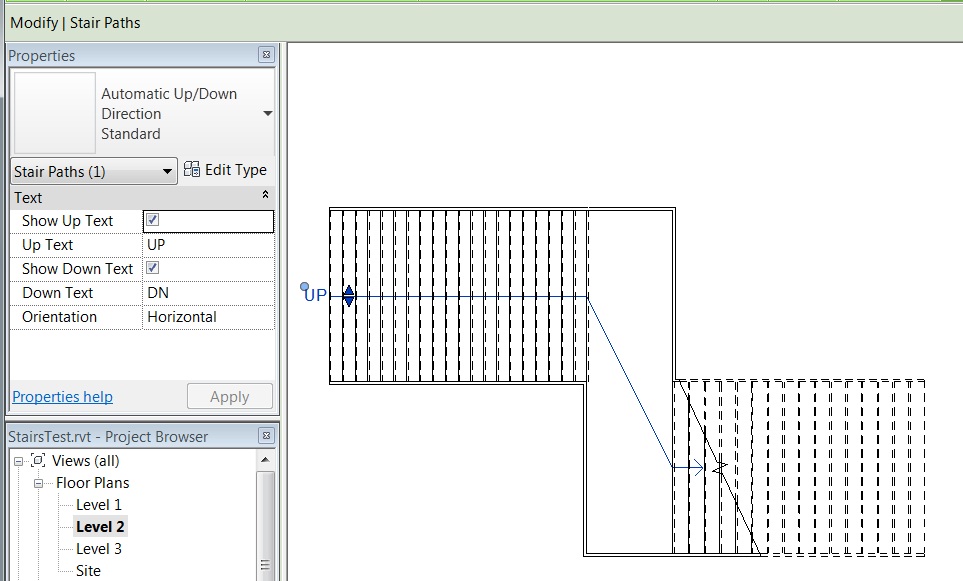
下面的示例在项目中查找StairsPathType和FloorPlan,并使用它们为给定的Stairs创建新的StairsPath。
代码区域:创建楼梯路径
private void CreateStairsPath(Document document, Stairs stairs)
{
    Transaction transNewPath = new Transaction(document, "New Stairs Path");
    transNewPath.Start();

    // Find StairsPathType
    FilteredElementCollector collector = new FilteredElementCollector(document);
    ICollection<ElementId> stairsPathIds = collector.OfClass(typeof(StairsPathType)).ToElementIdsElementId();

    // Find a FloorPlan
    ElementId planViewId = ElementId.InvalidElementId;
    FilteredElementCollector viewCollector = new FilteredElementCollector(document);
    ICollection<ElementId> viewIds = viewCollector.OfClass(typeof(View)).ToElementIdsElementId();
    foreach (ElementId viewId in viewIds)
    {
        View view = document.GetElement(viewId) as View;
        if (view.ViewType == ViewType.FloorPlan)
        {
            planViewId = view.Id;
            break;
        }
    }

    LinkElementId stairsLinkId = new LinkElementId(stairs.Id);
    StairsPath.Create(stairs.Document, stairsLinkId, stairsPathIds.First(), planViewId);
    transNewPath.Commit();
}
StairsPath具有StairsPathType。楼梯路径类型可从两个预定义的系统族中获得:“自动向上/向下方向”和“固定向上方向”。可用于这两种类型的属性作为StairsPathType类中的属性提供,例如FullStepArrow和DistanceToCutMark。
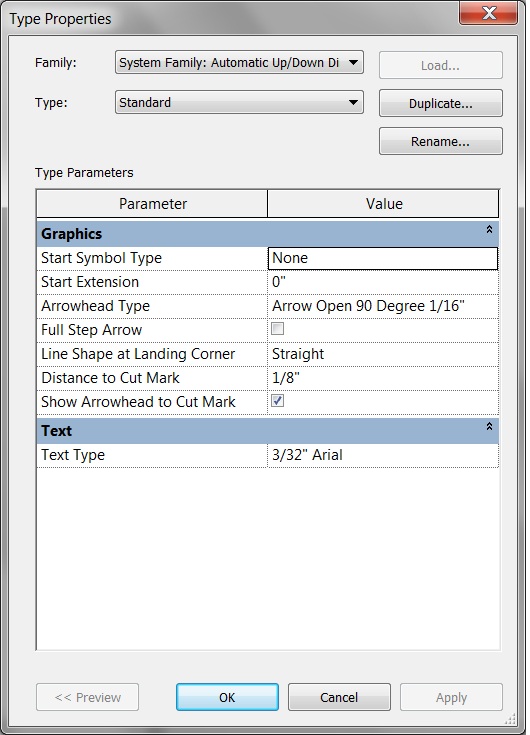
CutMarkType类表示Revit UI中的剪切标记类型,它具有表示在UI中编辑剪切标记类型时可用的相同属性的属性,例如CutLineAngle和CutLineExtension。它与StairsType对象相关联,可以使用BuiltInParameter STAIRSTYPE_CUTMARK_TYPE进行检索,如下所示。
代码区域:获取楼梯的CutMarkType
private CutMarkType GetCutMark(Stairs stairs)
{
    CutMarkType cutMarkType = null;
    StairsType stairsType = stairs.Document.GetElement(stairs.GetTypeId()) as StairsType;
    Parameter paramCutMark = stairsType.get_Parameter(BuiltInParameter.STAIRSTYPE_CUTMARK_TYPE);
    if (paramCutMark.StorageType == StorageType.ElementId)  // should be an element id
    {
        ElementId cutMarkId = paramCutMark.AsElementId();
        cutMarkType = stairs.Document.GetElement(cutMarkId) as CutMarkType;
    }

    return cutMarkType;
}
楼梯构件
楼梯构件
Stairs类表示Revit中的楼梯图元,并包含表示有关踏步、高度、楼层数以及楼梯高度、底部标高和顶部标高的信息的属性。Stairs类的方法可用于获取楼梯平台构件、楼梯梯段构件和楼梯支撑。
下面的示例按构件查找所有楼梯,并将有关每个楼梯的一些信息输出到TaskDialog对话框。请注意,此示例使用带有BuiltInCategory.OST_Stairs的类别过滤器,该过滤器将返回所有楼梯的ElementId,因此在从文档中检索时将每个ElementId转换为Stairs类之前,需要进行测试以查看每个ElementId是否代表Stairs By Component。
代码区域:获取楼梯信息
private Stairs GetStairInfo(Document document)
{
    Stairs stairs = null;

    FilteredElementCollector collector = new FilteredElementCollector(document);
    ICollection<ElementId> stairsIds = collector.WhereElementIsNotElementType().OfCategory(BuiltInCategory.OST_Stairs).ToElementIdsElementId();
    foreach (ElementId stairId in stairsIds)
    {
        if (Stairs.IsByComponent(document, stairId) == true)
        {
            stairs = document.GetElement(stairId) as Stairs;

            // Format the information
            String info = "\nNumber of stories:  " + stairs.NumberOfStories;
            info += "\nHeight of stairs:  " + stairs.Height;
            info += "\nNumber of treads:  " + stairs.ActualTreadsNumber;
            info += "\nTread depth:  " + stairs.ActualTreadDepth;

            // Show the information to the user.
            TaskDialog.Show("Revit", info);
        }
    }

    return stairs;
}
StairsType类表示Stairs元素的类型。它包含有关楼梯的信息,例如楼梯对象中所有梯段和平台的类型、楼梯左侧、右侧和中间支撑的类型和偏移,以及与楼梯生成相关的许多其他特性,例如楼梯图元上每个踢面的最大高度。下面的示例获取Stairs元素的StairsType,并在TaskDialog中显示有关该元素的一些信息。
代码区域:获取楼梯类型信息
private void GetStairsType(Stairs stairs)
{
    StairsType stairsType = stairs.Document.GetElement(stairs.GetTypeId()) as StairsType;

    // Format stairs type info for display
    string info = "Stairs Type:  " + stairsType.Name;
    info += "\nLeft Lateral Offset:  " + stairsType.LeftLateralOffset;
    info += "\nRight Lateral Offset:  " + stairsType.RightLateralOffset;
    info += "\nMax Riser Height:  " + stairsType.MaxRiserHeight;
    info += "\nMin Run Width:  " + stairsType.MinRunWidth;

    TaskDialog.Show("Revit", info);
}
梯段
楼梯构件由梯段、平台和支撑组成。这些项中的每一项都可以从Stairs类中检索。梯段在Revit API中由StairsRun类表示。下面的示例获取Stairs对象的每个梯段,并确保它以踢面开始和结束。
代码区域:使用StairsRun
private void AddStartandEndRisers(Stairs stairs)
{
    ICollection<ElementId> runIds = stairs.GetStairsRuns();

    foreach (ElementId runId in runIds)
    {
        StairsRun run = stairs.Document.GetElement(runId) as StairsRun;
        if (null != run)
        {
            run.BeginsWithRiser = true;
            run.EndsWithRiser = true;
        }
    }
}
StairsRun类提供对梯段属性的访问,例如StairsRunStyle(直线、斜梯等),BaseElevation、TopElevation和有关高程的属性。StairsRun类中还有一些方法可用于访问梯段承载的支撑,可以是全部支撑,也可以仅是梯段边界左侧或右侧的支撑。GetStairsPath()方法将返回表示梯段上楼梯路径的曲线,这些曲线将投影到楼梯的底部标高上。GetFootprintBoundary()方法返回梯段的边界曲线,这些曲线也投影到楼梯的底部标高上。
StairsRun类有三个用于创建新梯段的静态方法。这些将在“创建和编辑楼梯”部分中介绍。
StairsRunType类表示StairsRun的类型。它包含有关梯段踏板和宽度的许多特性以及有关梯段的其他信息。下面的示例获取Stairs元素中第一个梯段的StairsRunType,并显示踢面和踏步厚度沿着以及类型名称。
代码区域:获取StairsRunType信息
private void GetRunType(Stairs stairs)
{
    ICollection<ElementId> runIds = stairs.GetStairsRuns();

    ElementId firstRunId = runIds.First();

    StairsRun firstRun = stairs.Document.GetElement(firstRunId) as StairsRun;
    if (null != firstRun)
    {
        StairsRunType runType = stairs.Document.GetElement(firstRun.GetTypeId()) as StairsRunType;
        // Format landing type info for display
        string info = "Stairs Run Type:  " + runType.Name;
        info += "\nRiser Thickness:  " + runType.RiserThickness;
        info += "\nTread Thickness:  " + runType.TreadThickness;

        TaskDialog.Show("Revit", info);
    }
}
平台
平台由StairsLanding类表示。下面的示例查找Stairs对象的每个平台的厚度。
代码区域:使用楼梯平台
private void GetStairLandings(Stairs stairs)
{
    ICollection<ElementId> landingIds = stairs.GetStairsLandings();
    string info = "Number of landings:  " + landingIds.Count;

    int landingIndex = 0;
    foreach (ElementId landingId in landingIds)
    {
        landingIndex++;
        StairsLanding landing = stairs.Document.GetElement(landingId) as StairsLanding;
        if (null != landing)
        {
            info += "\nThickness of Landing " + landingIndex + ":  " + landing.Thickness;
        }
    }

    TaskDialog.Show("Revit", info);
}
与StairsRun类似,StairsLanding具有GetStairsPath()方法和GetFootprintBoundary()方法,前者返回表示平台上投影到楼梯基层的楼梯路径的曲线,后者返回平台的边界曲线,也投影到楼梯基层。同样类似于StairsRun,有一种方法可以获取平台承载的所有支撑。
StairsLanding类有一个在两个梯段之间创建新平台的方法。它将在“创建和编辑楼梯”部分中介绍。
StairsLandingType类表示Revit API中的平台类型。StairsLandingType类只有两个特定于它的属性,即IsMonolithic(如果楼梯平台是整体的,则为真)和Thickness(表示楼梯平台的厚度)。
楼梯连接
Both StairsRun and StairsLanding have a GetConnections() method which provides information about connections among stairs components (run to run, or run to landing). The method returns a collection of StairsComponentConnection objects which have properties about each connection, including the connection type (to a landing, the start of a stairs run, or the end of a stairs run) and the Id of the connected stairs component.
StairsRun和StairsLanding都具有GetConnections()方法,该方法提供有关楼梯构件之间连接的信息(梯段到梯段,或梯段到平台)。该方法返回一个StairsStringentConnection对象的集合,这些对象具有关于每个连接的属性,包括连接类型(连接平台、楼梯梯段起点或楼梯梯段终点)和连接的楼梯构件的ID。
支撑
Revit API不显示楼梯支撑类。获取楼梯、楼梯梯段或楼梯平台的支撑时,支撑将为常规Revit图元。下面的示例获取Stairs对象的所有支撑的名称。
代码区域:获取楼梯支撑
private void GetStairSupports(Stairs stairs)
{
    ICollection<ElementId> supportIds = stairs.GetStairsSupports();
    string info = "Number of supports:  " + supportIds.Count;

    int supportIndex = 0;
    foreach (ElementId supportId in supportIds)
    {
        supportIndex++;
        Element support = stairs.Document.GetElement(supportId);
        if (null != support)
        {
            info += "\nName of support " + supportIndex + ":  " + support.Name;
        }
    }

    TaskDialog.Show("Revit", info);
}

 浙公网安备 33010602011771号