
实验 7: OpenDaylight 实验——Python 中的 REST API 调用
一、实验目的
对 Python 调用 OpenDaylight 的 REST API 方法有初步了解。
二、实验任务
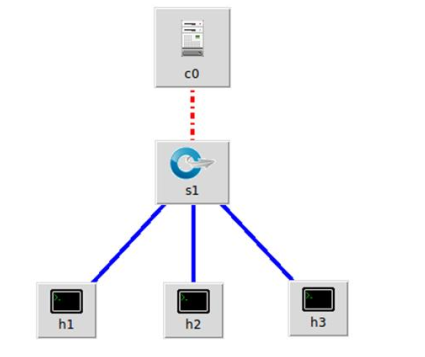
本实验需要用另一种方法完成上一个实验相同的功能,即通过 Python 程序调用OpenDaylight 的北向接口下发关于硬超时的流表,实现拓扑内主机在一定时间内的网络通断。实验拓扑如下:
三、 实验步骤
1. 实验环境
安装了 Ubuntu 18.04.5 Desktop amd64 的虚拟机
2. 实验过程
(1) 生成拓扑
sudo mn --topo=single,3 --controller=remote,ip=127.0.0.1,port=6633 --switch ovsk,protocols=OpenFlow13
(2)编写 Python 代码和 JSON 格式的请求内容
#!/usr/bin/python
import requests
from requests.auth import HTTPBasicAuth
def http_put(url,jstr):
    url= url
    headers = {'Content-Type':'application/json'}
    resp = requests.put(url,jstr,headers=headers,auth=HTTPBasicAuth('admin', 'admin'))
    return resp
if __name__ == "__main__":
    url = 'http://127.0.0.1:8181/restconf/config/opendaylight-inventory:nodes/node/openflow:1/flow-node-inventory:table/0/flow/1'
    with open('hardtimeout.json') as f:
        jstr = f.read()
    resp = http_puturl,jstr)
    print resp.content
由于是下发流表,因此需要有 http 请求的具体内容,同之前的 Postman 一样,也是以 JSON 格式来表示
{
    "flow": [
        {
            "id": "1",
            "match": {
                "in-port": "1",
                "ethernet-match": {
                    "ethernet-type": {
                        "type": "0x0800"
                    }
                },
                "ipv4-destination": "10.0.0.3/32"
            },
            "instructions": {
                "instruction": [
                    {
                        "order": "0",
                        "apply-actions": {
                            "action": [
                                {
                                    "order": "0",
                                    "drop-action": {}
                                }
                            ]
                        }
                    }
                ]
            },
            "flow-name": "flow1",
            "priority": "65535",
            "hard-timeout": "10",
            "cookie": "2",
            "table_id": "0"
        }
    ]
}
(3) 运行 Python 代码,完成流表下发
先执行
h1 ping h3
再ping的过程中执行
sudo odlnorth.py

四、实验心得
- 在生成拓扑之前,需要运行OpenDaylight,通过Postman的Delete动作清空残留表,用sudo mn -c清空Mininet数据,再生成拓扑。
- 我的Postman在

差点被遗忘

 浙公网安备 33010602011771号