解决Ubuntu配置nginx出现的问题

Ubuntu18.04配置nginx出现的各种错误

  1. 缺少pcre库

    编译nginx

    ![在这里插入图片描述]( https://img-blog.csdnimg.cn/20201121205102815.png?x-oss-process=image/watermark ,type_ZmFuZ3poZW5naGVpdGk,shadow_10,text_aHR0cHM6Ly9ibG9nLmNzZG4ubmV0L3FxXzQzMzI2NzQ0,size_16,color_FFFFFF,t_70#pic_center)

    出现错误

在这里插入图片描述

安装pcre库,出现错误

![在这里插入图片描述]( https://img-blog.csdnimg.cn/20201121205124688.png?x-oss-process=image/watermark ,type_ZmFuZ3poZW5naGVpdGk,shadow_10,text_aHR0cHM6Ly9ibG9nLmNzZG4ubmV0L3FxXzQzMzI2NzQ0,size_16,color_FFFFFF,t_70#pic_center)

手动编译安装pcre库

(1)下载并解压pcre库

wget https://ftp.pcre.org/pub/pcre/pcre-8.43.tar.gz
tar -xvf pcre-8.43.tar.gz

![在这里插入图片描述]( https://img-blog.csdnimg.cn/20201121205133932.png?x-oss-process=image/watermark ,type_ZmFuZ3poZW5naGVpdGk,shadow_10,text_aHR0cHM6Ly9ibG9nLmNzZG4ubmV0L3FxXzQzMzI2NzQ0,size_16,color_FFFFFF,t_70#pic_center)

(2)编译安装pcre库

cd pcre-8.43
sudo ./configure
sudo make
sudo make install

重新编译nginx

#在nginx-1.12.2目录下
sudo ./configure --with-stream

命令执行成功

![在这里插入图片描述]( https://img-blog.csdnimg.cn/20201121205149500.png?x-oss-process=image/watermark ,type_ZmFuZ3poZW5naGVpdGk,shadow_10,text_aHR0cHM6Ly9ibG9nLmNzZG4ubmV0L3FxXzQzMzI2NzQ0,size_16,color_FFFFFF,t_70#pic_center)

  1. 出现"struct crypt_data"没有名为"current_salt"成员的错误

    执行make命令

    sudo make && make install
    

    出现"struct crypt_data"没有名为"current_salt"成员的错误

    在这里插入图片描述

    解决方案:进入相应路径,将源码的第36行注释

    sudo vi src/os/unix/ngx_user.c
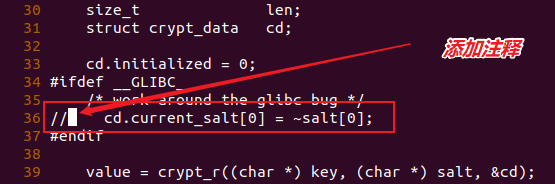
    

在这里插入图片描述

重新执行sudo make && make install命令

  1. 出现-Werror=cast-function-type错误

![在这里插入图片描述]( https://img-blog.csdnimg.cn/2020112120524016.png?x-oss-process=image/watermark ,type_ZmFuZ3poZW5naGVpdGk,shadow_10,text_aHR0cHM6Ly9ibG9nLmNzZG4ubmV0L3FxXzQzMzI2NzQ0,size_16,color_FFFFFF,t_70#pic_center)

解决方案

#进入nginx-1.12.2目录下的objs目录
cd objs
#修改Makefile文件
sudo vi Makefile 

在这里插入图片描述

重新回到nginx-1.12.2目录下执行sudo make && make install命令

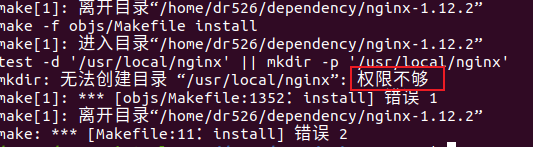
  1. make命令出现权限不够错误

在这里插入图片描述

进入root模式执行命令

sudo su #进入root模式
make && make install
  1. nginx启动出现无法连接pcre库错误

    在这里插入图片描述

    查看依赖库

在这里插入图片描述

到/usr/local/lib目录下查看

在这里插入图片描述

设置软连接

#回到nginx下的sbin目录
cd /usr/local/nginx/sbin
#设置软连接
ln -s /usr/local/lib/libpcre.so.1.2.11 libpcre.so.1
#设置LD_LIBRARY_PATH(注:这种方法,每次开启nginx都需要重新设置LD_LIBRARY_PATH)
export LD_LIBRARY_PATH=/usr/local/lib:$LD_LIBRARY_PATH

重新启动nginx

./nginx
# 查看服务是否正常启动
netstat -tanp

![在这里插入图片描述]( https://img-blog.csdnimg.cn/20201121205407216.png?x-oss-process=image/watermark ,type_ZmFuZ3poZW5naGVpdGk,shadow_10,text_aHR0cHM6Ly9ibG9nLmNzZG4ubmV0L3FxXzQzMzI2NzQ0,size_16,color_FFFFFF,t_70#pic_center)

posted @ 2020-11-21 20:58  dr526  阅读(749)  评论(0)    收藏  举报