
随笔分类 - 技术
摘要:mac os 下使用 podman machine init podman machine start podman machine stop podman machine set --rootless podman machine start 修改代理 $ podman machine ssh C
阅读全文
摘要:windows 机器去连接远端服务器中的linux系统。linux系统由docker容器启动,默认是root 账号。sshd 默认禁止root账号登陆, 比较简单的是通过ssh的密钥直接登陆。另外,linux 系统不能访问外网,需要传递文件。 linux开启ssh服务 ubuntu系统 servic
阅读全文
摘要:去掉重复, 以及开头的冒号 export LD_LIBRARY_PATH=$(echo $LD_LIBRARY_PATH | awk -F: '{for(i=1;i<=NF;i++) if(!a[$i]++) printf(i>1?":%s":"%s"),$i}' | sed 's/^://') e
阅读全文
摘要:镜像制作 注意 mac 最近的芯片都是arm64架构, 而Linux一般都是 amd64架构 创建 Dockerfile 文件 # FROM ubuntu # 使用阿里云 alinux3 FROM alibaba-cloud-linux-3-registry.cn-hangzhou.cr.aliyu
阅读全文
摘要:使用Python内置的 pdb 模块 描述: pdb 是Python的内置调试器,可以逐行执行代码,检查变量,设置断点等。 使用方法: import pdb pdb.set_trace() python在你想开始调试的地方插入 pdb.set_trace(),程序会在这里暂停,进入调试模式。 常用命
阅读全文
摘要:#!/bin/bash VARIABLE_NAME="HelloWorld" cat <<'EOF' The variable $VARIABLE_NAME should not be replaced. EOF cat <<EOF In this case, we'll escape the do
阅读全文
摘要:尝试恢复 grub 界面 按e 编辑, ro 后加上 splash nomodeset 按快捷键ctl + alt + F1, 或者 ctl + alt + F2 或者 其他 F3可以图形登录 删除nvidia 相关, reboot 后可以登录图形界面 sudo apt-get remove nvi
阅读全文
摘要:https://help.aliyun.com/document_detail/206889.html
阅读全文
摘要:比较pdf差别 https://vslavik.github.io/diff-pdf/ brew install diff-pdf 使用 diff-pdf --view a.pdf b.pdf # or diff-pdf --output-diff=diff.pdf a.pdf b.pdf
阅读全文
摘要:## mintlinux安装docker * 用 Aliyun 代理 ```bash # step 1: 安装必要的一些系统工具 sudo apt update sudo apt -y install apt-transport-https ca-certificates curl software
阅读全文
摘要:看到一个github上搭建的博客, 很漂亮, https://adaning.github.io/tags/ 有机会可以搞一个。 参考它上面的提示 Powered by Hexo | Theme Matery
阅读全文
摘要:## 固件 * [下载](https://www.123pan.com/s/Q968Vv-MuUK3)解压固件文件, 复制 360f5 1141 那个版本至桌面, ## 方法1. 连网线升级固件步骤(忽略,直接方法2) 1. 固件复制桌面后, 拔掉路由WAN口网线,然后电脑到路由由LAN口连根线,
阅读全文
摘要:* 命令: sudo ifconfig awdl0 down * 命令原理:注意影响隔空投送功能 此命令关闭的是awdl0网卡, 此网卡被应用于Airdrop, AirPlay等功能, 被苹果默认开启。此网卡开启会极 大影响WIFI, 但是对于电脑用户基本上不需要这些功能, 还有安全风险。 此命令的
阅读全文
摘要: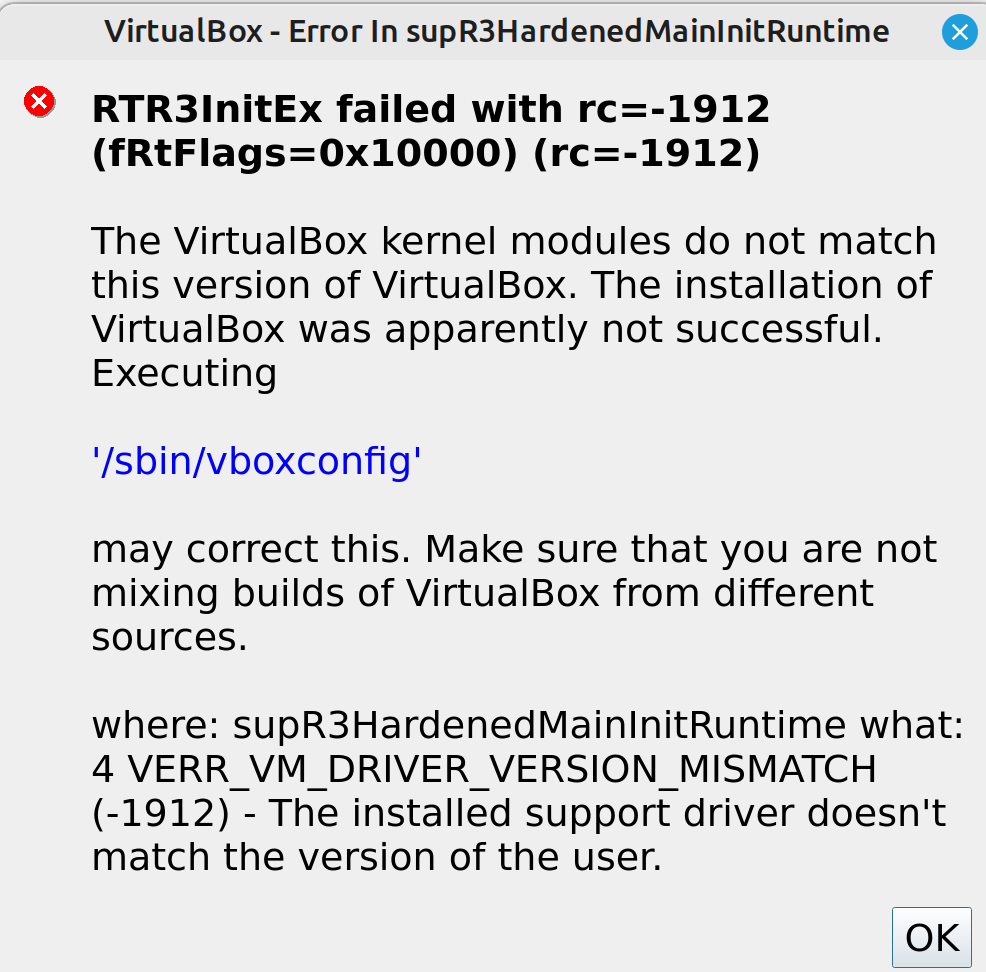 ```bash sudo modinfo vboxdrv sudo rm /lib/modules/5.15.
阅读全文
摘要:> mint linux 下使用virtualbox,安装了 Oracle_VM_VirtualBox_Extension_Pack-6.1.34.vbox-extpack 后。仍然无法使用usb。 * 如下处理。 可能只是最后一句生效了。 ```bash sudo groupadd usbfs s
阅读全文
摘要:安装 sbcl-2.2.1 有点问题,尝试安装老版本 https://trac.macports.org/wiki/howto/InstallingOlderPort
阅读全文
摘要:* 当前 mint linux 20.2,4K显示器, 2倍分辨率设置,鼠标大小无法调大。早一个版本也不行。 * 解决:系统设置 -> 主题 -> 鼠标指针, 换一个试试, 我选了Adwaita后, 终于解决。  浙公网安备 33010602011771号