
五个视频网站数据统计分析- 输入输出格式练习
一、需求
自定义输入格式 完成统计任务 输出多个文件
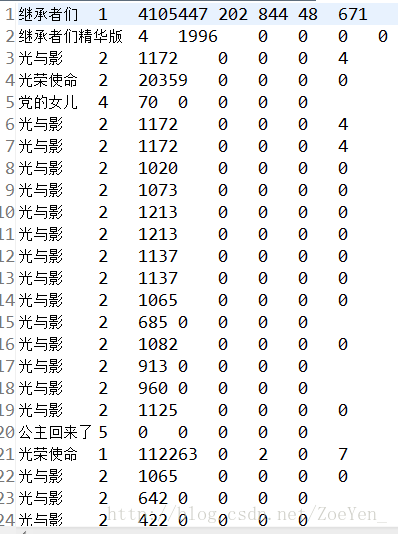
输入数据:5个网站的 每天电视剧的 播放量 收藏数 评论数 踩数 赞数
输出数据:按网站类别 统计每个电视剧的每个指标的总量
任务目标:自定义输入格式 完成统计任务 输出多个文件
二、数据
部分数据
三、思路
第一步:定义一个电视剧热度数据的bean。
第二步:定义一个读取热度数据的InputFormat类。
第三步:写MapReduce统计程序
第四步:上传tvplay.txt数据集到HDFS,并运行程序
四、代码
1.利用WritableComparable接口,自定义一个TVWritable类,实现WritableComparable类,将各个参数封装起来,便于计算。
package com.pc.hadoop.pc.tv;

import java.io.DataInput;
import java.io.DataOutput;
import java.io.IOException;

import org.apache.hadoop.io.WritableComparable;

public class TVWritable implements WritableComparable

{
    //定义5个成员变量
    private int view;
    private int collection;
    private int comment;
    private int diss;
    private int up;

    //构造函数
    public TVWritable(){}


    //定义一个set方法,用this关键字对封装好的数据进行引用
    public void set(int view,int collection,int comment, int diss,int up)
    {

        this.view = view;
        this.collection = collection;
        this.comment = comment;
        this.diss = diss;
        this.up = up;
    }

    //使用get和set对封装好的数据进行存取
    public int getView()
    {
        return view;
    }
    public void setView(int view)
    {
        this.view = view;
    }


    public int getCollection()
    {
        return collection;
    }
    public void setCollection(int collection)
    {
        this.collection = collection;
    }


    public int getComment()
    {
        return comment;
    }
    public void setComment(int comment)
    {
        this.comment = comment;
    }


    public int getDiss()
    {
        return diss;
    }
    public void setDiss(int diss)
    {
        this.diss = diss;
    }


    public int getUp()
    {
        return up;
    }
    public void setUp(int up)
    {
        this.up = up;
    }

    //实现WritableComparaqble的redafields()方法,以便该数据能被序列化后完成网络传输或文件输入。
    @Override
    public void readFields(DataInput in) throws IOException
    {
        // TODO Auto-generated method stub

        view = in.readInt();
        collection = in.readInt();
        comment = in.readInt();
        diss = in.readInt();
        up = in.readInt();

    }

    //实现WritableComparaqble的write()方法,以便该数据能被反序列化后完成网络传输或文件输入。
    @Override
    public void write(DataOutput out) throws IOException
    {
        // TODO Auto-generated method stub
        out.writeInt(view);
        out.writeInt(collection);
        out.writeInt(comment);
        out.writeInt(diss);
        out.writeInt(up);
    }

    //使用compareTo对其中的数据进行比较
    @Override
    public int compareTo(Object o)
    {
        // TODO Auto-generated method stub
        return 0;
    }

}
2.自定义一个TVInputFormat类取继承FileInputFormat文件输入格式这个父类,然后对createRecordReader()方法进行重写,其实质则是重写TVRecordReader()这个方法,得到其返回值,利用TVRecordReader()这个方法去继承RecordReader()这个方法。
  1 package com.pc.hadoop.pc.tv;
  2
  3 import java.io.IOException;
  4
  5 import org.apache.hadoop.conf.Configuration;
  6 import org.apache.hadoop.fs.FSDataInputStream;
  7 import org.apache.hadoop.fs.FileSystem;
  8 import org.apache.hadoop.fs.Path;
  9 import org.apache.hadoop.io.Text;
 10 import org.apache.hadoop.mapreduce.InputSplit;
 11 import org.apache.hadoop.mapreduce.RecordReader;
 12 import org.apache.hadoop.mapreduce.TaskAttemptContext;
 13 import org.apache.hadoop.mapreduce.lib.input.FileInputFormat;
 14 import org.apache.hadoop.mapreduce.lib.input.FileSplit;
 15 import org.apache.hadoop.util.LineReader;
 16
 17 public class TVInputFormat extends FileInputFormat<Text,TVWritable>
 18 {
 19     protected boolean isSplitable()
 20     {
 21         return false;
 22     }
 23
 24     @Override
 25     public RecordReader<Text, TVWritable> createRecordReader(InputSplit inputsplit, TaskAttemptContext context) throws IOException, InterruptedException
 26     {
 27         // TODO Auto-generated method stub
 28         return new TVRecordReader();
 29     }
 30
 31     public static class TVRecordReader extends RecordReader<Text,TVWritable>
 32     {
 33         public LineReader in; //自定义行读取器
 34         public Text lineKey; //声明key类型
 35         public TVWritable lineValue; //自定义value
 36         public Text line; //每行数据类型
 37
 38         //
 39         @Override
 40         public void close() throws IOException
 41         {
 42             // TODO Auto-generated method stub
 43             if(in != null)
 44             {
 45                 in.close();
 46             }
 47
 48         }
 49
 50         //获取当前key
 51         @Override
 52         public Text getCurrentKey() throws IOException, InterruptedException
 53         {
 54             // TODO Auto-generated method stub
 55             return lineKey;
 56         }
 57
 58         //获取当前value
 59         @Override
 60         public TVWritable getCurrentValue() throws IOException, InterruptedException
 61
 62         {
 63             // TODO Auto-generated method stub
 64             return lineValue;
 65         }
 66
 67         //获取当前进程
 68         @Override
 69         public float getProgress() throws IOException, InterruptedException
 70
 71         {
 72             // TODO Auto-generated method stub
 73             return 0;
 74         }
 75
 76         //初始化
 77         @Override
 78         public void initialize(InputSplit inputsplit, TaskAttemptContext context) throws IOException, InterruptedException
 79
 80         {
 81             // TODO Auto-generated method stub
 82
 83             FileSplit split = (FileSplit) inputsplit;//获取分片内容
 84             Configuration job = context.getConfiguration();//读取配置信息
 85             Path file = split.getPath();//获取路径
 86             FileSystem fs = file.getFileSystem(job);//获取文件系统
 87
 88             FSDataInputStream filein = fs.open(file);//通过文件系统打开文件,对文件进行读取
 89             in = new LineReader(filein,job);
 90             lineKey = new Text();//新建一个Text实例作为自定义输入格式的key
 91             lineValue = new TVWritable();
 92             line = new Text();
 93
 94
 95
 96         }
 97
 98         @Override
 99         public boolean nextKeyValue() throws IOException, InterruptedException
100
101         {
102             // TODO Auto-generated method stub
103             int lineSize = in.readLine(line);
104             if(lineSize == 0)
105             return false;
106             //读取每行数据解数组i
107             String[] i = line.toString().split("\t");
108             if(i.length != 7)
109
110             {
111                 throw new IOException("Invalid record received");
112             }
113             //自定义key和value的值
114             lineKey.set(i[0]+"\t"+i[1]);//电视剧名称和所属视频网站
115             lineValue.set(Integer.parseInt(i[2].trim()), Integer.parseInt(i[3].trim()), Integer.parseInt(i[4].trim()), Integer.parseInt(i[5].trim()), Integer.parseInt(i[6].trim() ));
116
117
118             return true;
119
120         }
121
122     }
123
124
125
126 }
3.使用MapperReducer对输入的数据进行进行相应的处理输出想要得到的结果。
在reduce在定义一个多输出的对象MultipleOutputs
 1 /**
 2      * @input Params Text TvPlayData
 3      * @output Params Text TvPlayData
 4      * @author yangjun
 5      * @function 直接输出
 6      */
 7     public static class TVPlayMapper extends
 8             Mapper<Text, TVWritable, Text, TVWritable> {
 9         @Override
10         protected void map(Text key, TVWritable value, Context context)
11                 throws IOException, InterruptedException {
12             context.write(key, value);
13         }
14     }
15     /**
16      * @input Params Text TvPlayData
17      * @output Params Text Text
18      * @author yangjun
19      * @fuction 统计每部电视剧的 点播数 收藏数等  按source输出到不同文件夹下
20      */
21     public static class TVPlayReducer extends
22             Reducer<Text, TVWritable, Text, Text> {
23         private Text m_key = new Text();
24         private Text m_value = new Text();
25         private MultipleOutputs<Text, Text> mos;
26
27         protected void setup(Context context) throws IOException,
28                 InterruptedException {
29             mos = new MultipleOutputs<Text, Text>(context);
30         }//将 MultipleOutputs 的初始化放在 setup() 中,因为在 setup() 只会被调用一次
31 //定义reduce() 方法里的 multipleOutputs.write(…)。你需要把以前的 context.write(…) 替换成现在的这个
32         protected void reduce(Text Key, Iterable<TVWritable> Values,
33                 Context context) throws IOException, InterruptedException {
34              int view = 0;
35              int collection = 0;
36              int comment = 0;
37              int diss = 0;
38              int up = 0;
39             for (TVWritable a:Values) {
40                  view += a.getView();
41                  collection += a.getCollection();
42                  comment +=a.getComment();
43                  diss += a.getDiss();
44                  up += a.getUp();
45             }
46             //tvname  source
47             String[] records = Key.toString().split("\t");
48             // 1优酷2搜狐3土豆4爱奇艺5迅雷看看
49             String source = records[1];// 媒体类别
50             m_key.set(records[0]);
51             m_value.set(view+"\t"+collection+"\t"+comment+"\t"+diss+"\t"+up);
52             if (source.equals("1")) {
53                 mos.write("youku", m_key, m_value);
54             } else if (source.equals("2")) {
55                 mos.write("souhu", m_key, m_value);
56             } else if (source.equals("3")) {
57                 mos.write("tudou", m_key, m_value);
58             } else if (source.equals("4")) {
59                 mos.write("aiqiyi", m_key, m_value);
60             } else if (source.equals("5")) {
61                 mos.write("xunlei", m_key, m_value);
62             }
63         }
64
65         protected void cleanup(Context context) throws IOException,
66                 InterruptedException {
67             mos.close();   //关闭 MultipleOutputs,也就是关闭 RecordWriter,并且是一堆 RecordWriter,因为这里会有很多 reduce 被调用。
68         }
69     }
4 运行run函数对作业进行运行,并自定义输出MultipleOutputs函数调用addNameoutput方法对其进行设置多路径的输出。
 1 @Override
 2     public int run(String[] args) throws Exception {
 3         Configuration conf = new Configuration();// 配置文件对象
 4         Path mypath = new Path(args[1]);
 5         FileSystem hdfs = mypath.getFileSystem(conf);// 创建输出路径
 6         if (hdfs.isDirectory(mypath)) {
 7             hdfs.delete(mypath, true);
 8         }
 9
10         Job job = new Job(conf, "tvplay");// 构造任务
11         job.setJarByClass(TVplay.class);// 设置主类
12
13         job.setMapperClass(TVPlayMapper.class);// 设置Mapper
14         job.setMapOutputKeyClass(Text.class);// key输出类型
15         job.setMapOutputValueClass(TVWritable.class);// value输出类型
16         job.setInputFormatClass(TVInputFormat.class);//自定义输入格式
17
18         job.setReducerClass(TVPlayReducer.class);// 设置Reducer
19         job.setOutputKeyClass(Text.class);// reduce key类型
20         job.setOutputValueClass(Text.class);// reduce value类型
21         // 自定义文件输出格式,通过路径名(pathname)来指定输出路径
22         MultipleOutputs.addNamedOutput(job, "youku", TextOutputFormat.class,
23                 Text.class, Text.class);
24         MultipleOutputs.addNamedOutput(job, "souhu", TextOutputFormat.class,
25                 Text.class, Text.class);
26         MultipleOutputs.addNamedOutput(job, "tudou", TextOutputFormat.class,
27                 Text.class, Text.class);
28         MultipleOutputs.addNamedOutput(job, "aiqiyi", TextOutputFormat.class,
29                 Text.class, Text.class);
30         MultipleOutputs.addNamedOutput(job, "xunlei", TextOutputFormat.class,
31                 Text.class, Text.class);
32
33         FileInputFormat.addInputPath(job, new Path(args[0]));// 输入路径
34         FileOutputFormat.setOutputPath(job, new Path(args[1]));// 输出路径
35         job.waitForCompletion(true);
36         return 0;
37     }
38     public static void main(String[] args) throws Exception {
39         String[] args0 = { "hdfs://pc1:9000/home/hadoop/tvplay/tvplay.txt",
40                 "hdfs://pc1:9000/home/hadoop/tvplay/out/" };
41         int ec = ToolRunner.run(new Configuration(), new TVplay(), args0);
42         //public static int run(Configuration conf,Tool tool, String[] args),可以在job运行的时候指定配置文件或其他参数
43         //这个方法调用tool的run(String[])方法,并使用conf中的参数,以及args中的参数,而args一般来源于命令行。
44         System.exit(ec);
45     }
五、运行
在myeclipse上运行:
1.创建目录、home/hadoop/tvplay,将数据文件上传至目录下

2.右键->run as->run on hadoop
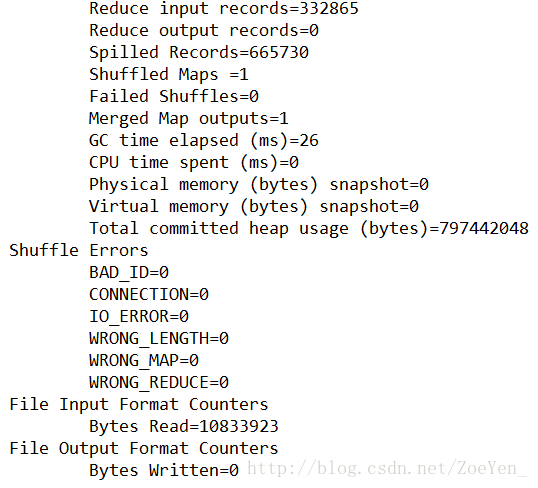
控制台显示信息
右键refresh
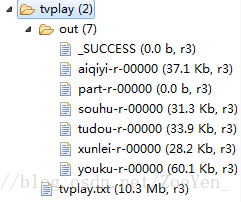
部分结果

.在hdfs上运行:
1.修改args0的两个路径,或者删除运行结果的out文件夹
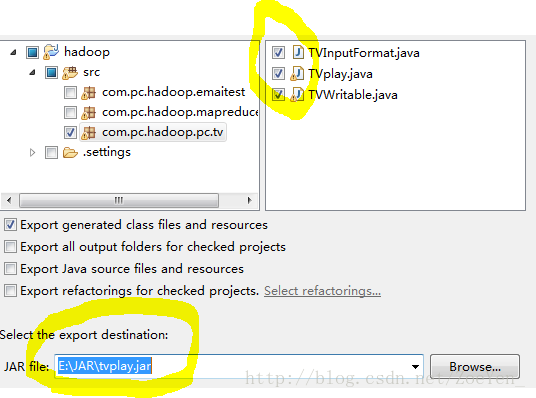
2.将三个java文件打包到本机,右键->export->JAR file
3.将jar包上传到hdfs的文件系统

4.运行程序
[hadoop@pc1 hadoop]$ bin/hadoop jar tvplay.jar com.pc.hadoop.pc.tv.TVplay /home/hadoop/tvplay/tvplay.txt /home/hadoop/tvplay/out
- 1
- 2
- 3

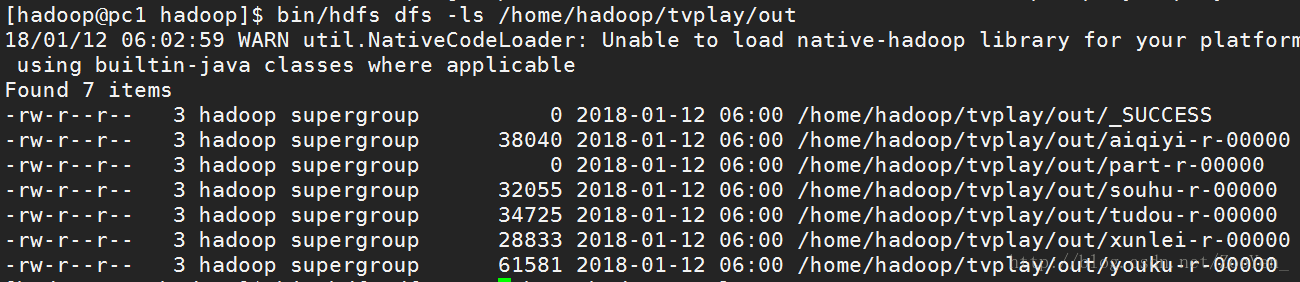
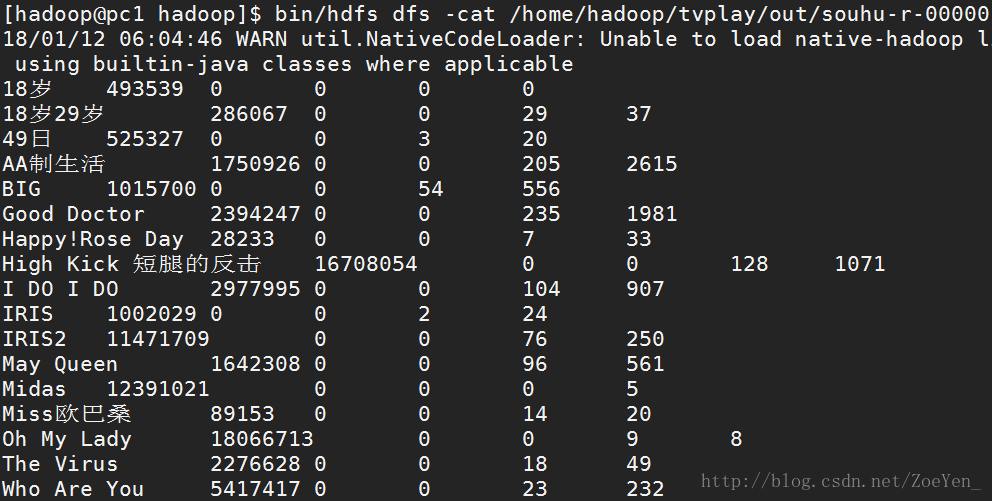
5.查看运行结果

 浙公网安备 33010602011771号