
表格行添加双击事件
需求: 文件管理功能, 类似与windows 的文件及文件夹操作
如下图:
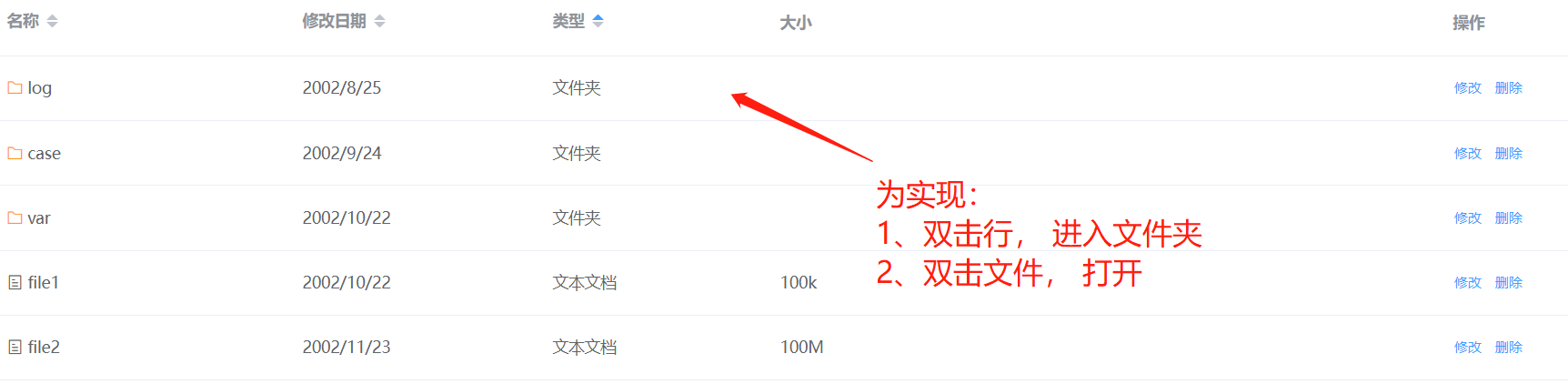
双击是实现:
1、主要依靠 mounted() 中 this.$nextTick, 渲染后挂载事件
2、其中 addEventListener('dblclick', function () {}) 为主要功能实现
前端vue代码:
<template>
    <div class="log_manage">
        <div class="head">
            <div class="step">
                <span><i class="step-i el-icon-back" title="上一层" @click="onStep"></i></span>
                <span><i class="step-i el-icon-right" title="下一层" @click="underStep"></i></span>
            </div>
            <div class="path path_display" v-if="is_path" tabindex="-1" @focus="focus_path">
                <i slot="prefix" class="el-input__icon el-icon-folder-opened"
                   style="color: #ff9b11; font-size: 22px; margin: 0 5px"></i>
                <span v-for="(value, index) in display_path" :key="index">
                    <i class="el-icon-arrow-right"></i>
                    {{ value }}
                </span>
            </div>
            <el-input class="path path-input" v-model="log_path" placeholder="请输入内容" v-else
                      tabindex="-1" @blur="blur_path" ref="input" @keyup.enter.native="onSubmit">
                <i slot="prefix" class="el-input__icon el-icon-folder-opened"
                   style="color: #ff9b11; font-size: 22px; margin: 0 5px"></i>
            </el-input>
            <div class="refresh">
                <el-button icon="el-icon-refresh" @click="refresh_content" title="刷新"></el-button>
            </div>
            <div class="search-box">
                <el-input v-model="search_path" placeholder="请输入内容">
                    <i slot="prefix" class="el-input__icon el-icon-search" style="padding-left: 6px"></i>
                </el-input>
            </div>
            <div class="search">
                <el-button @click="execute_search">搜索</el-button>
            </div>
        </div>
        <div class="content-box">
            <el-table
                    :data="dir_list"
                    :default-sort="{prop: 'type', order: 'ascending'}"
                    style="width: 100%">
                <el-table-column
                        prop="name"
                        label="名称"
                        sortable
                        width="260">
                    <template slot-scope="scope">
                        <span v-if="scope.row.type === '文件夹'">
                            <i class="el-icon-folder" style="color: #ff9b11;"></i>
                            {{ scope.row.name }}
                        </span>
                        <span v-else>
                            <i class="el-icon-tickets"></i>
                            {{ scope.row.name }}
                        </span>
                    </template>
                </el-table-column>
                <el-table-column
                        prop="time"
                        sortable
                        label="修改日期"
                        width="220">
                </el-table-column>
                <el-table-column
                        class="file-type"
                        prop="type"
                        sortable
                        label="类型"
                        width="200">
                </el-table-column>
                <el-table-column
                        prop="size"
                        label="大小"
                        width="460">
                </el-table-column>
                <el-table-column fixed="right" label="操作" width="200">
                    <template slot-scope="scope">
                        <el-button @click="my_modify(scope.row)" type="text" size="small">修改</el-button>
                        <el-button @click="my_delete(scope.row)" type="text" size="small">删除</el-button>
                    </template>
                </el-table-column>
            </el-table>
        </div>
    </div>
</template>
js:
<script>
    import {check, open_file} from "@/js/log_manage"

    export default {
        name: "LogManage",
        mounted() {
            this.$nextTick(() => {
                setTimeout(this.bindEvent, 500)
            })
        },
        data() {
            return {
                dir_list: [
                    {'name': 'file1', 'time': '2002/10/22', 'type': '文本文档', 'size': '100k'},
                    {'name': 'file2', 'time': '2002/11/23', 'type': '文本文档', 'size': '100M'},
                    {'name': 'file3', 'time': '2002/9/24', 'type': '文本文档', 'size': '10M'},
                    {'name': 'file4', 'time': '2002/8/25', 'type': '文本文档', 'size': '1k'},
                    {'name': 'log', 'time': '2002/8/25', 'type': '文件夹', 'size': ''},
                    {'name': 'case', 'time': '2002/9/24', 'type': '文件夹', 'size': ''},
                    {'name': 'var', 'time': '2002/10/22', 'type': '文件夹', 'size': ''},
                ],
                // 路径相关
                is_path: true,
                // 初始路径
                base_path: 'logs',
                // 当前路径
                log_path: 'logs/sdfd/fdfd',
                // 搜索路径
                search_path: '',
                // 显示路径
                display_path: ['logs', '123'],
                // 前进一步
                history_path: 'logs/sdfd/fdfd',
                dir_name: '',
            }
        },
        methods: {
            // 路径显示
            focus_path() {
                this.is_path = false;
                this.$nextTick(() => {
                    this.$refs.input.focus()
                })
            },
            blur_path() {
                this.is_path = true;
                this.log_path = this.base_path
            },
            // enter 跳转
            onSubmit() {
                console.log(this.log_path)
            },
            // 刷新
            refresh_content() {
                console.log(this.log_path)
            },
            // 执行搜索
            execute_search() {
                console.log(this.search_path)
            },
            // 上一步
            onStep() {
                if (this.log_path === this.base_path) {
                    return
                }
                let path = this.log_path.split('/');
                path.pop(-1);
                this.log_path = path.join('/');
                console.log(this.log_path);
            },
            // 下一步
            underStep() {
                if (this.log_path === this.history_path) {
                    return
                }
                let path_list = this.history_path.split('/');
                let path = this.log_path.split('/');
                for (let i = 0; i < path_list.length; i++) {
                    if (path_list[i] === path[path.length - 1]) {
                        let under_path = path_list[i + 1];
                        path.push(under_path);
                        this.log_path = path.join('/');
                        break
                    }
                }
                console.log(this.log_path)
            },
            dir_open(name) {
                console.log(name);
                let path = this.log_path + '/' + name;
                check(path)
            },
            file_open(name) {
                console.log(name);
                let path = this.log_path + '/' + name;
                open_file(path)
            },
            // 绑定
            bindEvent() {
                // 双击打开
                let item = document.querySelectorAll('tr.el-table__row');
                for (let i = 0; i < item.length; i++) {
                    let td = item[i].childNodes;
                    if (td[2].childNodes[0].textContent === '文件夹') {
                        let dir_open_event = this.dir_open;
                        item[i].addEventListener('dblclick', function () {
                            dir_open_event(td[0].childNodes[0].textContent.trim())
                        });
                        // item[i].style.background  = 'red'

                    } else {
                        let file_open_event = this.file_open;
                        item[i].addEventListener('dblclick', function () {
                            file_open_event(td[0].childNodes[0].textContent.trim())
                        });
                    }
                }
            },
        }

    }
</script>
css:
<style scoped>
    .head {
        /*line-height: 60px;*/
        height: 40px;
    }

    /* 顶部栏 */
    .step {
        float: left;
        width: 80px;
    }

    .step > span {
        line-height: 40px;
        text-align: center;
    }

    .step-i {
        width: 40px;
        font-size: 20px;
        color: #7e8188;
    }

    .step-i:hover {
        color: #0978e7c2;
    }

    .path {
        width: 55%;
        float: left;
        line-height: 40px;
    }

    .path_display {
        background-color: #FFF;
        background-image: none;
        border: 1px solid #DCDFE6;
        box-sizing: border-box;
        color: #606266;
        display: inline-block;
        font-size: 14px;
        height: 40px;
        padding: 0 15px 0 4px;
        transition: border-color .2s cubic-bezier(.645, .045, .355, 1);
    }

    /deep/ .el-input__inner {
        padding-left: 45px;
        border-radius: 0 !important;
    }

    .refresh {
        text-align: center;
        float: left;
        border-radius: 0;
    }

    .refresh > .el-button {
        text-align: center;
        padding: 0;
        width: 40px;
        line-height: 38px;
        font-size: 18px;
        color: #999b9d;
        border: 1px solid #DCDFE6;
        border-radius: 0
    }

    .refresh > .el-button:hover {
        color: #0978e7c2;
    }

    .search-box {
        width: calc(100% - 55% - 180px);
        float: left;
    }

    .search {
        float: left;
        border-radius: 0;
        border: 0;
    }

    .search > .el-button {
        text-align: center;
        padding: 0;
        width: 60px;
        line-height: 38px;
        border: 1px solid #DCDFE6;
        border-radius: 0
    }

    /* 内容 */
    .content-box {
        background-color: pink;
        height: 600px;
    }
    /deep/.el-table__row:hover {
        background-color: pink;
    }
</style>
import js: 可根据情况自行设定
import axios from "@/js/my_axios";


function check(path) {
    console.log(path);
    let data = {
        'path': path
    };

    return axios({
        method: 'get',
        url: 'log_manage',
        params: data,
    }).then((response) => {
        console.log(response.data)
    }).catch((error) => {
        console.log(error);
    });
}

function open_file(path) {
    console.log(path);
    let data = {
        'path': path
    };

    return axios({
        method: 'post',
        url: 'log_manage',
        data: data,
    }).then((response) => {
        console.log(response.data)
    }).catch((error) => {
        console.log(error);
    });
}


function delete_file(path) {
    console.log(path);
    let data = {
        'path': path
    };

    return axios({
        method: 'delete',
        url: 'log_manage',
        data: data,
    }).then((response) => {
        console.log(response.data)
    }).catch((error) => {
        console.log(error);
    });
}


export {
    check,
    open_file,
    delete_file,
}

 浙公网安备 33010602011771号