
微服务间通信-CAP(RabbitMQ)
CAP-RabbitMQ
前言
首先CAP和RabbitMQ(我只用过这个)这是两个东西,但是通常是结合在一起使用,来实现微服务间的通信(相当于异步线程,不会影响主线程的效率问题)。
CAP简介
CAP 是一个EventBus,同时也是一个在微服务或者SOA系统中解决分布式事务问题的一个框架。它有助于创建可扩展,可靠并且易于更改的微服务系统。
先介绍一下什么是EventBus:
事件总线是一种机制,它允许不同的组件彼此通信而不彼此了解。 组件可以将事件发送到Eventbus,而无需知道是谁来接听或有多少其他人来接听。 组件也可以侦听Eventbus上的事件,而无需知道谁发送了事件。 这样,组件可以相互通信而无需相互依赖。 同样,很容易替换一个组件。 只要新组件了解正在发送和接收的事件,其他组件就永远不会知道。
架构预览

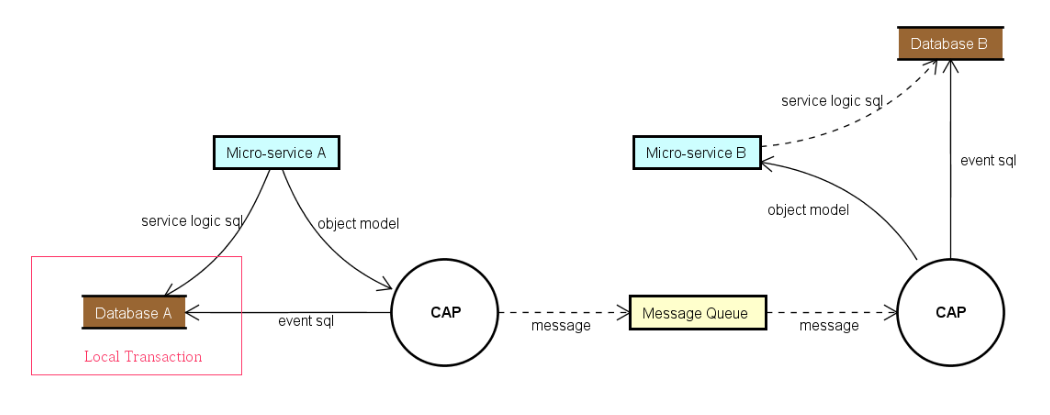
CAP使用
Nuget包
先安装CAP
PM> Install-Package DotNetCore.CAP
CAP支持一些主流的消息队列,我只使用过RabbitMQ
//只用过他
PM> Install-Package DotNetCore.CAP.RabbitMQ
//other
PM> Install-Package DotNetCore.CAP.Kafka
PM> Install-Package DotNetCore.CAP.AzureServiceBus
PM> Install-Package DotNetCore.CAP.AmazonSQS
...
CAP支持一些主流的DB来进行存储
//只用过他
PM> Install-Package DotNetCore.CAP.SqlServer
//other
PM> Install-Package DotNetCore.CAP.MySql
PM> Install-Package DotNetCore.CAP.PostgreSql
PM> Install-Package DotNetCore.CAP.MongoDB
Configuration
#region CAP
//sql Service
builder.Services.AddEntityFrameworkSqlServer().AddDbContext<CAPDBContext>(options =>
{
    options.UseSqlServer("CAPDBConnection").UseLoggerFactory(CAPLoggerFactory.capLoggerFactory);
}, ServiceLifetime.Scoped);

//Config

builder.Services.AddCap(x =>
{
    x.DefaultGroupName = "QueueName";
    x.UseSqlServer((config) => { config.ConnectionString = "CAPDBConnection"; config.Schema = "cap"; });

    x.UseRabbitMQ(
        o =>
        {
            o.HostName = "RabbitMQ Server的地址";
            o.Port = 5672;//RabbitMQ Server的端口号,一般默认为5672
            o.UserName = "连接RabbitMQ Server时的账户名,请优先配置具有Admin权限的user";
            o.Password = "连接RabbitMQ Server时的密码信息";
            o.VirtualHost = "在RabbitMQ Server上注册的client名";
            o.ExchangeName = "RabbitMQ Server注册的Exchange信息,消息会在同exchange内传输";

        });

    x.UseDashboard(o =>
    {
        o.PathMatch = "/cap";
    });
    //常规配置
    x.ConsumerThreadCount = 10;
    x.FailedRetryCount = 5;
    x.FailedRetryInterval = 60;
    //x.FailedThresholdCallback = info.Message.Headers[Headers.CallbackName];
    x.SucceedMessageExpiredAfter = 4 * 3600;
});
//注入EventBus Service
builder.Services.AddSingleton<IEventBus, EventBus>();

#endregion
发布
注入 ICapPublisher 然后使用 ICapPublisher 进行消息发送
 public class EventBus : IEventBus
    {
        private ICapPublisher _publisher;

        public EventBus(ICapPublisher publisher)
        {
            _publisher = publisher;
        }

        public void Publish<TMessage>(TMessage message, string key = null, string callbackName = null)
        {
            var msgName = key ?? message.GetType().FullName;
            try
            {
                //logger
                _publisher.Publish(msgName, message, callbackName);

            }
            catch (Exception ex)
            {
                //logger
                throw ex;
            }
        }

        public async Task PublishAsync<TMessage>(TMessage message, string key = null, string callbackName = null, CancellationToken cancellationToken = default)
        {
            var msgName = key ?? message.GetType().FullName;
            try
            {
                //logger
                await _publisher.PublishAsync(msgName, message, callbackName, cancellationToken);

            }
            catch (Exception ex)
            {
                //logger
                throw ex;
            }
        }
    }
    public class HelloWorldService: IHelloWorldService
    {
        private readonly GHelloWorld.GHelloWorldClient _gHelloWorldClient;
        private readonly IEventBus _eventBus;
        public HelloWorldService(GHelloWorld.GHelloWorldClient gHelloWorldClient, IEventBus eventBus)
        {
            _gHelloWorldClient = gHelloWorldClient;
            _eventBus = eventBus;
        }

        public void HelloWorld_CAP()
        {
            try
            {
                var msg = "Hello World";
                var key = CAPConstants.HelloWorldKey;
                //封装好了
                _eventBus.Publish(msg, key);
            }
            catch (Exception e)
            {
                //logger.Error
                throw;
            }
        }
     }
订阅
添加 CapSubscribeAttribute 来订阅相关消息。
namespace Server.Event
{
    public class HelloWorldConsumer : ICapSubscribe
    {
        [CapSubscribeAttribute(CAPConstants.HelloWorldKey, false)]
        public async Task<string> Consume(JsonElement msg)
        {
            try
            {
                Console.WriteLine("Hello World");

            }
            catch (Exception e)
            {
                //logger
            }
            return CAPConstants.HelloWorldKey;
        }
    }
}
Dashboard
CAP 同时提供了dashboard功能,你可以很方便的查看发出和接收到的消息。 除此之外,你还可以在dashboard中实时查看发送或者接收到的消息。
首先需要安装NuGet
PM> Install-Package DotNetCore.CAP.Dashboard
在分布式环境中,仪表盘内置集成了 Consul 作为节点的注册发现,同时实现了网关代理功能,你同样可以方便的查看本节点或者其他节点的数据,它就像你访问本地资源一样。
services.AddCap(x =>
{
    //...

    // 注册 Dashboard
    x.UseDashboard();

    // 注册节点到 Consul
    x.UseDiscovery(d =>
    {
        d.DiscoveryServerHostName = "localhost";
        d.DiscoveryServerPort = 8500;
        d.CurrentNodeHostName = "localhost";
        d.CurrentNodePort = 5800;
        d.NodeId = 1;
        d.NodeName = "CAP No.1 Node";
    });
});
仪表盘默认的访问地址是:http://localhost:xxx/cap,你可以在d.MatchPath配置项中修改cap路径后缀为其他的名字
楼主实战使用踩过的坑:
1.CAP与EF Core结合使用
CAP发送消息前会序列化message,如果需要传递的message是EF Core从DB里查出来(加Tracking),且主表有从表的反向导航属性,这种类型的对象,序列化的时候是无限大的,,,
Code Demo:https://github.com/Seth-Song/gRPC-CAP/tree/main/gRPC-HelloWorld

 浙公网安备 33010602011771号