
第二次作业
一.[实验目的]
1.掌握软件开发的基本流程
2.掌握常用的软件开发方式和工具。
[实验内容]
1.设计一个包含登录界面的计算器软件,该软件可以实现第一次作业中的全部功能,同时可以保存用户的历史计算记录(保存数据最好使用数据库)。
二.[实验要求]
1.完成软件的UI设计、使用Visio设计软件中所涉及的所有流程图。
2.选择合适的集成开发环境和工具完成计算器软件的开发
3.将开发好软件进行测试并截图
4.将本次实验过程写成实验报告提交在本次作业的链接中
5.关键代码部分以代码块格式粘贴在实验报告正文中
6.软件架构以及开发技术不限
7.本次作业为个人作业,发现雷同作业一律按0分处理。
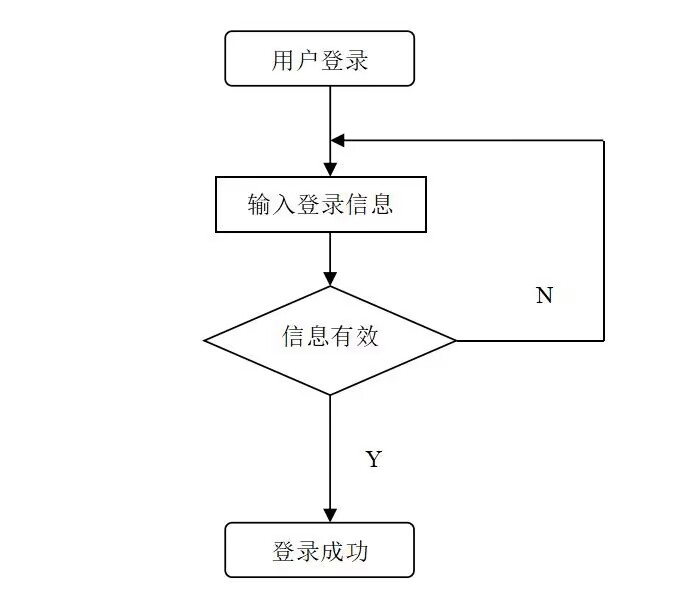
三.登录流程图

登录界面截图
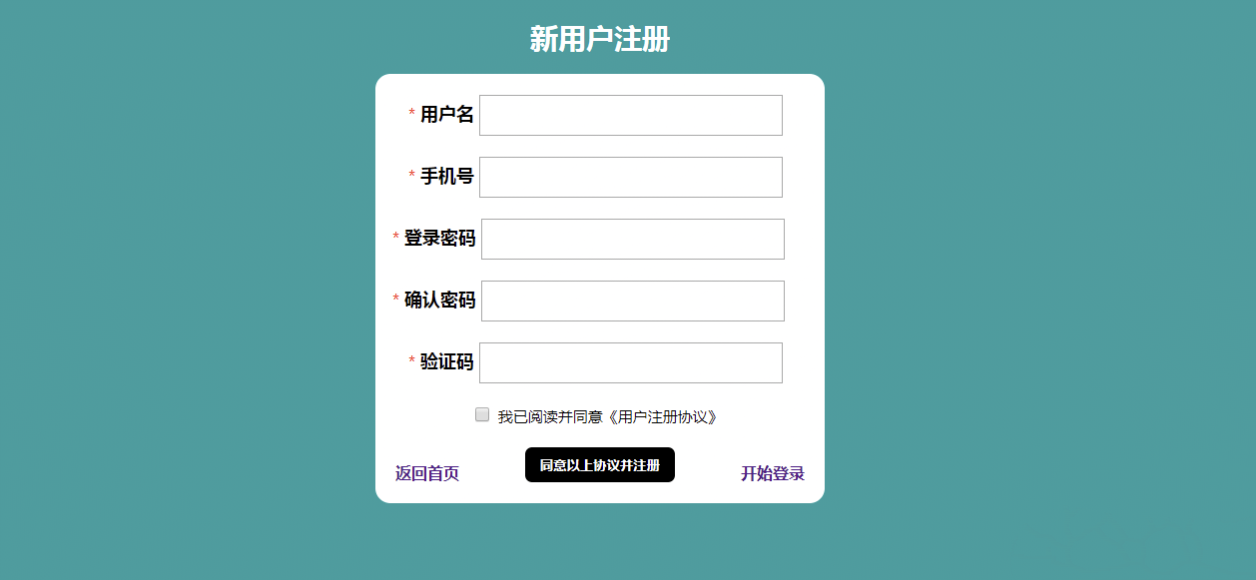
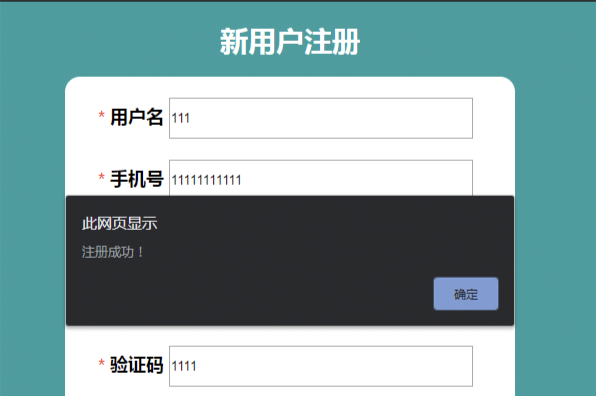

登陆界面代码:
#include <stdlib.h>
#include <string.h>
#define MAX_USERS 100
#define MAX_USERNAME 20
#define MAX_PASSWORD 20
struct User {
char username[MAX_USERNAME];
char password[MAX_PASSWORD];
};
struct User users[MAX_USERS];
int userCount = 0;
void registerUser() {
if (userCount >= MAX_USERS) {
printf("无法注册更多用户。\n");
return;
}
printf("请输入用户名: ");
scanf("%s", users[userCount].username);
printf("请输入密码: ");
scanf("%s", users[userCount].password);
printf("用户注册成功!\n");
userCount++;
}
int loginUser() {
char username[MAX_USERNAME];
char password[MAX_PASSWORD];
printf("请输入用户名: ");
scanf("%s", username);
printf("请输入密码: ");
scanf("%s", password);
for (int i = 0; i < userCount; i++) {
if (strcmp(username, users[i].username) == 0 && strcmp(password, users[i].password) == 0) {
printf("登录成功!\n");
return 1;
}
}
printf("用户名或密码错误。\n");
return 0;
}
int main() {
int choice;
do {
printf("\n1. 注册\n");
printf("2. 登录\n");
printf("3. 退出\n");
printf("请选择操作: ");
scanf("%d", &choice);
switch (choice) {
case 1:
registerUser();
break;
case 2:
if (loginUser()) {
// 用户登录成功后的操作
}
break;
case 3:
printf("程序退出。\n");
break;
default:
printf("无效的选择,请重新输入。\n");
}
} while (choice != 3);
return 0;
}
1 * {
2 margin: 0;
3 padding: 0;
4 box-sizing: border-box;
5 }
6 body {
7 width: 100%;
8 height: 100%;
9 }
10 .container {
11 width: 100%;
12 height: 100vh;
13 background-color: #ededed;
14 display: flex;
15 justify-content: center;
16 align-items: center;
17 }
18 .container .box {
19 width: 900px;
20 height: 550px;
21 background: #fff;
22 border-radius: 4px;
23 position: relative;
24 }
25 .container .box .transtion-box {
26 position: absolute;
27 left: 0;
28 transition: 0.5s all ease-in-out;
29 }
30 .container .box .transtion-box .login-box,
31 .reg-box {
32 width: 640px;
33 height: 100%;
34 display: flex;
35 flex-flow: column nowrap;
36 align-items: center;
37 padding: 50px 30px;
38 }
39
40 .container .box .transtion-box h1 {
41 margin-bottom: 35px;
42 }
43 .container .box .transtion-box section {
44 display: flex;
45 flex-flow: inherit;
46 align-items: inherit;
47 width: 100%;
48 margin-bottom: 30px;
49 }
50 .container .box .transtion-box section label {
51 font-size: 14px;
52 color: #909399;
53 text-transform: uppercase;
54 margin-bottom: 8px;
55 }
56 .container .box .transtion-box section input {
57 width: 50%;
58 outline: 0;
59 border: none;
60 font-size: 18px;
61 color: tomato;
62 text-align: center;
63 padding: 4px 10px;
64 border-bottom: 1px solid rgba(0, 0, 0, 0.4);
65 }
66 .container .box .transtion-box section span {
67 color: rgb(80, 80, 77);
68 font-size: 15px;
69 cursor: pointer;
70 margin-top: 18px;
71 }
72 .container .box .transtion-box button {
73 width: 50%;
74 padding: 6px 0;
75 text-align: center;
76 border: 3px solid #d4af7a;
77 border-radius: 20px;
78 background: #d4af7a;
79 color: #fff;
80 font-size: 17px;
81 letter-spacing: 6px;
82 text-indent: 6px;
83 margin-bottom: 15px;
84 cursor: pointer;
85 }
86 .container .box .transtion-box .other {
87 border: 3px solid #d3dae9;
88 background: #fff;
89 color: rgb(124, 145, 184);
90 font-weight: 600;
91 }
92 .container .box .transferToReg {
93 width: 260px;
94 height: 100%;
95 background: linear-gradient(
96 to bottom right,
97 #0e92eb 0%,
98 #5f90ec 50%,
99 #b08fe5 100%
100 );
101 border-top-right-radius: 4px;
102 border-bottom-right-radius: 4px;
103 position: absolute;
104 left: 640px;
105 top: 0;
106 display: flex;
107 flex-flow: column nowrap;
108 align-items: center;
109 padding: 50px 0;
110 color: white;
111 transition: all 1s ease-in-out;
112 }
113 .container .box .transferToReg .title {
114 margin-bottom: 10px;
115 transition: all 0.3s ease-in-out;
116 }
117 .container .box .transferToReg button {
118 margin-top: 260px;
119 width: 50%;
120 padding: 8px 0;
121 border-radius: 14px;
122 letter-spacing: 10px;
123 text-indent: 10px;
124 font-size: 18px;
125 color: #fff;
126 border: 3px solid #fff;
127 background: transparent;
128 font-weight: 700;
129 cursor: pointer;
130 }
131 .container .box .transferToReg button:hover {
132 border: 3px solid #206dfc;
133 }
使用html代码写一个计算机界面,可以实现简单的加减乘除操作。

1 <!DOCTYPE html>
2 <html lang="en">
3 <head>
4 <title>计算器</title>
5 <style type="text/css">
6 body {
7 margin: 0;
8 padding: 0;
9 background-color: #f1f1f1;
10 font-family: Arial, sans-serif;
11 font-size: 28px;
12 }
13 .calculator {
14 width: 600px;
15 background-color: #fff;
16 margin: 150px auto;
17 border-radius: 100px;
18 box-shadow: 0px 0px 10px rgba(0,0,0,0.2);
19 padding: 50px;
20 box-sizing: border-box;
21 }
22 .display {
23 height: 100px;
24 border: none;
25 border-radius: 200px;
26 background-color: #eee;
27 font-size: 40px;
28 text-align: right;
29 padding-right: 20px;
30 margin-bottom: 20px;
31 }
32 .button {
33 height: 100px;
34 border: none;
35 border-radius: 50px;
36 background-color: #FA8072;
37 color: #fff;
38 font-size: 36px;
39 cursor: pointer;
40 margin-right: 20px;
41 margin-bottom: 20px;
42 padding: 0 20px;
43 box-sizing: border-box;
44 }
45 .button:hover {
46 background-color: #3e8e41;
47 }
48 </style>
49 </head>
50 <body>
51 <div class="calculator">
52 <input type="text" class="display" id="display" readonly>
53 <button class="button" onclick="append('7')">7</button>
54 <button class="button" onclick="append('8')">8</button>
55 <button class="button" onclick="append('9')">9</button>
56 <button class="button" onclick="append('+')">+</button>
57 <br>
58 <button class="button" onclick="append('4')">4</button>
59 <button class="button" onclick="append('5')">5</button>
60 <button class="button" onclick="append('6')">6</button>
61 <button class="button" onclick="append('-')">-</button>
62 <br>
63 <button class="button" onclick="append('1')">1</button>
64 <button class="button" onclick="append('2')">2</button>
65 <button class="button" onclick="append('3')">3</button>
66 <button class="button" onclick="append('*')">*</button>
67 <br>
68 <button class="button" onclick="append('0')">0</button>
69 <button class="button" onclick="append('.')">.</button>
70 <button class="button" onclick="calculate()">=</button>
71 <button class="button" onclick="append('/')">/</button>
72 </div>
73 <script type="text/javascript">
74 function append(value) {
75 document.getElementById('display').value += value;
76 }
77 function clear() {
78 document.getElementById('display').value = '';
79 }
80 function calculate() {
81 document.getElementById('display').value = eval(document.getElementById('display').value);
82 }
83 </script>
84 </body>
85 </html>
测试结果
- 计算器页面
![]()
- 5*6=30
![手机屏幕截图
低可信度描述已自动生成]()
- 输入94/8=
![]()


 浙公网安备 33010602011771号