
wxjava 公众号模块对接
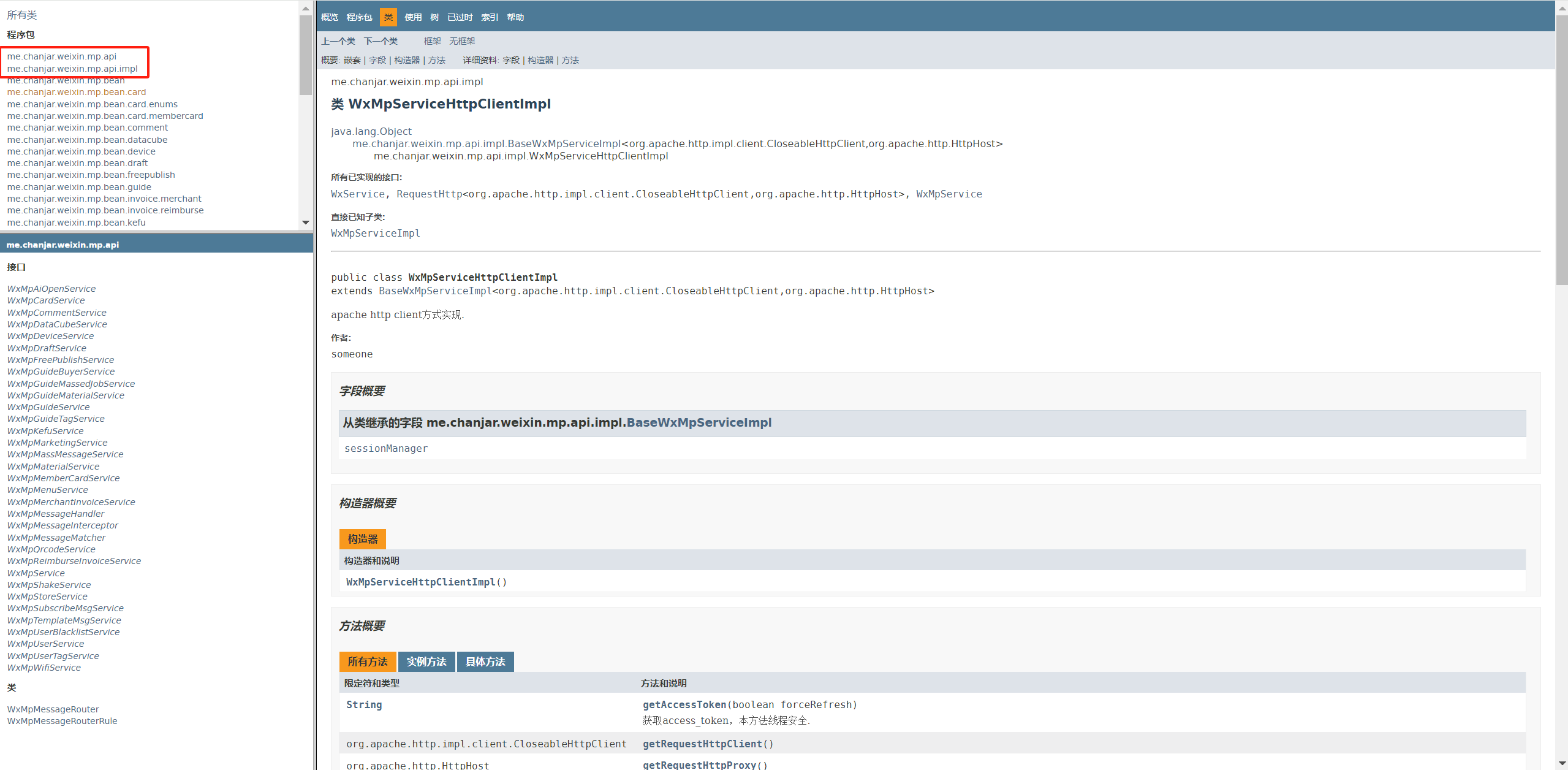
wxjava官方文档: http://binary.ac.cn/weixin-java-mp-javadoc/
wxjava gitee: https://gitee.com/binary/weixin-java-tools
wxjava github: https://github.com/Wechat-Group/WxJava
微信官网文档:https://developers.weixin.qq.com/doc/offiaccount/Getting_Started/Overview.html
后面调用的相关方法在这两个目录下就可以查询到,具体的详情有需要翻阅文档去了解
一、引入maven依赖
<dependency>
    <groupId>com.github.binarywang</groupId>
    <artifactId>wx-java-mp-spring-boot-starter</artifactId>
    <version>4.5.0</version>
</dependency>
二、在yml配置文件中新增配置
公众号配置(必填)
wx:
  mp:
    app-id: 填你自己的
    secret: 填你自己的
    token: 填你自己的
    aes-key: 填你自己的
    # 存储配置redis(可选)
    config-storage:
      type: jedis
      key-prefix: wx
      redis:
        host: 127.0.0.1
        port: 6379
        # 单机和sentinel同时存在时,优先使用sentinel配置
        sentinel-ips: 127.0.0.1:16379,127.0.0.1:26379
        sentinel-name: mymaster
      # http客户端配置
      http-client-type: httpclient
      http-proxy-host:
      http-proxy-port:
      http-proxy-username:
      http-proxy-password:
# 公众号地址host配置
#wx.mp.hosts.api-host=http://proxy.com/
#wx.mp.hosts.open-host=http://proxy.com/
#wx.mp.hosts.mp-host=http://proxy.com/
三、新增配置文件初始化wxjava
@Configuration
public class WxMpConfiguration {

    @Autowired
    private WxMpProperties wxMpProperties;

    /**
     * 微信客户端配置存储
     */
    @Bean
    public WxMpConfigStorage wxMpConfigStorage() {
        WxMpDefaultConfigImpl configStorage = new WxMpDefaultConfigImpl();
        // 设置微信公众号appId
        configStorage.setAppId(wxMpProperties.getAppId());
        // 设置微信公众号appSecret
        configStorage.setSecret(wxMpProperties.getSecret());
        // 设置微信公众号token
        configStorage.setToken(wxMpProperties.getToken());
        // 设置微信公众号的EncodingAESKey
        configStorage.setAesKey(wxMpProperties.getAesKey());
        return configStorage;
    }

    /**
     * WxMpService多个实现类 声明一个实例
     */
    @Bean
    public WxMpService wxMpService() {
        WxMpServiceImpl wxMpService = new WxMpServiceImpl();
        wxMpService.setWxMpConfigStorage(wxMpConfigStorage());
        return wxMpService;
    }
}
WxMpProperties 文件
@Component
@Data
@ConfigurationProperties(prefix = "wx.mp")
public class WxMpProperties {

    /**
     * 设置微信公众号的appid
     */
    private String appId;

    /**
     * 设置微信公众号的app secret
     */
    private String secret;

    /**
     * 设置微信公众号的token
     */
    private String token;

    /**
     * 设置微信公众号的EncodingAESKey
     */
    private String aesKey;
}
四、开始使用
验证并配置公众号信息
我这边用的是花生壳配置的内网穿透,试过natapp微信那边不会推送(坑,应该是微信拦截了),内网地址映射内网穿透,在公网尝试访问一下。
测试公众号登录地址 ,我这里用的是测试号;正式的也差不多,需要填对应的参数即可。
@Slf4j
@RestController
public class TestWxJavaController {

    @Autowired
    private WxMpService wxMpService;

    /**
     * 验证消息的确来自微信服务器
     * <p>
     * 开发者通过检验signature对请求进行校验。若确认此次GET请求来自微信服务器,请原样返回echostr参数内容,则接入生效
     *
     * @param signature 微信加密签名,signature结合了开发者填写的token参数和请求中的timestamp参数、nonce参数。
     * @param timestamp 时间戳
     * @param nonce     随机数
     * @param echostr   随机字符串
     * @return 结果
     */
    @RequestMapping("/send")
    public String configAccess(String signature, String timestamp, String nonce, String echostr) {
        // 校验签名
        if (!wxMpService.checkSignature(timestamp, nonce, signature)) {
            log.error("签名校验 ===》 非法请求");
            // 消息签名不正确,说明不是公众平台发过来的消息
            return null;
        }

        log.error("签名校验 ===》 验证成功");
        // 返回echostr
        return echostr;
    }
}
微信测试号配置:
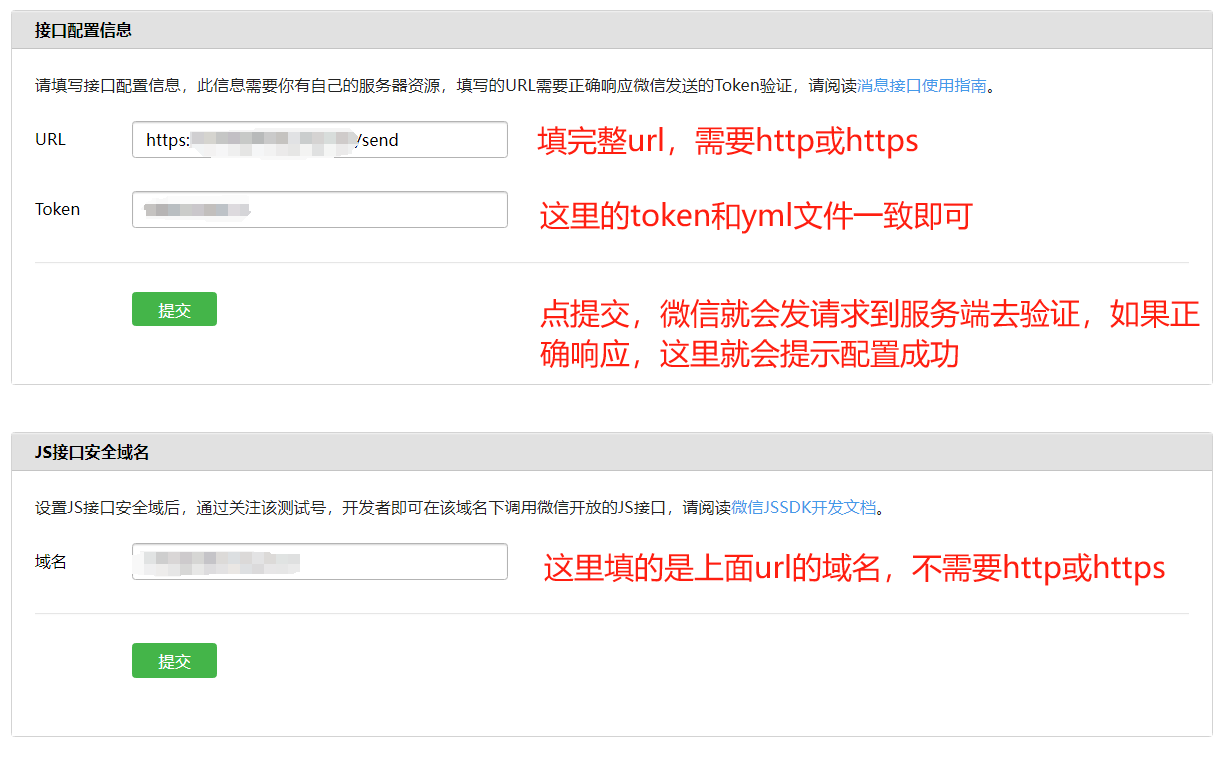
顺利给微信验签,即可配置成功。
1、MP_OAuth2网页授权
微信网页授权 - 流程时序图(via. nthack)

在微信测试号配置页面修改域名


1.1 构造网页授权url
    @GetMapping("/test")
    public void test() {
        String url = "要填一个能访问的地址";
        String s = wxMpService.getOAuth2Service().buildAuthorizationUrl(url, WxConsts.OAuth2Scope.SNSAPI_USERINFO, null);
        System.out.println(s);
    }

把链接打印在微信环境内打开,就会提示授权信息,配合前端页面就可以实现微信公众号授权,授权后会重定向到上面填的地址,然后会带一个参数code,这个code很重要,要获取下来,然后看1.2

1.2 获得access token
    @GetMapping("/test")
    public void test() throws WxErrorException {
        String code = "1.1获取的code";
        WxOAuth2AccessToken wxOAuth2AccessToken = wxMpService.getOAuth2Service().getAccessToken(code);
        System.out.println(wxOAuth2AccessToken.getAccessToken());
    }
wxOAuth2AccessToken实体可以获取以下数据:
    {
        "access_token": "",
        "expires_in": 7200,
        "refresh_token": "",
        "openid": "",
        "scope": "snsapi_userinfo"
    }
1.3 获得用户基本信息
    @GetMapping("/test")
    public void test() throws WxErrorException {
        WxOAuth2AccessToken wxOAuth2AccessToken = new WxOAuth2AccessToken();
        wxOAuth2AccessToken.setAccessToken("AccessToken");
        WxOAuth2UserInfo wxMpUser = wxMpService.getOAuth2Service().getUserInfo(wxOAuth2AccessToken, null);
        System.out.println(wxMpUser);
    }
可以获取用户信息,例如微信昵称、头像、openid等信息
1.4 刷新access token
    @GetMapping("/test")
    public void test() throws WxErrorException {
        WxOAuth2AccessToken wxOAuth2AccessToken = wxMpService.getOAuth2Service().refreshAccessToken("RefreshToken");
        System.out.println(wxOAuth2AccessToken);
    }
返回值和获取token一样
1.5 验证access token
    @GetMapping("/test")
    public void test() throws WxErrorException {
        WxOAuth2AccessToken wxOAuth2AccessToken = new WxOAuth2AccessToken();
        wxOAuth2AccessToken.setAccessToken("AccessToken");
        wxOAuth2AccessToken.setOpenId("OpenId");
        boolean valid = wxMpService.getOAuth2Service().validateAccessToken(wxOAuth2AccessToken);
        System.out.println(valid);
    }
2、微信JS-SDK支持
2.1 获得jsapi_ticket
    @GetMapping("/test")
    public void test() throws WxErrorException {
        System.out.println(wxMpService.getJsapiTicket());
    }
获得jsapi_ticket,不强制刷新jsapi_ticket,还有一个重载方法,形参需要填一个布尔值
2.2 创建调用jsapi时所需要的签名
    @GetMapping("/test")
    public void test() throws WxErrorException {
        String url = "填你自己的"
        System.out.println(wxMpService.createJsapiSignature(url));
    }
3、MP_验证消息合法性
3.1 验证消息的确来自微信服务器
    @RequestMapping("/send")
    public void configAccess(String signature, String timestamp, String nonce, String echostr) {
        // 校验签名
        if (!wxMpService.checkSignature(timestamp, nonce, signature)) {
            log.error("签名校验 ===》 非法请求");
            // 消息签名不正确,说明不是公众平台发过来的消息
            return null;
        }

        log.error("签名校验 ===》 验证成功");
    }
之前的例子有用到这个方法,如果收到微信回调信息,可以传入接收的时间戳、随机数、签名去校验信息是否来自微信端,避免有用户恶意伪造微信请求
4、MP_同步回复消息(被动回复)
4.1 接收消息并回复消息
微信公众号收到回复后会推送给配置在微信通知的地址

在body中会有以下数据(官方文档复制的,以实际收到为准):
    <xml>
        <ToUserName><![CDATA[toUser]]></ToUserName>
        <FromUserName><![CDATA[fromUser]]></FromUserName>
        <CreateTime>12345678</CreateTime>
        <MsgType><![CDATA[text]]></MsgType>
        <Content><![CDATA[你好]]></Content>
    </xml>

在url的params参数有以下数据:
    {
        "signature": "",
        "timestamp": "",
        "nonce ": "",
        "openid": ""
    }
然后就可以编写代码针对用户的发送消息进行一定的被动回复
 @RequestMapping("send")
    public String send(@RequestBody String requestBody, @RequestParam("signature") String signature, @RequestParam("timestamp") String timestamp, @RequestParam("nonce") String nonce) {
        // 校验签名
        if (!wxMpService.checkSignature(timestamp, nonce, signature)) {
            log.error("签名校验 ===》 非法请求");
            // 消息签名不正确,说明不是公众平台发过来的消息
            return null;
        }
        log.error("签名校验 ===》 验证成功");

        // 解析消息体,封装为对象
        WxMpXmlMessage xmlMessage = WxMpXmlMessage.fromXml(requestBody);
        // 接收消息内容
        String inContent = xmlMessage.getContent();
        // 响应的消息内容
        String outContent;
        // 根据不同的关键字回复消息
        if (inContent.contains("hello")) {
            outContent = "hello world";
        } else if (inContent.contains("java")) {
            outContent = "hello java";
        } else {
            outContent = "服务繁忙,暂时不能回复";
        }

        // 构造响应消息对象
        WxMpXmlOutTextMessage outTextMessage = WxMpXmlOutMessage.TEXT()
                .content(outContent)
                .fromUser(xmlMessage.getToUser())
                .toUser(xmlMessage.getFromUser()).build();

        // 将响应消息转换为xml格式返回
        return outTextMessage.toXml();
    }
正常响应:

WxMpXmlOutTextMessage是同步回复给微信消息的对象,不同类型的消息类型可以用不同的方式构造:
文本消息
WxMpXmlOutMessage.TEXT()
  .content("content")
  .fromUser("to")
  .toUser("from")
  .build();
图片消息
WxMpXmlOutMessage.IMAGE()
  .mediaId("ddfefesfsdfef")
  .fromUser("to")
  .toUser("from")
  .build();
语音消息
WxMpXmlOutMessage.VOICE()
  .mediaId("ddfefesfsdfef")
  .fromUser("to")
  .toUser("from")
  .build();
视频消息
WxMpXmlOutMessage.VIDEO()
  .mediaId("media_id")
  .fromUser("toUser")
  .toUser("fromUser")
  .title("title")
  .description("ddfff")
  .build();
音乐消息
WxMpXmlOutMessage.MUSIC()
  .fromUser("toUser")
  .toUser("fromUser")
  .title("title")
  .description("ddfff")
  .hqMusicUrl("hQMusicUrl")
  .musicUrl("musicUrl")
  .thumbMediaId("thumbMediaId")
  .build();
图文消息
WxMpXmlOutNewsMessage.Item item = new WxMpXmlOutNewsMessage.Item();
item.setDescription("description");
item.setPicUrl("picUrl");
item.setTitle("title");
item.setUrl("url");

WxMpXmlOutNewsMessage m = WxMpXmlOutMessage.NEWS()
  .fromUser("toUser")
  .toUser("fromUser")
  .addArticle(item)
  .build();
5、MP_素材管理
- 新增的永久素材也可以在公众平台官网素材管理模块中看到
- 永久素材的数量是有上限的,请谨慎新增。图文消息素材和图片素材的上限为5000,其他类型为1000
- 素材的格式大小等要求与公众平台官网一致。具体是,图片大小不超过2M,支持bmp/png/jpeg/jpg/gif格式,语音大小不超过5M,长度不超过60秒,支持mp3/wma/wav/amr格式
- 调用该接口需https协议
- 永久图片素材新增后,将带有URL返回给开发者,开发者可以在腾讯系域名内使用(腾讯系域名外使用,图片将被屏蔽)
5.1 新增临时素材
请注意:
- 对于临时素材,每个素材(media_id)会在开发者上传或粉丝发送到微信服务器3天后自动删除(所以用户发送给开发者的素材,若开发者需要,应尽快下载到本地),以节省服务器资源。
- media_id是可复用的。
- 素材的格式大小等要求与公众平台官网一致。具体是,图片大小不超过2M,支持png/jpeg/jpg/gif格式,语音大小不超过5M,长度不超过60秒,支持mp3/amr格式
- 需使用https调用本接口。
本接口即为原“上传多媒体文件”接口。
注意事项:
- 上传的临时多媒体文件有格式和大小限制,如下:
- 图片(image): 2M,支持PNG\JPEG\JPG\GIF格式
- 语音(voice):2M,播放长度不超过60s,支持AMR\MP3格式
- 视频(video):10MB,支持MP4格式
- 缩略图(thumb):64KB,支持JPG格式
媒体文件在后台保存时间为3天,即3天后media_id失效。
    @GetMapping("/test")
    public void test() throws WxErrorException {
        File file = new File("填本地图片路径");
        WxMediaUploadResult wxMediaUploadResult = wxMpService.getMaterialService().mediaUpload(WxConsts.MediaFileType.IMAGE, file);
        System.out.println(wxMediaUploadResult);
    }

5.2 获取临时素材
  @GetMapping("/test")
    public void test() throws WxErrorException {
        String mediaId = "素材id";
        File file = wxMpService.getMaterialService().mediaDownload(mediaId);
        System.out.println(file.isFile());
    }
5.3 上传图文消息内的图片获取URL
  @GetMapping("/test")
    public void test() throws WxErrorException {
        File file = new File("填本地图片路径");
        WxMediaImgUploadResult wxMediaImgUploadResult = wxMpService.getMaterialService().mediaImgUpload(file);
        System.out.println(wxMediaImgUploadResult);
    }

5.4 新增非图文永久素材
除了3天就会失效的临时素材外,开发者有时需要永久保存一些素材,届时就可以通过本接口新增永久素材。
永久图片素材新增后,将带有URL返回给开发者,开发者可以在腾讯系域名内使用(腾讯系域名外使用,图片将被屏蔽)。
请注意:
- 新增的永久素材也可以在公众平台官网素材管理模块中看到
- 永久素材的数量是有上限的,请谨慎新增。图文消息素材和图片素材的上限为5000,其他类型为1000
- 素材的格式大小等要求与公众平台官网一致。具体是,图片大小不超过2M,支持bmp/png/jpeg/jpg/gif格式,语音大小不超过5M,长度不超过60秒,支持mp3/wma/wav/amr格式
- 调用该接口需https协议
    @GetMapping("/test")
    public void test() throws WxErrorException {
        File file = new File("填本地图片路径");
        WxMpMaterial wxMpMaterial = new WxMpMaterial();
        wxMpMaterial.setFile(file);
        wxMpMaterial.setName(file.getName());
        WxMpMaterialUploadResult wxMpMaterialUploadResult = wxMpService.getMaterialService().materialFileUpload(WxConsts.MediaFileType.IMAGE, wxMpMaterial);
        System.out.println(wxMpMaterialUploadResult);
    }

5.5 获取声音或者图片永久素材
@GetMapping("/test")
    public void test() throws WxErrorException {
        String mediaId = "素材id";
        InputStream inputStream = null;
        try {
            File file = new File("C:\\Users\\Administrator\\Desktop\\image.png");
            if (!file.exists()) {
                file.createNewFile();
            }
            inputStream = wxMpService.getMaterialService().materialImageOrVoiceDownload(mediaId);
            try (FileOutputStream outputStream = new FileOutputStream(file)) {
                int bytesRead;
                byte[] buffer = new byte[1024];
                while ((bytesRead = inputStream.read(buffer)) != -1) {
                    outputStream.write(buffer, 0, bytesRead);
                }
            }
        } catch (IOException e) {
            e.printStackTrace();
        } finally {
            if (inputStream != null) {
                try {
                    inputStream.close();
                } catch (IOException e) {
                    e.printStackTrace();
                }
            }
        }
    }
会在桌面生成一个名为image.png文件,具体就根据实际情况看获取的是什么类型的文件来定义了
5.6 删除永久素材
在新增了永久素材后,开发者可以根据本接口来删除不再需要的永久素材,节省空间。
请注意:
- 请谨慎操作本接口,因为它可以删除公众号在公众平台官网素材管理模块中新建的图文消息、语音、视频等素材(但需要先通过获取素材列表来获知素材的media_id)
- 临时素材无法通过本接口删除
- 调用该接口需https协议
    @GetMapping("/test")
    public void test() throws WxErrorException {
        String mediaId = "素材id";
        boolean b = wxMpService.getMaterialService().materialDelete(mediaId);
        System.out.println(b);
    }
5.7 获取各类素材总数
    @GetMapping("/test")
    public void test() throws WxErrorException {
        WxMpMaterialCountResult wxMpMaterialCountResult = wxMpService.getMaterialService().materialCount();
        System.out.println(wxMpMaterialCountResult);
    }

5.8 分页获取图文素材列表
    @GetMapping("/test")
    public void test() throws WxErrorException {
        // 从全部素材的该偏移位置开始返回,0表示从第一个素材返回
        String offset = "0";
        // 返回素材的数量,取值在1到20之间
        String count = "20";
        WxMpMaterialNewsBatchGetResult wxMpMaterialNewsBatchGetResult = wxMpService.getMaterialService().materialNewsBatchGet(offset, count);
        System.out.println(wxMpMaterialNewsBatchGetResult);
    }

5.9 分页获取其他媒体素材列表
    @GetMapping("/test")
    public void test() throws WxErrorException {
        // 从全部素材的该偏移位置开始返回,0表示从第一个素材返回
        String offset = "0";
        // 返回素材的数量,取值在1到20之间
        String count = "20";
        WxMpMaterialFileBatchGetResult wxMpMaterialFileBatchGetResult = wxMpService.getMaterialService().materialFileBatchGet(WxConsts.MediaFileType.IMAGE, offset, count);
        System.out.println(wxMpMaterialFileBatchGetResult);
    }
响应:
{
    "totalCount": 1,
    "itemCount": 1,
    "items": [{
        "mediaId": "",
        "updateTime": "",
        "name": "",
        "url": ""
    }]
}
6、草稿箱
6.1 新建草稿
    @GetMapping("/test")
    public void test() throws WxErrorException {
        // 标题
        String title = "这里是标题";
        // 图文消息的具体内容,支持HTML标签,必须少于2万字符,小于1M,且此处会去除JS,涉及图片url必须来源 "上传图文消息内的图片获取URL"接口获取。外部图片url将被过滤。
        String content = "这里是内容";
        // 图文消息的封面图片素材id(必须是永久MediaID)
        String thumbMediaId = "图片素材id";
        String s = wxMpService.getDraftService().addDraft(title, content, thumbMediaId);
        System.out.println(s);
    }
上面的方法只填了必填参数,还有一个重载方法可以添加完整参数新建草稿
String addDraft(WxMpAddDraft addDraft) throws WxErrorException;
    @GetMapping("/test")
    public void test() throws WxErrorException {
       String thumbMediaId = "图片素材id";
        List<WxMpDraftArticles> draftArticleList = new ArrayList<>();
        WxMpDraftArticles draftArticle = WxMpDraftArticles.builder()
                .title("新建草稿-对象形式")
                .author("dragon")
                .digest("图文消息的摘要,仅有单图文消息才有摘要,多图文此处为空")
                .content("图文消息的具体内容,支持HTML标签,必须少于2万字符,小于1M,且此处会去除JS")
                .contentSourceUrl("https://github.com/Wechat-Group/WxJava")
                .thumbMediaId(thumbMediaId)
                // 显示封面、打开评论、所有人可评论
                .showCoverPic(1).needOpenComment(1).onlyFansCanComment(0)
                .build();
        draftArticleList.add(draftArticle);

        WxMpAddDraft addDraft = WxMpAddDraft.builder().articles(draftArticleList).build();
        String mediaId = wxMpService.getDraftService().addDraft(addDraft);
        System.out.println(mediaId);
    }
WxMpDraftArticles 对象属性描述
| 参数 | 说明 |
|---|---|
| title | 标题 |
| author | 作者 |
| digest | 图文消息的摘要,仅有单图文消息才有摘要,多图文此处为空。如果本字段为没有填写,则默认抓取正文前54个字。 |
| content | 图文消息的具体内容,支持HTML标签,必须少于2万字符,小于1M,且此处会去除JS,涉及图片url必须来源 "上传图文消息内的图片获取URL"接口获取。外部图片url将被过滤。 |
| contentSourceUrl | 图文消息的原文地址,即点击“阅读原文”后的URL |
| thumbMediaId | 图文消息的封面图片素材id(必须是永久MediaID) |
| showCoverPic | 是否显示封面,0为false,即不显示,1为true,即显示(默认) |
| needOpenComment | 是否打开评论,0不打开(默认),1打开 |
| onlyFansCanComment | 是否粉丝才可评论,0所有人可评论(默认),1粉丝才可评论 |
| url | 草稿的临时链接,点击图文消息跳转链接 |
| thumbUrl | 图文消息的封面url |
6.2 获取草稿信息
    @GetMapping("/test")
    public void test() throws WxErrorException {
        String mediaId = "草稿素材id";
        WxMpDraftInfo wxMpDraftInfo = wxMpService.getDraftService().getDraft(mediaId);
        System.out.println(wxMpDraftInfo);
    }
响应结果字段大致和6.1提交的内容相似
6.3 修改草稿
    @GetMapping("/test")
    public void test() throws WxErrorException {
        String thumbMediaId = "永久图片素材id";
        String mediaId = "旧的图文素材id";
        WxMpDraftArticles draftArticles = WxMpDraftArticles.builder()
                .title("新标题").content("新图文消息的具体内容").thumbMediaId(thumbMediaId).build();
        WxMpUpdateDraft updateDraft = WxMpUpdateDraft.builder()
                .mediaId(mediaId)
                .index(0)
                .articles(draftArticles)
                .build();
        Boolean updateDraftResult = wxMpService.getDraftService().updateDraft(updateDraft);
        System.out.println(updateDraftResult);
    }
6.4 删除草稿
    @GetMapping("/test")
    public void test() throws WxErrorException {
        String mediaId = "";
         wxMpService.getDraftService().delDraft(mediaId);
    }
6.5 获取草稿列表
    @GetMapping("/test")
    public void test() throws WxErrorException {
        // offset 分页页数,从0开始 从全部素材的该偏移位置开始返回,0表示从第一个素材返回
        int offset = 0;
        // count 每页数量 返回素材的数量,取值在1到20之间
        int count = 20;
        // noContent 1 表示不返回 content 字段,0 表示正常返回,默认为 0(选填)
        int noCount = 0;
        System.out.println(wxMpService.getDraftService().listDraft(offset, count));
    }
listDraft 有重载方法;noCount 可以不填,如果有需要就调另一个重载的方法
返回的结构:
{
    "totalCount": 3,
    "itemCount": 3,
    "items": [{
        "updateTime": "",
        "mediaId": "",
        "content": {
            "newsItem": [{
                "onlyFansCanComment": "",
                "author": "",
                "contentSourceUrl": "",
                "title": "",
                "needOpenComment": "",
                "content": "",
                "url": "",
                "showCoverPic": "",
                "thumbMediaId": "",
                "digest": "",
                "thumbUrl": ""
            }]
        }
    }]
}
6.6 获取草稿数量
    @GetMapping("/test")
    public void test() throws WxErrorException {
        System.out.println(wxMpService.getDraftService().countDraft());
    }
7、MP_主动发送消息(客服消息)
7.1 发送客服消息
不同类型的客服消息有不同的构造方法:
文本消息
WxMpKefuMessage
  .TEXT()
  .toUser("OPENID")
  .content("sfsfdsdf")
  .build();
图片消息
WxMpKefuMessage
  .IMAGE()
  .toUser("OPENID")
  .mediaId("MEDIA_ID")
  .build();
语音消息
WxMpKefuMessage.VOICE()
  .toUser("OPENID")
  .mediaId("MEDIA_ID")
  .build();
视频消息
WxMpKefuMessage.VIDEO()
  .toUser("OPENID")
  .title("TITLE")
  .mediaId("MEDIA_ID")
  .thumbMediaId("MEDIA_ID")
  .description("DESCRIPTION")
  .build();
音乐消息
WxMpKefuMessage.MUSIC()
  .toUser("OPENID")
  .title("TITLE")
  .thumbMediaId("MEDIA_ID")
  .description("DESCRIPTION")
  .musicUrl("MUSIC_URL")
  .hqMusicUrl("HQ_MUSIC_URL")
  .build();
图文消息
WxMpKefuMessage.WxArticle article1 = new WxMpKefuMessage.WxArticle();
article1.setUrl("URL");
article1.setPicUrl("PIC_URL");
article1.setDescription("Is Really A Happy Day");
article1.setTitle("Happy Day");

WxMpKefuMessage.WxArticle article2 = new WxMpKefuMessage.WxArticle();
article2.setUrl("URL");
article2.setPicUrl("PIC_URL");
article2.setDescription("Is Really A Happy Day");
article2.setTitle("Happy Day");

WxMpKefuMessage.NEWS()
    .toUser("OPENID")
    .addArticle(article1)
    .addArticle(article2)
    .build();
示例:
图文消息
发送图文消息(点击跳转到图文消息页面) 图文消息条数限制在1条以内,注意,如果图文数超过1,则将会返回错误码45008。
  @GetMapping("/test")
    public void test() throws WxErrorException {
        String openId = "openid";
        String mediaId = "草稿图文素材id";
        WxMpKefuMessage message = WxMpKefuMessage.MPNEWS()
                .mediaId(mediaId)
                .toUser(openId)
                .build();
        boolean result = wxMpService.getKefuService().sendKefuMessage(message);
        System.out.println(result);
    }
文本消息
    @GetMapping("/test")
    public void test() throws WxErrorException {
        String openId = "openid";
        WxMpKefuMessage message = WxMpKefuMessage.TEXT()
                .toUser(openId)
                .content("欢迎欢迎,热烈欢迎\n换行测试\n超链接:<a href=\"http://www.baidu.com\">Hello World</a>")
                .build();
        boolean result = wxMpService.getKefuService().sendKefuMessage(message);
        System.out.println(result);
    }
8、客服管理
8.1 获取客服基本信息
    @GetMapping("/test")
    public void test() throws WxErrorException {
        System.out.println(wxMpService.getKefuService().kfList());
    }

8.2 获取在线客服接待信息
    @GetMapping("/test")
    public void test() throws WxErrorException {
        System.out.println(wxMpService.getKefuService().kfOnlineList());
    }

8.3 添加客服账号
    @GetMapping("/test")
    public void test() throws WxErrorException {
        boolean result = wxMpService.getKefuService().kfAccountAdd(WxMpKfAccountRequest.builder()
                .nickName("客服昵称,最长6个汉字或12个英文字符")
                .kfAccount("完整客服账号,格式为:账号前缀@公众号微信号")
                .inviteWx("接收绑定邀请的客服微信号")
                .build());
        System.out.println(result);
    }
8.4 修改客服账号
    @GetMapping("/test")
    public void test() throws WxErrorException {
        boolean result = wxMpService.getKefuService().kfAccountUpdate(WxMpKfAccountRequest.builder()
                .nickName("新的客服昵称")
                .kfAccount("新的客服账号")
                .inviteWx("新的客服微信号").build());
        System.out.println(result);
    }
8.5 绑定客服账号
这个功能只能正式认证后使用,测试号无法绑定微信号
    @GetMapping("/test")
    public void test() throws WxErrorException {
        boolean result = wxMpService.getKefuService().kfAccountInviteWorker(WxMpKfAccountRequest.builder()
                .nickName("之前创建的客服昵称")
                .kfAccount("之前创建的客服账号")
                .inviteWx("接收绑定邀请的客服微信号")
                .build());
        System.out.println(result);
    }
8.6 删除客服账号
    @GetMapping("/test")
    public void test() throws WxErrorException {
        String kfAccount = "客服账号";
        boolean result = wxMpService.getKefuService().kfAccountDel(kfAccount)
        System.out.println(result);
    }
8.7 上传客服头像
    @GetMapping("/test")
    public void test() throws WxErrorException {
        String kfAccount = "客服账号";
        File file = new File("本地图片路径");
        boolean result = wxMpService.getKefuService().kfAccountUploadHeadImg(kfAccount, file);
        System.out.println(result);
    }
8、客服会话、聊天记录
8.1 创建会话
这个功能只能正式认证后使用
    @GetMapping("/test")
    public void test() throws WxErrorException {
        String openId = "openid";
        String kfAccount = "客服账号";
        boolean result = wxMpService.getKefuService().kfSessionCreate(openId, kfAccount);
        System.out.println(result);
    }
8.2 关闭会话
    @GetMapping("/test")
    public void test() throws WxErrorException {
        String openId = "openid";
        String kfAccount = "客服账号";
        boolean result = wxMpService.getKefuService().kfSessionClose(openId, kfAccount);
        System.out.println(result);
    }
8.3 获取用户的会话状态
    @GetMapping("/test")
    public void test() throws WxErrorException {
        String openId = "openid";
        WxMpKfSessionGetResult wxMpKfSessionGetResult = wxMpService.getKefuService().kfSessionGet(openId);
        System.out.println(wxMpKfSessionGetResult);
    }

8.4 获取客服的会话列表
这个功能绑定客服微信号后才能使用
    @GetMapping("/test")
    public void test() throws WxErrorException {
        String kfAccount = "客服账号
        WxMpKfSessionList wxMpKfSessionList = wxMpService.getKefuService().kfSessionList(kfAccount);
        System.out.println(wxMpKfSessionList);
    }
8.5 获取未接入会话列表
    @GetMapping("/test")
    public void test() throws WxErrorException {
        WxMpKfSessionWaitCaseList wxMpKfSessionWaitCaseList = wxMpService.getKefuService().kfSessionGetWaitCase();
        System.out.println(wxMpKfSessionWaitCaseList);
    }

8.6 获取聊天记录
每次查询时段不能超过24小时
    @GetMapping("/test")
    public void test() throws WxErrorException {
        DateTime beginDate = DateUtil.parse("2023-12-27");
        DateTime endDate = DateUtil.parse("2023-12-28");
        WxMpKfMsgList wxMpKfMsgList = wxMpService.getKefuService().kfMsgList(beginDate, endDate);
        System.out.println(wxMpKfMsgList);
    }
8.7 客服输入状态
开发者可通过调用“客服输入状态”接口,返回客服当前输入状态给用户。
此接口需要客服消息接口权限。
如果不满足发送客服消息的触发条件,则无法下发输入状态。
下发输入状态,需要客服之前30秒内跟用户有过消息交互。
在输入状态中(持续15s),不可重复下发输入态。
在输入状态中,如果向用户下发消息,会同时取消输入状态
    @GetMapping("/test")
    public void test() throws WxErrorException {
        String openId = "openid";
        // "Typing":对用户下发“正在输入"状态 " CancelTyping":取消对用户的”正在输入"状态
        String command = "Typing";
        System.out.println(wxMpService.getKefuService().sendKfTypingState(openId, command));
    }
9、模板消息
9.1 设置所属行业
    @GetMapping("/test")
    public void test() throws WxErrorException {
        WxMpTemplateIndustry industry = new WxMpTemplateIndustry(WxMpTemplateIndustryEnum.findByCode(2),
                WxMpTemplateIndustryEnum.findByCode(3));
        System.out.println(wxMpService.getTemplateMsgService().setIndustry(industry));
    }
9.2 获取设置的行业信息
    @GetMapping("/test")
    public void test() throws WxErrorException {
        WxMpTemplateIndustry industry = wxMpService.getTemplateMsgService().getIndustry();
        System.out.println(industry);
    }

9.3 发送模板消息
关于接口文档,请注意:
- 模板消息调用时主要需要模板ID和模板中各参数的赋值内容;
- 模板中参数内容必须以".DATA"结尾,否则视为保留字;
- 模板保留符号""。
发送前需要在测试号管理页面先新增模板

    @GetMapping("/test")
    public void test() throws WxErrorException {
        String openId = "openid";
        WxMpTemplateMessage templateMessage  = WxMpTemplateMessage.builder()
                .toUser(openId)
                .templateId("模板id")
                .url("https://baidu.com").build();
        templateMessage.addData(new WxMpTemplateData("time", DateUtil.format(new Date(),DatePattern.NORM_DATE_PATTERN), "#FF00FF"))
                .addData(new WxMpTemplateData("number", RandomStringUtils.randomAlphanumeric(100), "#FF00FF"));
        wxMpService.getTemplateMsgService().sendTemplateMsg(templateMessage);
    }
效果:

9.4 获得模板ID
    @GetMapping("/test")
    public void test() throws WxErrorException {
        // shortTemplateId 模板库中模板的编号,有“TM**”和“OPENTMTM**”等形式
        String tm00015 = wxMpService.getTemplateMsgService().addTemplate("TM00015");
        System.out.println(tm00015);
    }
9.5 获取模板列表
    @GetMapping("/test")
    public void test() throws WxErrorException {
        List<WxMpTemplate> allPrivateTemplate = wxMpService.getTemplateMsgService().getAllPrivateTemplate();
        System.out.println(allPrivateTemplate);
    }
响应:
    [{
        "template_id": "",
        "title": "通知模板-Hello",
        "primary_industry": "",
        "deputy_industry": "",
        "content": "你好,欢迎关注\n时间:{{time.DATA}}\n号码:{{number.DATA}}",
        "example": ""
    }]
9.6 删除模板
    @GetMapping("/test")
    public void test() throws WxErrorException {
        String templateId = "模板id";
        boolean result = wxMpService.getTemplateMsgService().delPrivateTemplate(templateId);
        System.out.println(result);
    }
10、用户管理
10.1 设置用户备注名
    @GetMapping("/test")
    public void test() throws WxErrorException {
        String openId = "ofz766aiJPv0F5_ewrlB1YkpG4WE";
        wxMpService.getUserService().userUpdateRemark(openId,"测试备注");
    }
10.2 获取用户基本信息
    @GetMapping("/test")
    public void test() throws WxErrorException {
        String openId = "openId";
        WxMpUser wxMpUser = wxMpService.getUserService().userInfo(openId);
        System.out.println(wxMpUser);
    }
WxMpUser 对象属性描述
| 参数 | 说明 |
|---|---|
| subscribe | 用户是否订阅该公众号标识,值为0时,代表此用户没有关注该公众号,拉取不到其余信息。 |
| openid | 用户的标识,对当前公众号唯一 |
| language | 用户的语言,简体中文为zh_CN |
| subscribe_time | 用户关注时间,为时间戳。如果用户曾多次关注,则取最后关注时间 |
| unionid | 只有在用户将公众号绑定到微信开放平台账号后,才会出现该字段。 |
| remark | 公众号运营者对粉丝的备注,公众号运营者可在微信公众平台用户管理界面对粉丝添加备注 |
| groupid | 用户所在的分组ID(兼容旧的用户分组接口) |
| tagid_list | 用户被打上的标签ID列表 |
| subscribe_scene | 返回用户关注的渠道来源,ADD_SCENE_SEARCH 公众号搜索,ADD_SCENE_ACCOUNT_MIGRATION 公众号迁移,ADD_SCENE_PROFILE_CARD 名片分享,ADD_SCENE_QR_CODE 扫描二维码,ADD_SCENE_PROFILE_LINK 图文页内名称点击,ADD_SCENE_PROFILE_ITEM 图文页右上角菜单,ADD_SCENE_PAID 支付后关注,ADD_SCENE_WECHAT_ADVERTISEMENT 微信广告,ADD_SCENE_REPRINT 他人转载 ,ADD_SCENE_LIVESTREAM 视频号直播,ADD_SCENE_CHANNELS 视频号 , ADD_SCENE_OTHERS 其他 |
| qr_scene | 二维码扫码场景(开发者自定义) |
| qr_scene_str | 二维码扫码场景描述(开发者自定义) |
10.3 获取用户基本信息列表
最多支持一次拉取100条。
    @GetMapping("/test")
    public void test() throws WxErrorException {
        String openId = "openId";
        List<String> list = Collections.singletonList(openId);
        List<WxMpUser> wxMpUsers = wxMpService.getUserService().userInfoList(Collections.singletonList(list));
        System.out.println(wxMpUsers);
    }
10.4 获取用户列表
公众号可通过本接口来获取帐号的关注者列表,
关注者列表由一串OpenID(加密后的微信号,每个用户对每个公众号的OpenID是唯一的)组成。
一次拉取调用最多拉取10000个关注者的OpenID,可以通过多次拉取的方式来满足需求。
    @GetMapping("/test")
    public void test() throws WxErrorException {
        // 可选,第一个拉取的OPENID,null为从头开始拉取
        String openId = "openId";
        WxMpUserList wxMpUserList = wxMpService.getUserService().userList(openIdx);
        System.out.println(wxMpUserList);
    }

10.5 获取用户列表(全部)
    @GetMapping("/test")
    public void test() throws WxErrorException {
        WxMpUserList wxMpUserList = wxMpService.getUserService().userList();
        System.out.println(wxMpUserList);
    }

11、菜单相关操作
11.1 自定义菜单创建接口
有两个重载方法,可以自行选择。
String menuCreate(WxMenu menu) throws WxErrorException;
String menuCreate(String json) throws WxErrorException;
新增一级菜单
    @GetMapping("/test")
    public void test() throws WxErrorException {
        String json = "  {\n" +
                "            \"button\":[\n" +
                "            {\n" +
                "                \"type\":\"click\",\n" +
                "                    \"name\":\"今日歌曲\",\n" +
                "                    \"key\":\"V1001_TODAY_MUSIC\"\n" +
                "            }]}\n";
        String result = wxMpService.getMenuService().menuCreate(json);
        System.out.println(result);
    }
json 数据结构,如果需要其他参数可以参考下面的表格:
{
    "button": [{
        "type": "click",
        "name": "今日歌曲",
        "key": "V1001_TODAY_MUSIC"
    }]
}
参数说明:
| 参数 | 是否必须 | 说明 |
|---|---|---|
| button | 是 | 一级菜单数组,个数应为1~3个 |
| sub_button | 否 | 二级菜单数组,个数应为1~5个 |
| type | 是 | 菜单的响应动作类型,view表示网页类型,click表示点击类型,miniprogram表示小程序类型 |
| name | 是 | 菜单标题,不超过16个字节,子菜单不超过60个字节 |
| key | click等点击类型必须 | 菜单KEY值,用于消息接口推送,不超过128字节 |
| url | view、miniprogram类型必须 | 网页 链接,用户点击菜单可打开链接,不超过1024字节。 type为miniprogram时,不支持小程序的老版本客户端将打开本url。 |
| media_id | media_id类型和view_limited类型必须 | 调用新增永久素材接口返回的合法media_id |
| appid | miniprogram类型必须 | 小程序的appid(仅认证公众号可配置) |
| pagepath | miniprogram类型必须 | 小程序的页面路径 |
| article_id | article_id类型和article_view_limited类型必须 | 布后获得的合法 article_id |
key 这个参数用于微信推送给服务端做标识使用,服务端根据这个key做相应的一些操作。会推送给之前写的那个'xxx/send'接口
推送数据:
<xml>
    <ToUserName>
        <![CDATA[]]>
    </ToUserName>
    <FromUserName>
        <![CDATA[]]>
    </FromUserName>
    <CreateTime>1703817991</CreateTime>
    <MsgType>
        <![CDATA[event]]>
    </MsgType>
    <Event>
        <![CDATA[CLICK]]>
    </Event>
    <EventKey>
        <![CDATA[V1001_TODAY_MUSIC]]>
    </EventKey>
</xml>
新增多级菜单
@GetMapping("/test")
    public void test() throws WxErrorException {
        String json = "{\"button\":[{\"name\":\"扫码\",\"sub_button\":[{\"type\":\"scancode_waitmsg\",\"name\":\"扫码带提示\",\"key\":\"rselfmenu_0_0\",\"sub_button\":[]},{\"type\":\"scancode_push\",\"name\":\"扫码推事件\",\"key\":\"rselfmenu_0_1\",\"sub_button\":[]}]},{\"name\":\"发图\",\"sub_button\":[{\"type\":\"pic_sysphoto\",\"name\":\"系统拍照发图\",\"key\":\"rselfmenu_1_0\",\"sub_button\":[]},{\"type\":\"pic_photo_or_album\",\"name\":\"拍照或者相册发图\",\"key\":\"rselfmenu_1_1\",\"sub_button\":[]},{\"type\":\"pic_weixin\",\"name\":\"微信相册发图\",\"key\":\"rselfmenu_1_2\",\"sub_button\":[]}]}]}";
        String result = wxMpService.getMenuService().menuCreate(json);
        System.out.println(result);
    }
json 数据结构:
{
    "button": [{
        "name": "扫码",
        "sub_button": [{
            "type": "scancode_waitmsg",
            "name": "扫码带提示",
            "key": "rselfmenu_0_0",
            "sub_button": []
        }, {
            "type": "scancode_push",
            "name": "扫码推事件",
            "key": "rselfmenu_0_1",
            "sub_button": []
            }]
    }, {
        "name": "发图",
        "sub_button": [{
            "type": "pic_sysphoto",
            "name": "系统拍照发图",
            "key": "rselfmenu_1_0",
            "sub_button": []
        }, {
            "type": "pic_photo_or_album",
            "name": "拍照或者相册发图",
            "key": "rselfmenu_1_1",
            "sub_button": []
        }, {
            "type": "pic_weixin",
            "name": "微信相册发图",
            "key": "rselfmenu_1_2",
            "sub_button": []
        }]
    }]
}
11.2 自定义菜单删除接口
    @GetMapping("/test")
    public void test() throws WxErrorException {
        wxMpService.getMenuService().menuDelete();
    }
11.3 自定义菜单查询接口
    @GetMapping("/test")
    public void test() throws WxErrorException {
        WxMpMenu wxMpMenu = wxMpService.getMenuService().menuGet();
        System.out.println(wxMpMenu);
    }
11.4 获取自定义菜单配置接口
本接口将会提供公众号当前使用的自定义菜单的配置,如果公众号是通过API调用设置的菜单,则返回菜单的开发配置,而如果公众号是在公众平台官网通过网站功能发布菜单,则本接口返回运营者设置的菜单配置。
请注意:
- 第三方平台开发者可以通过本接口,在旗下公众号将业务授权给你后,立即通过本接口检测公众号的自定义菜单配置,并通过接口再次给公众号设置好自动回复规则,以提升公众号运营者的业务体验。
- 本接口与自定义菜单查询接口的不同之处在于,本接口无论公众号的接口是如何设置的,都能查询到接口,而自定义菜单查询接口则仅能查询到使用API设置的菜单配置。
- 认证/未认证的服务号/订阅号,以及接口测试号,均拥有该接口权限。
- 从第三方平台的公众号登录授权机制上来说,该接口从属于消息与菜单权限集。
- 本接口中返回的图片/语音/视频为临时素材(临时素材每次获取都不同,3天内有效,通过素材管理-获取临时素材接口来获取这些素材),本接口返回的图文消息为永久素材素材(通过素材管理-获取永久素材接口来获取这些素材)。
    @GetMapping("/test")
    public void test() throws WxErrorException {
        WxMpGetSelfMenuInfoResult selfMenuInfo = wxMpService.getMenuService().getSelfMenuInfo();
        System.out.println(selfMenuInfo);
    }
WxMpGetSelfMenuInfoResult 对象属性描述
| 参数 | 说明 |
|---|---|
| is_menu_open | 菜单是否开启,0代表未开启,1代表开启 |
| selfmenu_info | 菜单信息 |
| button | 菜单按钮 |
| type | 菜单的类型,公众平台官网上能够设置的菜单类型有view(跳转网页)、text(返回文本,下同)、img、photo、video、voice。使用API设置的则有8种,详见《自定义菜单创建接口》 |
| name | 菜单名称 |
| value、url、key等字段 | 对于不同的菜单类型,value的值意义不同。官网上设置的自定义菜单: Text:保存文字到value; Img、voice:保存mediaID到value; Video:保存视频下载链接到value; News:保存图文消息到news_info,同时保存mediaID到value; View:保存链接到url。 使用API设置的自定义菜单: click、scancode_push、scancode_waitmsg、pic_sysphoto、pic_photo_or_album、 pic_weixin、location_select:保存值到key;view:保存链接到url |
| news_info | 图文消息的信息 |
| title | 图文消息的标题 |
| digest | 摘要 |
| author | 作者 |
| show_cover | 是否显示封面,0为不显示,1为显示 |
| cover_url | 封面图片的URL |
| content_url | 正文的URL |
| source_url | 原文的URL,若置空则无查看原文入口 |
12、用户标签
12.1 创建标签
    @GetMapping("/test")
    public void test() throws WxErrorException {
        WxUserTag wxUserTag = wxMpService.getUserTagService().tagCreate("标签一");
        System.out.println(wxUserTag);
    }

12.2 获取公众号已创建的标签
    @GetMapping("/test")
    public void test() throws WxErrorException {
        List<WxUserTag> wxUserTags = wxMpService.getUserTagService().tagGet();
        System.out.println(wxUserTags);
    }

12.3 编辑标签
    @GetMapping("/test")
    public void test() throws WxErrorException {
        Long tagId = 100L;
        String name = "修改标签一";
        Boolean result = wxMpService.getUserTagService().tagUpdate(tagId, name);
        System.out.println(result);
    }
12.4 删除标签
    @GetMapping("/test")
    public void test() throws WxErrorException {
        Long tagId = 100L;
        Boolean result = wxMpService.getUserTagService().tagDelete(tagId);
        System.out.println(result);
    }
12.5 批量为用户打标签
    @GetMapping("/test")
    public void test() throws WxErrorException {
        Long tagId = 2L;
        String[] openIds = {"openId"};
        Boolean result = wxMpService.getUserTagService().batchTagging(tagId, openIds);
        System.out.println(result);
    }
12.6 批量为用户取消标签
    @GetMapping("/test")
    public void test() throws WxErrorException {
        Long tagId = 2L;
        String[] openIds = {"openIds"};
        Boolean result = wxMpService.getUserTagService().batchUntagging(tagId, openIds);
        System.out.println(result);
    }
12.7 获取用户身上的标签列表
    @GetMapping("/test")
    public void test() throws WxErrorException {
        String openId = "openId";
        List<Long> longs = wxMpService.getUserTagService().userTagList(openId);
        System.out.println(longs);
    }
12.8 获取标签下粉丝列表
    @GetMapping("/test")
    public void test() throws WxErrorException {
        Long tagId = 2L;
        String nextOpenid = "";
        WxTagListUser wxTagListUser = wxMpService.getUserTagService().tagListUser(tagId,nextOpenid);
        System.out.println(wxTagListUser);
    }

12、用户分析数据
12.1 获取用户增减数据
最大时间跨度7天,endDate不能早于begingDate
    @GetMapping("/test")
    public void test() throws WxErrorException {
        //  获取数据的起始日期,begin_date和end_date的差值需小于“最大时间跨度”(比如最大时间跨度为1时,begin_date和end_date的差值只能为0,才能小于1),否则会报错
        DateTime beginDate = DateUtil.parse("2023-12-27");
        // 取数据的结束日期,end_date允许设置的最大值为昨日
        DateTime endDate = DateUtil.parse("2023-12-29");
        List<WxDataCubeUserSummary> userSummary = wxMpService.getDataCubeService().getUserSummary(beginDate, endDate);
        System.out.println(userSummary);
    }
正常返回数据:
{
    "list": [
        {
            "ref_date": "2014-12-07",
            "user_source": 0,
            "new_user": 0,
            "cancel_user": 0
        }//后续还有ref_date在begin_date和end_date之间的数据
    ]
}
userSummary 对象属性描述:
| 参数 | 说明 |
|---|---|
| ref_date | 数据的日期 |
| user_source | 用户的渠道,数值代表的含义如下: 0代表其他合计 1代表公众号搜索 17代表名片分享 30代表扫描二维码 57代表文章内账号名称 100代表微信广告 161代表他人转载 149代表小程序关注 200代表视频号 201代表直播 |
| new_user | 新增的用户数量 |
| cancel_user | 取消关注的用户数量,new_user减去cancel_user即为净增用户数量 |
12.2 获取累计用户数据
    @GetMapping("/test")
    public void test() throws WxErrorException {
        DateTime beginDate = DateUtil.parse("2023-12-22");
        DateTime endDate = DateUtil.parse("2023-12-28");
        List<WxDataCubeUserCumulate> userCumulate = wxMpService.getDataCubeService().getUserCumulate(beginDate, endDate);
        System.out.println(userCumulate);
    }
正常返回数据:
{
    "list": [
        {
            "ref_date": "2014-12-07",
            "cumulate_user": 1217056
        }, //后续还有ref_date在begin_date和end_date之间的数据
    ]
}
WxDataCubeUserCumulate 对象属性描述:
| 参数 | 说明 |
|---|---|
| ref_date | 数据的日期 |
| cumulate_user | 总用户量 |
12.3 获取图文群发每日数据
最大时间跨度1天,endDate不能早于begingDate
    @GetMapping("/test")
    public void test() throws WxErrorException {
        DateTime beginDate = DateUtil.parse("2023-12-28");
        DateTime endDate = DateUtil.parse("2023-12-28");
        List<WxDataCubeArticleResult> articleSummary = wxMpService.getDataCubeService().getArticleSummary(beginDate, endDate);
        System.out.println(articleSummary);
    }
正常返回数据:
{
    "list": [
        {
            "ref_date": "2014-12-08",
            "msgid": "10000050_1",
            "title": "12月27日 DiLi日报",
            "int_page_read_user": 23676,
            "int_page_read_count": 25615,
            "ori_page_read_user": 29,
            "ori_page_read_count": 34,
            "share_user": 122,
            "share_count": 994,
            "add_to_fav_user": 1,
            "add_to_fav_count": 3
        }
      //后续会列出该日期内所有被阅读过的文章(仅包括群发的文章)在当天的阅读次数等数据
    ]
}
返回参数说明:
| 参数 | 说明 |
|---|---|
| ref_date | 数据的日期,需在begin_date和end_date之间 |
| ref_hour | 数据的小时,包括从000到2300,分别代表的是[000,100)到[2300,2400),即每日的第1小时和最后1小时 |
| stat_date | 统计的日期,在getarticletotal接口中,ref_date指的是文章群发出日期, 而stat_date是数据统计日期 |
| msgid | 请注意:这里的msgid实际上是由msgid(图文消息id,这也就是群发接口调用后返回的msg_data_id)和index(消息次序索引)组成, 例如12003_3, 其中12003是msgid,即一次群发的消息的id; 3为index,假设该次群发的图文消息共5个文章(因为可能为多图文),3表示5个中的第3个 |
| title | 图文消息的标题 |
| int_page_read_user | 图文页(点击群发图文卡片进入的页面)的阅读人数 |
| int_page_read_count | 图文页的阅读次数 |
| ori_page_read_user | 原文页(点击图文页“阅读原文”进入的页面)的阅读人数,无原文页时此处数据为0 |
| ori_page_read_count | 原文页的阅读次数 |
| share_scene | 分享的场景 1代表好友转发 2代表朋友圈 255代表其他 |
| share_user | 分享的人数 |
| share_count | 分享的次数 |
| add_to_fav_user | 收藏的人数 |
| add_to_fav_count | 收藏的次数 |
| 获取图文群发总数据接口中的详细字段解释 | intpagefromsessionreaduser 公众号会话阅读人数; intpagefromsessionreadcount 公众号会话阅读次数; intpagefromhistmsgreaduser 历史消息页阅读人数; intpagefromhistmsgreadcount 历史消息页阅读次数; intpagefromfeedreaduser 朋友圈阅读人数; intpagefromfeedreadcount 朋友圈阅读次数; intpagefromfriendsreaduser 好友转发阅读人数; intpagefromfriendsreadcount 好友转发阅读次数; intpagefromotherreaduser 其他场景阅读人数; intpagefromotherreadcount 其他场景阅读次数 ;intpagefromkanyikanreaduser 看一看来源阅读人数;intpagefromkanyikanreadcount 看一看来源阅读次数;intpagefromsouyisoureaduser 搜一搜来源阅读人数;intpagefromsouyisoureadcount 搜一搜来源阅读次数;feedsharefromsessionuser 公众号会话转发朋友圈人数; feedsharefromsessioncnt 公众号会话转发朋友圈次数; feedsharefromfeeduser 朋友圈转发朋友圈人数; feedsharefromfeedcnt 朋友圈转发朋友圈次数 feedsharefromotheruser; 其他场景转发朋友圈人数 feedsharefromothercnt其他场景转发朋友圈次数 |
| target_user | 送达人数,一般约等于总粉丝数(需排除黑名单或其他异常情况下无法收到消息的粉丝) |
| user_source | 在获取图文统计数据、图文阅读分时数据时才有该字段,代表用户从哪里进入来阅读该图文。99999999.全部;0:会话;1.好友;2.朋友圈;4.历史消息页;5.其他;6.看一看;7.搜一搜; |
12.4 获取图文群发总数据
最大时间跨度1天,endDate不能早于begingDate
    @GetMapping("/test")
    public void test() throws WxErrorException {
        DateTime beginDate = DateUtil.parse("2023-12-28");
        DateTime endDate = DateUtil.parse("2023-12-28");
        List<WxDataCubeArticleTotal> articleTotal = wxMpService.getDataCubeService().getArticleTotal(beginDate, endDate);
        System.out.println(articleTotal);
    }
12.5 获取图文统计数据
最大时间跨度3天,endDate不能早于begingDate
    @GetMapping("/test")
    public void test() throws WxErrorException {
        DateTime beginDate = DateUtil.parse("2023-12-28");
        DateTime endDate = DateUtil.parse("2023-12-28");
        List<WxDataCubeArticleResult> userRead = wxMpService.getDataCubeService().getUserRead(beginDate, endDate);
        System.out.println(userRead);
    }
12.6 获取图文统计分时数据
最大时间跨度1天,endDate不能早于begingDate
    @GetMapping("/test")
    public void test() throws WxErrorException {
        DateTime beginDate = DateUtil.parse("2023-12-28");
        DateTime endDate = DateUtil.parse("2023-12-28");
        List<WxDataCubeArticleResult> userRead = wxMpService.getDataCubeService().getUserReadHour(beginDate, endDate);
        System.out.println(userRead);
    }
12.7 获取图文分享转发数据
最大时间跨度7天,endDate不能早于begingDate
    @GetMapping("/test")
    public void test() throws WxErrorException {
        DateTime beginDate = DateUtil.parse("2023-12-28");
        DateTime endDate = DateUtil.parse("2023-12-28");
        List<WxDataCubeArticleResult> userRead = wxMpService.getDataCubeService().getUserShare(beginDate, endDate);
        System.out.println(userRead);
    }
12.8 获取图文分享转发数据
最大时间跨度1天,endDate不能早于begingDate
    @GetMapping("/test")
    public void test() throws WxErrorException {
        DateTime beginDate = DateUtil.parse("2023-12-28");
        DateTime endDate = DateUtil.parse("2023-12-28");
        List<WxDataCubeArticleResult> userRead = wxMpService.getDataCubeService().getUserShareHour(beginDate, endDate);
        System.out.println(userRead);
    }
12.9 获取消息发送概况数据
最大时间跨度7天,endDate不能早于begingDate
    @GetMapping("/test")
    public void test() throws WxErrorException {
        DateTime beginDate = DateUtil.parse("2023-12-28");
        DateTime endDate = DateUtil.parse("2023-12-28");
        List<WxDataCubeMsgResult> upstreamMsg = wxMpService.getDataCubeService().getUpstreamMsg(beginDate, endDate);
        System.out.println(upstreamMsg);
    }
返回参数说明:
| 参数 | 说明 |
|---|---|
| ref_date | 数据的日期,需在begin_date和end_date之间 |
| ref_hour | 数据的小时,包括从000到2300,分别代表的是[000,100)到[2300,2400),即每日的第1小时和最后1小时 |
| msg_type | 消息类型,代表含义如下: 1代表文字 2代表图片 3代表语音 4代表视频 6代表第三方应用消息(链接消息) |
| msg_user | 上行发送了(向公众号发送了)消息的用户数 |
| msg_count | 上行发送了消息的消息总数 |
| count_interval | 当日发送消息量分布的区间,0代表 “0”,1代表“1-5”,2代表“6-10”,3代表“10次以上” |
| int_page_read_count | 图文页的阅读次数 |
| ori_page_read_user | 原文页(点击图文页“阅读原文”进入的页面)的阅读人数,无原文页时此处数据为0 |
12.10 获取消息发送概况数据
最大时间跨度1天,endDate不能早于begingDate
    @GetMapping("/test")
    public void test() throws WxErrorException {
        DateTime beginDate = DateUtil.parse("2023-12-28");
        DateTime endDate = DateUtil.parse("2023-12-28");
        List<WxDataCubeMsgResult> upstreamMsgHour = wxMpService.getDataCubeService().getUpstreamMsgHour(beginDate, endDate);
        System.out.println(upstreamMsgHour);
    }
12.11 获取消息发送周数据
最大时间跨度30天,endDate不能早于begingDate
    @GetMapping("/test")
    public void test() throws WxErrorException {
        DateTime beginDate = DateUtil.parse("2023-12-28");
        DateTime endDate = DateUtil.parse("2023-12-28");
        List<WxDataCubeMsgResult> upstreamMsgWeek = wxMpService.getDataCubeService().getUpstreamMsgWeek(beginDate, endDate);
        System.out.println(upstreamMsgWeek);
    }
12.12 获取消息发送月数据
最大时间跨度30天,endDate不能早于begingDate
    @GetMapping("/test")
    public void test() throws WxErrorException {
        DateTime beginDate = DateUtil.parse("2023-12-28");
        DateTime endDate = DateUtil.parse("2023-12-28");
        List<WxDataCubeMsgResult> upstreamMsgMonth = wxMpService.getDataCubeService().getUpstreamMsgMonth(beginDate, endDate);
        System.out.println(upstreamMsgMonth);
    }
12.13 获取消息发送分布数据
最大时间跨度15天,endDate不能早于begingDate
    @GetMapping("/test")
    public void test() throws WxErrorException {
        DateTime beginDate = DateUtil.parse("2023-12-28");
        DateTime endDate = DateUtil.parse("2023-12-28");
        List<WxDataCubeMsgResult> upstreamMsgDist = wxMpService.getDataCubeService().getUpstreamMsgDist(beginDate, endDate);
        System.out.println(upstreamMsgDist);
    }
12.14 获取消息发送分布周数据
最大时间跨度30天,endDate不能早于begingDate
    @GetMapping("/test")
    public void test() throws WxErrorException {
        DateTime beginDate = DateUtil.parse("2023-12-28");
        DateTime endDate = DateUtil.parse("2023-12-28");
        List<WxDataCubeMsgResult> upstreamMsgDistWeek = wxMpService.getDataCubeService().getUpstreamMsgDistWeek(beginDate, endDate);
        System.out.println(upstreamMsgDistWeek);
    }
12.15 获取消息发送分布月数据
最大时间跨度30天,endDate不能早于begingDate
    @GetMapping("/test")
    public void test() throws WxErrorException {
        DateTime beginDate = DateUtil.parse("2023-12-28");
        DateTime endDate = DateUtil.parse("2023-12-28");
        List<WxDataCubeMsgResult> upstreamMsgDistMonth = wxMpService.getDataCubeService().getUpstreamMsgDistMonth(beginDate, endDate);
        System.out.println(upstreamMsgDistMonth);
    }
12.16 获取消息发送分布周数据
最大时间跨度30天,endDate不能早于begingDate
    @GetMapping("/test")
    public void test() throws WxErrorException {
        DateTime beginDate = DateUtil.parse("2023-12-28");
        DateTime endDate = DateUtil.parse("2023-12-28");
        List<WxDataCubeInterfaceResult> interfaceSummary = wxMpService.getDataCubeService().getInterfaceSummary(beginDate, endDate);
        System.out.println(interfaceSummary);
    }
12.17 获取消息发送分布周数据
最大时间跨度1天,endDate不能早于begingDate
    @GetMapping("/test")
    public void test() throws WxErrorException {
        DateTime beginDate = DateUtil.parse("2023-12-28");
        DateTime endDate = DateUtil.parse("2023-12-28");
        List<WxDataCubeInterfaceResult> interfaceSummaryHour = wxMpService.getDataCubeService().getInterfaceSummaryHour(beginDate, endDate);
        System.out.println(interfaceSummaryHour);
    }
五、结束总结
第一次使用wxjava,总的来说还算比较简单,如果有需要可以在工作正式环境中尝试使用,应该能提升不少工作效率。公众号篇就基本结束了,后面会继续更新wxjava其他模块的代码实现。

 浙公网安备 33010602011771号