
Lab1: Xv6 and Unix utilities
配置问题:
- /usr/bin/env: ‘python’: No such file or directory
lab
sleep:
作为新手我的第一个想法居然是:int sleep(int ),以为这个题目是要编写一个函数调用。没有理解shell中的一个个指令背后是什么。
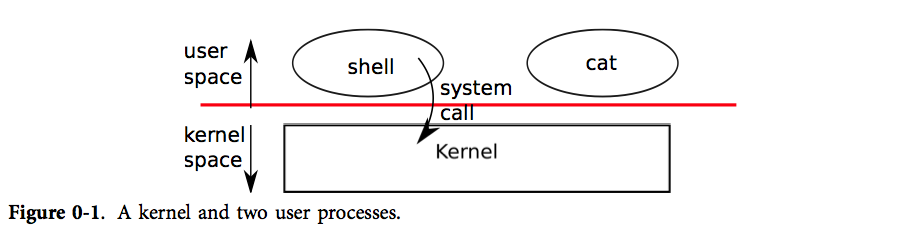
看到这张图片有些领悟,操作系统的内核态提供了一些接口供用户态运行的程序使用,我要做的应该是编写一个运行在用户态的程序,他能使用内核态的接口实现目标功能。
而这个运行在用户态的程序并不是shell的接口函数,他也是一个程序,shell也是一个程序,shell通过fork和exec来运行这个程序。
shell 是一个普通的程序,它接受用户输入的命令并且执行它们,它也是传统 Unix 系统中最基本的用户界面。shell 作为一个普通程序,而不是内核的一部分,充分说明了系统调用接口的强大:shell 并不是一个特别的用户程序。
进程通过系统调用使用内核服务。系统调用会进入内核,让内核执行服务然后返回。所以进程总是在用户空间和内核空间之间交替运行。
#include "kernel/types.h"
#include "kernel/stat.h"
#include "user/user.h"

int main(int argc, char *argv[]) {

    if (argc < 2) {
        fprintf(2, "Usage: sleep ticks...");
        exit(1);
    }

    sleep(atoi(argv[1]));

    exit(0);
}
pingpong:
主要注意管道的半双工特性,数据只能在一个方向上流动。
#include "kernel/types.h"
#include "kernel/stat.h"
#include "user/user.h"

int main(int argc, char *argv[]) {
    char buf[10];
    int pid;
    int p1[2], p2[2];
    pipe(p1);
    pipe(p2);
    pid = fork();
    if (pid == 0) {
        close(p1[1]); // p1 子读父写
        close(p2[0]); // p2 子写父读
        int ret = read(p1[0], buf, sizeof(buf));
        if (ret > 0) {
            printf("%d: received ping\n", getpid());
            write(p2[1], "pong", 5);
        } else {
            printf("close or error\n");
        }
        exit(0);
    } else if (pid > 0) {
        close(p1[0]);
        close(p2[1]);
        write(p1[1], "ping", 5);
        int ret = read(p2[0], buf, sizeof(buf));
        if (ret > 0) {
            printf("%d: received pong\n", getpid());
        } else {
            printf("close or error\n");
        }
    } else {
        printf("fork error\n");
    }
    exit(0);
}
primes:(难顶)

Hint: read returns zero when the write-side of a pipe is closed.
find:(难顶)
还是没有理解递归的思路,实际上就是在文件对比时出现答案,在目录时继续递归,大部分代码和参考的ls.c一模一样。唉。
#include "kernel/types.h"
#include "kernel/stat.h"
#include "user/user.h"
#include "kernel/fs.h"

char* fmtname(char *path) {
    char *prev = 0, *cur = strchr(path, '/');
    while (cur != 0) {
        prev = cur;
        cur = strchr(cur+1, '/');
    }
    return prev;
}

void find(char *path, char *filename) {
    char buf[512], *p;
    int fd;
    struct stat st;
    struct dirent de;

    if ((fd = open(path, 0)) < 0) {
        fprintf(2, "ls: cannot open %s\n", path);
        return;
    }
    if (fstat(fd, &st) < 0) {
        fprintf(2, "ls: cannot stat %s\n", path);
        close(fd);
        return;
    }
    switch (st.type) {
        case T_FILE: {
            char *f_name = fmtname(path);
            int isOK = 1;
            if (f_name == 0 || strcmp(f_name+1, filename) != 0) {
                isOK = 0;
            }
            if (isOK) {
                printf("%s\n", path);
            } else {
                printf("error: mismatching\n");
            }
            close(fd);
            break;
        }
        case T_DIR: {
            if(strlen(path) + 1 + DIRSIZ + 1 > sizeof buf){
                printf("find: path too long\n");
                break;
            }
            memset(buf, 0, sizeof(buf));
            uint path_len = strlen(path);
            memcpy(buf, path, path_len);
            buf[path_len] = '/';
            p = buf + path_len + 1;
            while (read(fd, &de, sizeof(de)) == sizeof(de)) {
                if (de.inum == 0 || strcmp(de.name, ".") == 0 || strcmp(de.name, "..") == 0) {
                    continue;
                }
                printf("test:%s\n", de.name);
                memmove(p, de.name, DIRSIZ);
                p[DIRSIZ] = 0;
                find(buf, filename);
            }
            close(fd);
            break;
        }
    }
}

int main(int argc, char *argv[]) {
    if (argc < 2) {
        printf("Usage: find [DIR] [filename]\n");
        exit(1);
    }
    find(argv[1], argv[2]);
    exit(0);
}
xargs:
xargs命令的作用,是将标准输入转为命令行参数。

 浙公网安备 33010602011771号