
【蓝牙小程序】实现简易table表格
Demo效果图
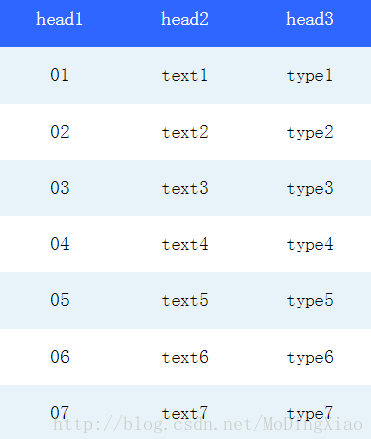
正文
由于需要开发小程序,前端又是自己弄,类似table的标签也没有,后来看到小程序文档中推荐使用flex布局,就把css中的flex布局学了一遍,效果还行,大家将就看一下
table.wxml
<view class="table">
  <view class="tr bg-w">
    <view class="th">head1</view>
    <view class="th">head2</view>
    <view class="th ">head3</view>
  </view>
  <block wx:for="{{listData}}" wx:key="{{code}}">
    <view class="tr bg-g" wx:if="{{index % 2 == 0}}">
      <view class="td">{{item.code}}</view>
      <view class="td">{{item.text}}</view>
      <view class="td">{{item.type}}</view>
    </view>
    <view class="tr" wx:else>
      <view class="td">{{item.code}}</view>
      <view class="td">{{item.text}}</view>
      <view class="td">{{item.type}}</view>
    </view>
  </block>
</view>
table.wxss
.table {
  border: 0px solid darkgray;
}
.tr {
  display: flex;
  width: 100%;
  justify-content: center;
  height: 3rem;
  align-items: center;
}
.td {
    width:40%;
    justify-content: center;
    text-align: center;
}
.bg-w{
  background: snow;
}
.bg-g{
  background: #E6F3F9;
}
.th {
  width: 40%;
  justify-content: center;
  background: #3366FF;
  color: #fff;
  display: flex;
  height: 3rem;
  align-items: center;
}
table.js
Page({
  data: {
    listData:[
      {"code":"01","text":"text1","type":"type1"},
      {"code":"02","text":"text2","type":"type2"},
      {"code":"03","text":"text3","type":"type3"},
      {"code":"04","text":"text4","type":"type4"},
      {"code":"05","text":"text5","type":"type5"},
      {"code":"06","text":"text6","type":"type6"},
      {"code":"07","text":"text7","type":"type7"}
    ]
  },
  onLoad: function () {
    console.log('onLoad')
  }

})
参考资料:
转载自:微信小程序----简易table表格
链接:https://blog.csdn.net/MoDingXiao/article/details/54694730
作者:oys1341
其他:
微信小程序表格组件(锁头、锁列、样式、字体颜色等)
https://blog.csdn.net/OneGLYF/article/details/136742671
微信小程序表格组件--固定表头、自适应列宽、单元格点击事件支持、斑马线样式
https://blog.csdn.net/qq_44722452/article/details/136277840?spm=1001.2101.3001.6661.1&utm_medium=distribute.pc_relevant_t0.none-task-blog-2%7Edefault%7EBlogCommendFromBaidu%7EPaidSort-1-136277840-blog-144831337.235%5Ev43%5Epc_blog_bottom_relevance_base6&depth_1-utm_source=distribute.pc_relevant_t0.none-task-blog-2%7Edefault%7EBlogCommendFromBaidu%7EPaidSort-1-136277840-blog-144831337.235%5Ev43%5Epc_blog_bottom_relevance_base6&utm_relevant_index=1
微信小程序自定义表格样式
https://blog.csdn.net/weixin_43923808/article/details/144831337?spm=1001.2101.3001.6650.3&utm_medium=distribute.pc_relevant.none-task-blog-2%7Edefault%7EYuanLiJiHua%7EPosition-3-144831337-blog-76922167.235%5Ev43%5Epc_blog_bottom_relevance_base6&depth_1-utm_source=distribute.pc_relevant.none-task-blog-2%7Edefault%7EYuanLiJiHua%7EPosition-3-144831337-blog-76922167.235%5Ev43%5Epc_blog_bottom_relevance_base6&utm_relevant_index=6
<!-- 列表模式 -->
<view wx:if="{{revealTypeIndex===0}}" class="list-mode">
  <scroll-view scroll-y="true" style="height: calc(100vh - 620rpx)">
    <van-cell-group inset border="{{false}}">
      <van-cell
        wx:for="{{sersorInfoList}}"
        title="{{item.sensor_value + sensorMap[sensorNameEnValue]}}"
        wx:key="item"
        data-id="{{item.id}}"
        data-value="{{item.sersor_value}}"
        bind:longpress="delRecord"
        bind:tap="updateRecord"
        value="{{item.create_time}}" />
    </van-cell-group>
  </scroll-view>
</view>
这段代码是一个微信小程序的 WXML 模板代码,主要实现了一个列表模式的视图展示。我来逐步解析它的结构和功能:
1. 外层容器和条件渲染
<view wx:if="{{revealTypeIndex===0}}" class="list-mode">-
这是一个
view容器,只有当revealTypeIndex等于 0 时才会渲染显示 -
class="list-mode"指定了该视图的样式类
2. 可滚动区域
<scroll-view scroll-y="true" style="height: calc(100vh - 620rpx)">-
这是一个可垂直滚动的区域 (
scroll-y="true") -
高度通过计算得出:视口高度减去 620rpx(rpx 是微信小程序的自适应单位)
3. 单元格组
<van-cell-group inset border="{{false}}">-
使用了 Vant Weapp 组件库的
van-cell-group组件 -
inset属性表示有内边距 -
border="{{false}}"表示不显示边框
4. 单元格列表
<van-cell
  wx:for="{{sersorInfoList}}"
  title="{{item.sensor_value + sensorMap[sensorNameEnValue]}}"
  wx:key="item"
  data-id="{{item.id}}"
  data-value="{{item.sersor_value}}"
  bind:longpress="delRecord"
  bind:tap="updateRecord"
value="{{item.create_time}}" />-
使用
wx:for遍历sersorInfoList数组渲染多个单元格 -
每个单元格显示:
-
标题 (
title):由item.sensor_value和sensorMap[sensorNameEnValue]拼接而成 -
值 (
value):显示创建时间item.create_time
-
-
wx:key="item"用于列表渲染优化 -
自定义数据属性:
-
data-id存储项目的 ID -
data-value存储传感器值
-
-
事件绑定:
-
bind:longpress长按触发delRecord方法(可能是删除记录) -
bind:tap点击触发updateRecord方法(可能是更新记录)
-
总结功能:
这段代码实现了一个传感器数据列表,当 revealTypeIndex 为 0 时显示。列表可以垂直滚动,每个条目显示传感器值、单位和创建时间,支持点击更新和长按删除操作。
注意事项:
-
代码中有一个拼写错误:
data-value="{{item.sersor_value}}"应该是data-value="{{item.sensor_value}}"(多了一个 r) -
sensorMap[sensorNameEnValue]看起来是用来显示单位的映射 -
整体使用了 Vant Weapp 组件库的样式和组件

 浙公网安备 33010602011771号