
TextClock
TextClock
TextClock组件通过文本将当前系统时间显示在设备上。支持不同时区的时间显示,最高精度到秒级。
说明:
该组件从API Version 8开始支持。后续版本如有新增内容,则采用上角标单独标记该内容的起始版本。
#子组件
无
#接口
TextClock(options?: { timeZoneOffset?: number, controller?: TextClockController })
参数:
| 参数名 | 参数类型 | 必填 | 参数描述 |
|---|---|---|---|
| timeZoneOffset | number | 否 | 设置时区偏移量。 取值范围为[-14, 12],表示东十二区到西十二区,其中负值表示东时区,正值表示西时区,比如东八区为-8。 对横跨国际日界线的国家或地区,用-13(UTC+13)和-14(UTC+14)来保证整个国家或者区域处在相同的时间,当设置的值不在取值范围内时,将使用当前系统的时区偏移量。 默认值:当前系统的时区偏移量 |
| controller | TextClockController | 否 | 绑定一个控制器,用来控制文本时钟的状态。 |
#TextClockController
TextClock容器组件的控制器,可以将此对象绑定到TextClock组件,再通过它控制文本时钟的启动与停止。一个TextClock组件仅支持绑定一个控制器。
#导入对象
controller: TextClockController = new TextClockController();
#start
start()
启动文本时钟。
#stop
stop()
停止文本时钟。
#属性
除支持通用属性外,还支持以下属性:
| 名称 | 参数类型 | 描述 |
|---|---|---|
| format | string | 设置显示时间格式。 日期间隔符固定为"/",时间间隔符为":"。 如yyyyMMdd,yyyy-MM-dd显示为yyyy/MM/dd, hhmmss显示为hh:mm:ss。 时间格式只用写一位即可,如"hhmmss"等同于"hms"。 支持的时间格式化字符串: - YYYY/yyyy:完整年份。 - YY/yy:年份后两位。 - M:月份(若想使用01月则使用MM)。 - d:日期(若想使用01日则使用dd)。 - D:年中日(一年中的第几天)。 - H:24小时制。 - h:12小时制。 - m:分钟。 - s:秒。 - SSS:毫秒。 默认值: 'hms' |
#事件
除支持通用事件外,还支持以下事件:
| 名称 | 功能描述 |
|---|---|
| onDateChange(event: (value: number) => void) | 提供时间变化回调,该事件最小回调间隔为秒。 value: Unix Time Stamp,即自1970年1月1日(UTC)起经过的毫秒数。 |
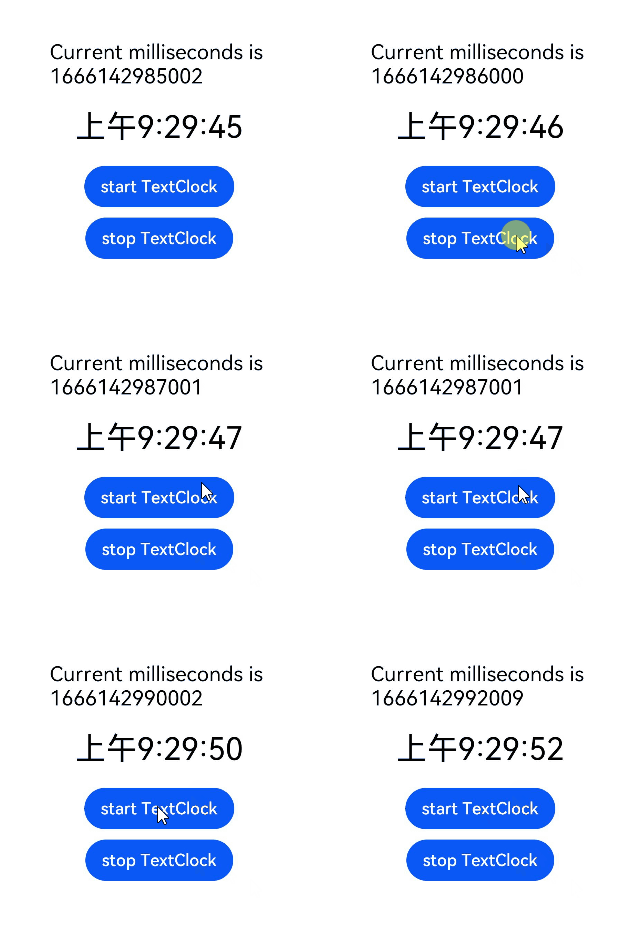
#示例
@Entry
@Component
struct Second {
  @State accumulateTime: number = 0;
  // 导入对象
  controller: TextClockController = new TextClockController();
  build() {
    Flex({ direction: FlexDirection.Column, alignItems: ItemAlign.Center, justifyContent: FlexAlign.Center }) {
      Text('Current milliseconds is ' + this.accumulateTime)
        .fontSize(20)
      // 以12小时制显示东八区的系统时间,精确到秒。
      TextClock({ timeZoneOffset: -8, controller: this.controller })
        .format('hms')
        .onDateChange((value: number) => {
          this.accumulateTime = value;
        })
        .margin(20)
        .fontSize(30)
      Button("start TextClock")
        .margin({ bottom: 10 })
        .onClick(() => {
          // 启动文本时钟
          this.controller.start();
        })
      Button("stop TextClock")
        .onClick(() => {
          // 停止文本时钟
          this.controller.stop();
        })
    }
    .width('100%')
    .height('100%')
  }
}

 浙公网安备 33010602011771号